10 Best Nas Devices 2 Bay Of 2026
Nas Devices 2 Bay — Reviews, Recommendations & Updated Buying Guide November 2026


UGREEN DH2300 2 Bay Desktop NAS
Why We Love It


UGREEN NASync DH4300 Plus 4-Bay Desktop NAS
Why We Love It
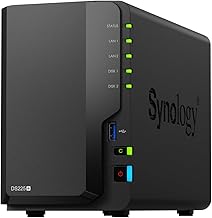
Synology DS225+ Private Cloud Media Server - Stream
Why We Love It

TERRAMASTER F2-425 2-Bay NAS
Why We Love It

UGREEN NASync DXP4800 Pro 4-Bay 8GB Desktop NAS
Why We Love It

TERRAMASTER F4-425 4-Bay NAS
Why We Love It

Synology DS223 Home & Office Backup Hub - Centralize Files
Why We Love It

Synology DS725+ Expandable NAS Storage
Why We Love It

QNAP TS-233-US 2-Bay NAS
Why We Love It

Buffalo LinkStation 210 2TB 1-Bay NAS Network Attached
Why We Love It
Quick Pick
10 Best Nas Devices 2 Bay Of 2026
Quick Pick
UGREEN DH2300 2 Bay Desktop NAS, Cloud Backup, 4K HDMI,AI Album NAS Server | 1GbE Port, 4GB RAM, Cloud Backup, Remote Access, NFC, Multi-Device Connectivity, Versatile Expansion Ports (Diskless)
UGREEN NASync DH4300 Plus 4-Bay Desktop NAS, 4K HDMI NAS Server for Home | 2.5 GbE Port, 8GB LPDDR4X RAM, A76+A55 8 Cores SoC, Cloud Backup, Remote Access, NFC, Multi-Device Connectivity (Diskless)
Synology DS225+ Private Cloud Media Server - Stream, Back Up Photos & Share Files, Intel CPU for Hardware Transcoding (2-Bay Diskless NAS)
TERRAMASTER F2-425 2-Bay NAS, N5095, 4GB DDR4, 2.5GbE, Diskless | Auto-back up phones and PCs, organize photos with local AI, and stream 4K media via Plex or Emby from one home NAS.
UGREEN NASync DXP4800 Pro 4-Bay 8GB Desktop NAS,Network Attached Storage (Diskless)
TERRAMASTER F4-425 4-Bay NAS, N5095, 4GB DDR4, 2.5GbE, Diskless | 4K H.265 decoding, Plex, Emby, Jellyfin, and local AI photo sorting. TNAS Mobile simplifies setup, backup, and remote access.
Synology DS223 Home & Office Backup Hub - Centralize Files, Protect Data & Monitor Property (2-Bay Diskless NAS)
Synology DS725+ Expandable NAS Storage - Private Cloud for Home and Small Business (2-Bay Diskless NAS)
QNAP TS-233-US 2-Bay NAS, ARM Quad-Core, 2GB RAM
Buffalo LinkStation 210 2TB 1-Bay NAS Network Attached Storage with HDD Hard Drives Included NAS Storage That Works as Home Cloud or Network Storage Device for Home
Buying Guide: Nas Devices 2 Bay
📋 Table of Contents
1What storage capacity do I actually need in a 2-bay NAS?
For home use, 4-8TB total (2x2TB to 2x4TB) covers media, backups, and file sharing. If you plan to store 4K videos or large photo libraries, look for 10TB or more. Match your needs before overbuying for future-proofing.
2Should I prioritize RAID 1 or JBOD for my 2-bay NAS?
RAID 1 mirrors both drives, protecting against a single drive failure but halving usable space. JBOD gives full capacity but no redundancy. Choose RAID 1 for data safety, JBOD for maximum storage with your own backup plan.
3What processor and RAM specs matter for a 2-bay NAS?
A dual-core 1.2GHz+ CPU and at least 1GB RAM handle basic file sharing and media streaming. For virtualisation, Docker, or heavy transcoding, look for 2GB RAM and a faster CPU to avoid lag.
4Is a 2.5-inch or 3.5-inch drive better for a 2-bay NAS?
2.5-inch drives are quieter, cooler, and ideal for low-power setups. 3.5-inch drives offer more storage per drive but use more power and generate more heat. Choose based on your space and noise tolerance.
5What accessories or features are worth paying extra for?
A fan with variable speed control keeps noise and heat in check. USB 3.0 ports and an eSATA port expand connectivity. A built-in uninterruptible power supply (UPS) port is a premium but valuable addition for power stability.
How we choose
Our editors are people who genuinely love testing and writing about products. We compare each product's real-world usability and strengths, then distill what matters most into our own "Why We Love It" points — so you get an honest, at-a-glance sense of what counts before you buy.