10 Best Multi Effects Guitar Pedal With Usb Audio Of 2026
Multi Effects Guitar Pedal With Usb Audio — Reviews, Recommendations & Updated Buying Guide November 2026


VALETON Multi-Effects Processor for Guitar and Bass with 140
Why We Love It


SONICAKE Pocket Master Bass Guitar Amplifier
Why We Love It

Valeton GP-150 Multi-Effects Guitar Processor with HD
Why We Love It

VALETON GP-100 Guitar Pedal Multi-Effects Processor Guitar
Why We Love It

Digital Guitar Multi-Effects Pedal with 36 Presets & IR
Why We Love It
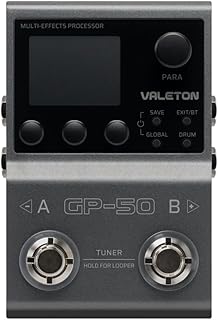
Valeton GP-50 - Multi-Effects Guitar Pedal with Amp Models
Why We Love It

Valeton GP150 Guitar Multi Effects Processor with Expression
Why We Love It

Zoom G1X FOUR Guitar Multi-Effects Processor with Expression
Why We Love It

IK Multimedia TONEX ONE+ AI Guitar Amp & Effects Pedal with
Why We Love It

IK Multimedia TONEX ONE AI MultiFX Guitar Pedal: Tone Model
Why We Love It
Quick Pick
10 Best Multi Effects Guitar Pedal With Usb Audio Of 2026
Quick Pick
VALETON Multi-Effects Processor for Guitar and Bass with 140 Effects 45 Amp Models 40 Simulations of IR Booths USB Audio Interface Expression Pedal GP-100 + Pedal Caps
SONICAKE Pocket Master Bass Guitar Amplifier, Modelling IR Cabinet Simulation, Multi-Effects with Stereo OTG USB Audio Interface, BT Audio, 1.77" Color LCD Screen, Black
Valeton GP-150 Multi-Effects Guitar Processor with HD Modeling, 200+ Effects, Built-In Battery, IR & NAM Support, Expression Pedal, USB Audio Interface(Incl 10 PCS Additional Toppers By VOLKTONE)
VALETON GP-100 Guitar Pedal Multi-Effects Processor Guitar Bass Amp | Modeling IR Cabinets Simulation with FX Loop MIDI I/O Expression Pedal Stereo OTG USB Audio Interface
Digital Guitar Multi-Effects Pedal with 36 Presets & IR | Alsaffan Digital Guitar Multi-Effects Pedal with 36 Presets & IR
Valeton GP-50 - Multi-Effects Guitar Pedal with Amp Models, Cab Sims, FX, Looper, Tuner & USB Audio
Valeton GP150 Guitar Multi Effects Processor with Expression Pedal HD NAM Modeling Pedal 200+ Effects IR Loader 6in/4out USB Audio Interface Bluetooth MIDI 180s Looper Built-in 3000mAh Battery Black
Zoom G1X FOUR Guitar Multi-Effects Processor with Expression Pedal, With 70+ Built-in Effects, Amp Modeling, Looper, Rhythm Section, Tuner, Battery Powered
IK Multimedia TONEX ONE+ AI Guitar Amp & Effects Pedal with Bluetooth Wireless Editing, MIDI Control, USB Audio Interface, 60,000+ Tone Models, Compact Amp Simulator Cab & Stompbox Modeler
IK Multimedia TONEX ONE AI MultiFX Guitar Pedal: Tone Model Any Electric Guitar Amp, Distortion, Overdrive, Modulation, Delay, Reverb & More
Buying Guide: Multi Effects Guitar Pedal With Usb Audio
📋 Table of Contents
1What number of effects and presets should I look for in a multi-effects pedal with USB audio?
Aim for at least 50-100 built-in effects and 10-20 user presets for flexibility. More effects allow experimentation, but too many can complicate navigation. USB connectivity often enables loading custom presets from a computer, so check if the pedal supports MIDI or software integration.
2Does USB audio support matter for recording or live use?
Yes — USB audio support lets you record directly into a DAW or interface, bypassing the need for an audio interface. For live use, it’s less critical unless you need to sync with software or control effects via MIDI. Look for 24-bit/48kHz resolution for clean, professional audio quality.
3What type of effects are most useful for a multi-effects pedal with USB audio?
Look for a mix of amp simulations, modulation (chorus, flanger), delay, reverb, and distortion. USB support often enables access to software-based effects or firmware updates. A pedal with a ‘scene’ feature lets you switch between effect combinations, ideal for live performance or recording sessions.
4Is a true bypass switch important for a multi-effects pedal with USB audio?
Yes — true bypass ensures your signal isn’t routed through the pedal’s circuitry when effects are off, preserving tone. Some USB-connected pedals use a buffer to maintain signal integrity, but this can add noise. Choose a model with true bypass or a high-quality buffer for the best sound.
5What should I check for when connecting a multi-effects pedal with USB audio to my computer or interface?
Ensure the pedal has a standard USB-C or USB-A port and is compatible with your OS (Windows, macOS, or Linux). Check if it requires drivers or works plug-and-play. Also, verify that it can function as a USB audio interface, allowing you to monitor effects in real-time without latency issues.
How we choose
Our editors are people who genuinely love testing and writing about products. We compare each product's real-world usability and strengths, then distill what matters most into our own "Why We Love It" points — so you get an honest, at-a-glance sense of what counts before you buy.