10 Best Multi Device Wireless Keyboard Of 2026
Multi Device Wireless Keyboard — Reviews, Recommendations & Updated Buying Guide November 2026


Logitech K580 Slim Multi-Device Wireless Keyboard
Why We Love It


Dell Premier Multi-Device Wireless Keyboard and Mouse
Why We Love It

Logitech Pebble Keys 2 K380s
Why We Love It

IClever Bluetooth Keyboard and Mouse Set DK03
Why We Love It
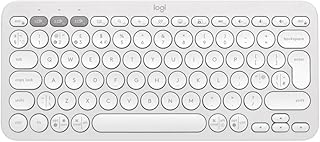
Logitech Pebble Keys 2 K380s
Why We Love It

Baseus Wireless Keyboard for Desktops
Why We Love It
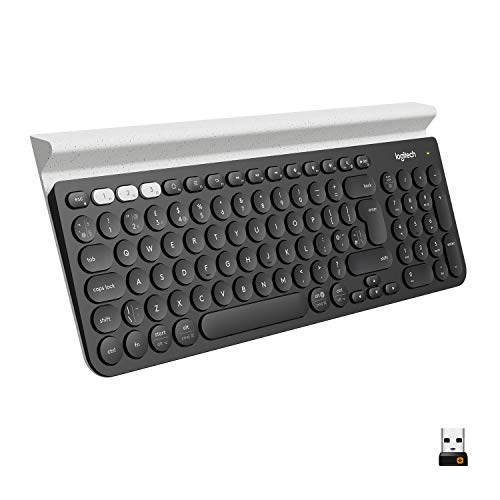
Logitech K780 Multi Device Wireless Keyboard For Windows
Why We Love It

HP 720 Multi Rechargeable Wireless Keyboard and Mouse
Why We Love It

Logitech MX Keys S Wireless Keyboard
Why We Love It

Kensington Multi-Device Dual Wireless Compact Keyboard
Why We Love It
Quick Pick
10 Best Multi Device Wireless Keyboard Of 2026
Quick Pick
Logitech K580 Slim Multi-Device Wireless Keyboard - Bluetooth/Receiver, Compact, Easy Switch, 24 Month Battery, Win/Mac, Desktop, Tablet,Smartphone, Laptop Compatible, English+Arabic Keyboard - White
Dell Premier Multi-Device Wireless Keyboard and Mouse - KM7321W | 2.4 GHz, Adjustable DPI, AES-128 Encryption, USB Receiver, AA Battery, AAA Batteries, Titan Gray
Logitech Pebble Keys 2 K380s, Multi-Device Bluetooth Wireless Keyboard with Customisable Shortcuts, Slim and Portable, Easy-Switch for Windows, macOS, iPadOS, Android, Chrome OS, ARA Layout - Graphite
iClever Bluetooth Keyboard and Mouse Set DK03, Rechargeable Dual-Mode (Bluetooth + 2.4G) Wireless Keyboard and Mouse Set, Ultra-Slim Multi-Device Keyboard for Mac, iPad, Apple, Android, Win,Grey Black
Logitech Pebble Keys 2 K380s, Multi-Device Bluetooth Wireless Keyboard with Customizable Shortcuts, Slim and Portable, Easy-Switch for Windows, macOS, iPadOS, Android, Chrome OS, US Intl Layout- White
Baseus Wireless Keyboard for Desktops, K01B Tri-Mode Wireless Multi-Device Keyboard, Ultra-Slim Keyboard for Computer, Desktop, PC, Laptop and Windows
Logitech K780 Multi Device Wireless Keyboard For Windows, Apple, Android Or Chrome, Wireless 2.4Ghz And Bluetooth, Quiet, Pc/Mac/Laptop/Smartphone/Tablet Dark Grey/White, Black
HP 720 Multi Rechargeable Wireless Keyboard and Mouse
Logitech MX Keys S Wireless Keyboard, Low Profile, Fluid Precise Quiet Typing, Programmable Keys, Backlighting, Bluetooth, USB C Rechargeable, for Windows PC, Linux, Chrome, Mac - Graphite, INT Layout
Kensington Multi-Device Dual Wireless Compact Keyboard - Black, Arabic English (K75502AB)
Buying Guide: Multi Device Wireless Keyboard
📋 Table of Contents
1What connectivity standards should I look for in a multi-device wireless keyboard?
Opt for Bluetooth 5.0 or higher for better range and stability, and check if it supports both iOS and Android. Some models also include a USB-C or Lightning connector for direct wired use, which can be handy for charging or when wireless connectivity is unreliable.
2How many devices can a multi-device wireless keyboard typically connect to at once?
Most models support connecting to at least two devices simultaneously, often a smartphone and a laptop or tablet. Some advanced models allow switching between up to four devices, which is useful for users who frequently toggle between work and personal tasks.
3What battery life should I expect from a multi-device wireless keyboard?
Look for models offering 6-12 months of battery life on a single charge, depending on usage. Keyboards with low-power Bluetooth and sleep modes tend to last longer, while those with backlighting or frequent connectivity switching may drain the battery faster.
4Are mechanical or membrane switches better for a multi-device wireless keyboard?
Mechanical switches offer a more tactile and durable typing experience, ideal for heavy users, while membrane switches are quieter and more budget-friendly. Choose mechanical if you prioritize comfort and longevity, and membrane if portability and cost are your main concerns.
5What accessories are worth including with a multi-device wireless keyboard?
A travel case or sleeve is useful for protection, and a USB-C charging cable ensures compatibility with modern devices. Some models come with a stylus or stand, but these are less common and often optional. Prioritize models with a simple, compact design for easy transport between devices.
How we choose
Our editors are people who genuinely love testing and writing about products. We compare each product's real-world usability and strengths, then distill what matters most into our own "Why We Love It" points — so you get an honest, at-a-glance sense of what counts before you buy.