10 Best Multi Camera Video Switchers Of 2026
Multi Camera Video Switchers — Reviews, Recommendations & Updated Buying Guide November 2026

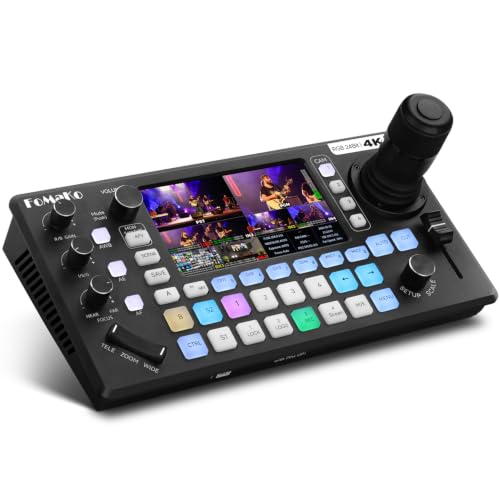
FoMaKo 4K HDMI Multi-Camera Streaming Video Mixer Switcher
Why We Love It


RØDE RØDECaster Video S
Why We Love It

FEELWORLD L4 Multi-camera Video Mixer Switcher 10.1"Touch
Why We Love It

Osee GoStream Deck HDMI Pro Live Streaming Multi Camera
Why We Love It

FoMaKo 4K HDMI Video Mixer Switcher
Why We Love It

RØDE RØDECaster Video Core
Why We Love It

Osee GoStream Deck Kit All-in-One Pro Live Streaming Multi
Why We Love It

Mixer Plus Compact Video Switcher 4 HDMI with 4''Built-in
Why We Love It

FEELWORLD L3Pro SDI & HDMI Video Switcher Multi-Camera Live
Why We Love It
Osee GoStream Deck All in One Pro Live Streaming Multi
Why We Love It
Quick Pick
10 Best Multi Camera Video Switchers Of 2026
Quick Pick
FoMaKo 4K HDMI Multi-Camera Streaming Video Mixer Switcher, Integrated 4D Joystick PTZ Camera Controller, 5.5" LCD Screen, XLR Audio and USB/SD Recording,4K 60FPS Input, 1080p 60FPS Output,KC800
RØDE RØDECaster Video S – Podcast Video Switcher and Audio Interface –
FEELWORLD L4 Multi-camera Video Mixer Switcher 10.1"Touch Screen USB3.0 Fast Streamin
osee GoStream Deck HDMI Pro Live Streaming Multi Camera Video Mixer Switcher
FoMaKo 4K HDMI Video Mixer Switcher, 10.1 Inch FHD LCD Screen, 5-CH Live Streaming Switcher, 4K 60FPS Input, 1080p 60FPS Output, Support PTZ Controller, SDI + HDMI Video Switcher,M6(NDI Upgradeable)
RØDE RØDECaster Video Core – Video and Audio Production Console –
Osee GoStream Deck Kit All-in-One Pro Live Streaming Multi Camera Video Mixer Switcher, 4 HDMI & USB-C Ports with 14 Inch Monitor, Integrated DC to Type C Cable, NDI (Optional), Expandable
Mixer Plus Compact Video Switcher 4 HDMI with 4''Built-in Screen, Portable Live Streaming Switcher for Multi-Camera, Online Class, Event, YouTube, OBS, Zoom
FEELWORLD L3Pro SDI & HDMI Video Switcher Multi-Camera Live Production
Osee GoStream Deck All in One Pro Live Streaming Multi Camera Video Mixer Switcher Recorder Player Kit 4 HDMI in USB-C I/O with 14 Inch Monitor Built-in DC-to-Type C Cable
Buying Guide: Multi Camera Video Switchers
📋 Table of Contents
1How many camera inputs do I actually need?
For small setups like interviews or webinars, 4 inputs are usually enough. Larger events with multiple angles or presenters may need 8 or more. Choose based on how many cameras you plan to use simultaneously, not just how many you own now.
2Should I prioritize HDMI or SDI inputs?
HDMI is common and cost-effective for most home or small studio setups, while SDI offers longer cable runs and better signal stability for professional environments. If you're using broadcast-grade cameras or long distances, SDI is worth the investment.
3What video resolution and frame rate should I look for?
Look for at least 1080p at 60fps for smooth, broadcast-quality video. Some models support 4K, but ensure your cameras and output devices can handle it. Higher frame rates are especially important for fast-moving subjects or slow-motion transitions.
4Is a built-in preview monitor essential?
Yes, a built-in preview screen (typically 4.3–7 inches) lets you review upcoming shots before switching, improving production quality. If your switcher lacks one, consider an external monitor for better control during live events or recordings.
5What accessories are worth adding to my setup?
A tally light system helps presenters know when they're on camera, and a USB capture card lets you stream or record directly to a computer. A remote control or control panel can also streamline operation during live events with multiple operators.
How we choose
Our editors are people who genuinely love testing and writing about products. We compare each product's real-world usability and strengths, then distill what matters most into our own "Why We Love It" points — so you get an honest, at-a-glance sense of what counts before you buy.