10 Best Multi Camera Video Mixers Of 2026
Multi Camera Video Mixers — Reviews, Recommendations & Updated Buying Guide November 2026

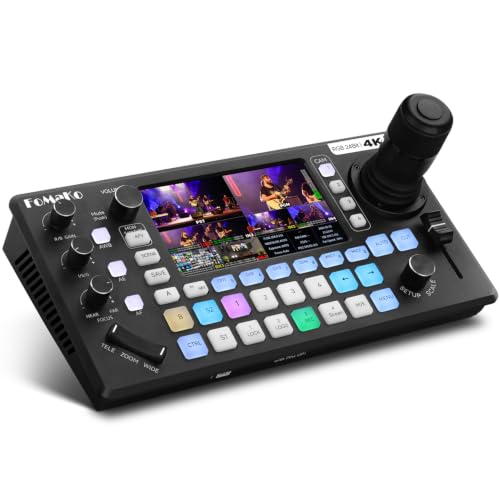
FoMaKo 4K HDMI Multi-Camera Streaming Video Mixer Switcher
Why We Love It


FEELWORLD L4 Multi-camera Video Mixer Switcher 10.1"Touch
Why We Love It

Osee GoStream Deck HDMI Pro Live Streaming Multi Camera
Why We Love It

Osee GoStream Deck Kit All-in-One Pro Live Streaming Multi
Why We Love It

RØDE RØDECaster Video S
Why We Love It

FEELWORLD L2 Plus Multi Camera Video Mixer Switcher
Why We Love It

RODE RODECaster Video All-in-One Production Console
Why We Love It

Blackmagic Design ATEM Mini Pro HDMI Live Stream Switcher
Why We Love It
Osee GoStream Deck All in One Pro Live Streaming Multi
Why We Love It

Osee GoStream Deck 4xHDMI Switcher
Why We Love It
Quick Pick
10 Best Multi Camera Video Mixers Of 2026
Quick Pick
FoMaKo 4K HDMI Multi-Camera Streaming Video Mixer Switcher, Integrated 4D Joystick PTZ Camera Controller, 5.5" LCD Screen, XLR Audio and USB/SD Recording,4K 60FPS Input, 1080p 60FPS Output,KC800
FEELWORLD L4 Multi-camera Video Mixer Switcher 10.1"Touch Screen USB3.0 Fast Streamin
osee GoStream Deck HDMI Pro Live Streaming Multi Camera Video Mixer Switcher
Osee GoStream Deck Kit All-in-One Pro Live Streaming Multi Camera Video Mixer Switcher, 4 HDMI & USB-C Ports with 14 Inch Monitor, Integrated DC to Type C Cable, NDI (Optional), Expandable
RØDE RØDECaster Video S – Podcast Video Switcher and Audio Interface –
FEELWORLD L2 Plus Multi Camera Video Mixer Switcher, 5.5 inch LCD Touch Screen PTZ Controller Chroma Key 4 HDMI Input USB3.0 Output Format Real Time Production Live Streaming Built-in Cooler
RODE RODECaster Video All-in-One Production Console | Integrated Audio & Video Mixer with Multi-Camera Switching, Touchscreen Control & USB-C Interface + Wireless PRO Wireless Microphone + More
Blackmagic Design ATEM Mini Pro HDMI Live Stream Switcher
Osee GoStream Deck All in One Pro Live Streaming Multi Camera Video Mixer Switcher Recorder Player Kit 4 HDMI in USB-C I/O with 14 Inch Monitor Built-in DC-to-Type C Cable
Osee GoStream Deck 4xHDMI Switcher, Video Mixer Live
Buying Guide: Multi Camera Video Mixers
📋 Table of Contents
1How many camera inputs do I actually need?
For basic live streaming or small events, 3-4 inputs are usually enough. If you plan to switch between multiple angles or use backup cameras, aim for 6 or more inputs to future-proof your setup and avoid bottlenecks.
2Does 4K support matter for my use case?
4K is ideal for high-end productions or large screens, but 1080p is sufficient for most live streams, webinars, or small studio setups. Check if your cameras and output display can handle 4K before investing in a 4K mixer to avoid unnecessary costs.
3What type of switching controls should I look for?
Manual push-button switching is best for live events with a dedicated operator, while automatic switching based on audio or motion suits interviews or solo content creators. Some mixers offer both for flexibility in different scenarios.
4Is built-in audio mixing enough, or should I use an external mixer?
Most multi camera mixers offer basic audio controls, but for professional sound with multiple microphones or music layers, an external audio mixer gives more precise control over levels, EQ, and effects, especially in complex setups.
5What connectivity options are essential for my workflow?
Look for HDMI and SDI inputs for cameras, plus USB or NDI for IP-based sources. Outputs like HDMI, SDI, and USB for recording or streaming are also key. Wireless or remote control support can streamline operation in larger setups.
How we choose
Our editors are people who genuinely love testing and writing about products. We compare each product's real-world usability and strengths, then distill what matters most into our own "Why We Love It" points — so you get an honest, at-a-glance sense of what counts before you buy.