10 Best Msi Graphics Card Of 2026
Msi Graphics Card — Reviews, Recommendations & Updated Buying Guide November 2026

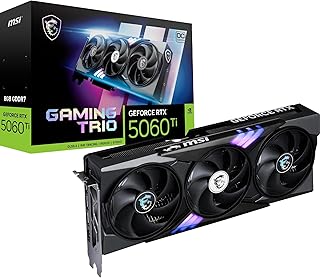
MSI GeForce RTX 5060 Ti 8G Gaming Trio OC Graphics Board
Why We Love It

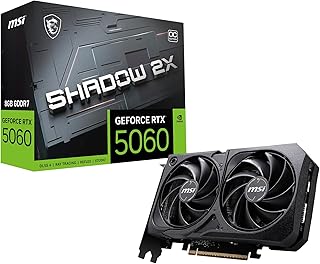
MSI GeForce RTX 5060 8G Shadow 2X OC
Why We Love It

MSI GeForce RTX 3050 Ventus 2X E 6G OC Graphics Card
Why We Love It

MSI GeForce RTX 5060 Ti 8G SHADOW 2X OC PLUS Graphics Card
Why We Love It

MSI Gaming RTX 5050 8G Shadow 2X OC Graphics Card (8GB GDDR6
Why We Love It

MSI Gaming GeForce RTX 4060 8GB GDRR6 128-Bit HDMI/DP Nvlink
Why We Love It
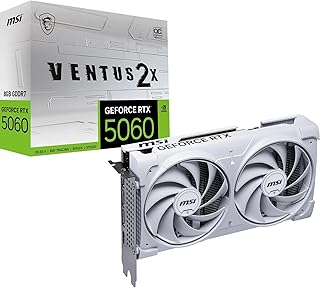
MSI GeForce RTX 5060 8G VENTUS 2X OC WHITE Graphics Card
Why We Love It

MSI GeForce RTX 5060 8G Ventus 2X OC Graphics Board VD9187
Why We Love It

PNY NVIDIA GeForce RTX™ 5050 Dual Fan
Why We Love It

MSI GeForce RTX 5060 Ti 16G Shadow 2X OC Plus
Why We Love It
Quick Pick
10 Best Msi Graphics Card Of 2026
Quick Pick
MSI GeForce RTX 5060 Ti 8G Gaming Trio OC Graphics Board VD9177
MSI GeForce RTX 5060 8G Shadow 2X OC - 8GB GDDR7 (28Gbps/128-bit), PCIe 5, Boost: 2535 Hz, HDMI 2.1b, DisplayPort 2.1b
MSI GeForce RTX 3050 Ventus 2X E 6G OC Graphics Card
MSI GeForce RTX 5060 Ti 8G SHADOW 2X OC PLUS Graphics Card - RTX 5060 Ti GPU, 8GB GDDR7 (28Gbps/256-bit), PCIe 5.0 - HDMI 2.1b, 3 x DisplayPort 2.1b
MSI Gaming RTX 5050 8G Shadow 2X OC Graphics Card (8GB GDDR6,128-bit, Extreme Performance: 2617 MHz, DisplayPort x3 2.1a, HDMI 2.1b, NVIDIA Blackwell Architecture)
MSI Gaming GeForce RTX 4060 8GB GDRR6 128-Bit HDMI/DP Nvlink TORX Fan 4.0 Ada Lovelace Architecture Graphics Card (RTX 4060 Gaming X 8G)
MSI GeForce RTX 5060 8G VENTUS 2X OC WHITE Graphics Card - 8GB GDDR7 (28Gbps/128-bit), PCIe 5.0 - HDMI 2.1b, 3 x DisplayPort 2.1b
MSI GeForce RTX 5060 8G Ventus 2X OC Graphics Board VD9187
PNY NVIDIA GeForce RTX™ 5050 Dual Fan, Graphics Card (8GB GDDR6, 128-bit, SFF-Ready, PCIe® 5.0, HDMI®/DP 2.1, 2-Slot, NVIDIA Blackwell Architecture, DLSS 4)
MSI GeForce RTX 5060 Ti 16G Shadow 2X OC Plus - 16GB GDDR7 (28Gbps/128-bit), PCIe 5, Boost: 2602 MHz, HDMI 2.1b, DisplayPort 2.1b, Metal Back Plate
Buying Guide: Msi Graphics Card
📋 Table of Contents
1What GPU architecture should I look for in an MSI graphics card?
Opt for cards with the latest NVIDIA RTX 40-series or AMD RDNA 3 architecture for ray tracing, AI upscaling, and improved performance. Older architectures like RTX 30-series or RDNA 2 are still capable but may lack future-proofing and newer features like DLSS 3.
2How much VRAM is enough for gaming and content creation?
For 4K gaming and light content creation, 8GB GDDR6 is sufficient. For 8K gaming, 12GB or 16GB GDDR6X is recommended. Content creators working with 4K or 8K video should aim for at least 16GB to handle large textures and render buffers without slowdowns.
3What cooling system is best for an MSI graphics card?
Look for dual or triple-fan designs with vapor chamber cooling for better heat dissipation and quieter operation. Cards with reinforced metal backplates also help with thermal management and structural rigidity, especially in high-performance models.
4Should I prioritize a higher clock speed or more CUDA cores?
Both matter, but more CUDA cores (or stream processors for AMD) generally provide better overall performance, while higher clock speeds improve single-threaded tasks. For gaming, a balance of both is ideal, but for rendering or AI work, core count often has a bigger impact.
5What power supply requirements should I consider?
MSI graphics cards with RTX 4070 or higher typically require a 750W or 850W power supply with an 8-pin PCIe connector. Ensure your PSU has enough wattage and the correct connectors to avoid instability or damage, especially when paired with high-end CPUs or multiple GPUs.
How we choose
Our editors are people who genuinely love testing and writing about products. We compare each product's real-world usability and strengths, then distill what matters most into our own "Why We Love It" points — so you get an honest, at-a-glance sense of what counts before you buy.