10 Best Mountup 32 Inch Computer Monitor Of 2026
Mountup 32 Inch Computer Monitor — Reviews, Recommendations & Updated Buying Guide November 2026


MOUNTUP Single Monitor Desk Mount Holds Screen up to 32 inch
Why We Love It

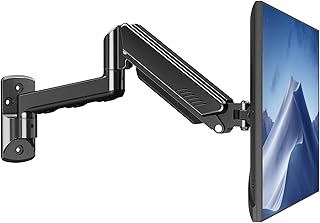
MOUNTUP Single Monitor Wall Mount for Max 32 Inch Computer
Why We Love It

MOUNTUP Monitor Stand for Desk
Why We Love It

MOUNTUP Dual Monitor Stand
Why We Love It

MOUNTUP Triple Monitor Mount Fits Max 32 Inch Screen
Why We Love It

MOUNTUP Dual Monitor Wall Mount for 2 Max 32 Inch Computer
Why We Love It

MOUNTUP Single Monitor Mount for 13-32 inch Screen
Why We Love It

MOUNTUP Dual Monitor Stand
Why We Love It

MOUNTUP Triple Monitor Stand Mount
Why We Love It

Single Monitor Mount for 13-32 inch Screen
Why We Love It
Quick Pick
10 Best Mountup 32 Inch Computer Monitor Of 2026
Quick Pick
MOUNTUP Single Monitor Desk Mount Holds Screen up to 32 inch, Height Adjustable Monitor Arm, Computer Monitors Stand with Clamp/Grommet Base, VESA Mounts Fit 2-9kg Computer, Black, MU0004
MOUNTUP Single Monitor Wall Mount for Max 32 Inch Computer Screen, Fully Adjustable Gas Spring Monitor Arm, Wall Mounted Monitor Holder Support 2.2-17.6lbs Display, VESA Bracket Fit 75x75mm, 100x100mm
MOUNTUP Monitor Stand for Desk, Freestanding Monitor Mount Fits 13-32 inch Screen up to 17.6 lbs, Screen Stand with Swivel, Height, Rotation Adjustment, VESA Mount 100 x 100mm, 75 x 75mm
MOUNTUP Dual Monitor Stand, Vertical Monitor Mount for 2 Max 32 inch Stack Screen Monitors, Height Adjustable, Swivel, Tilt Monitor Desk Mount with C Clamp Grommet Base
MOUNTUP Triple Monitor Mount Fits Max 32 Inch Screen, Holds 4.4-17.6lbs, 3 Monitors Desk Mount, Triple Monitor Stand for Desk, Spring Arm with Clamp/Grommet Base, VESA 75x75/100x100
MOUNTUP Dual Monitor Wall Mount for 2 Max 32 Inch Computer Screen, Fully Adjustable Spring Double Monitor Arm, Wall Mounted Monitor Holder Support 2.2-17.6lbs Display, VESA Bracket 75x75, 100x100
MOUNTUP Single Monitor Mount for 13-32 inch Screen, Spring Arm, Gaming & Home Office Use, VESA 75x75mm & 100x100mm, Freelift Pro Black
MOUNTUP Dual Monitor Stand - Freestanding & Height Adjustable Monitor Desk Mount, Steady VESA Mount Computer Stand for 2 Screens up to 27 inches, MU1002
MOUNTUP Triple Monitor Stand Mount - 3 Monitors Desk Mount for Computer Screens Up to 27 inch, Triple Monitor Arm with Spring, Heavy Duty Monitors Stand, Each Arm Holds 4.4-19.8 lbs, Black
Single Monitor Mount for 13-32 inch Screen, Spring Arm, Gaming & Home Office Use, VESA 75x75mm & 100x100mm, Freelift Pro White
Buying Guide: Mountup 32 Inch Computer Monitor
📋 Table of Contents
1Is a 32-inch monitor too large for a desk setup?
A 32-inch monitor works well if your desk is at least 60cm deep and you sit about 60-80cm away—this gives you a comfortable viewing angle without neck strain. If your space is tighter, a 27-inch might be better suited.
2What resolution should I look for in a 32-inch Mountup monitor?
Go for 1440p (QHD) as the minimum; 4K is ideal if you do design work or video editing, but it demands a stronger graphics card. At 32 inches, 1080p looks noticeably pixelated, so avoid it.
3Does the Mountup 32-inch come with a good stand, or do I need an arm?
Most Mountup models have basic stands with limited adjustment—if you need height, tilt, or swivel, investing in a separate monitor arm is worth it for better ergonomics. The VESA mount compatibility makes this straightforward.
4What refresh rate matters for a Mountup 32-inch monitor?
For office work and content consumption, 60Hz is fine; if you game or do video work, aim for 75Hz or higher. Check your graphics card can support higher refresh rates, or you'll waste money on specs you can't use.
5How do I know if my graphics card can handle a 32-inch 4K monitor?
An RTX 4060 or better (Nvidia) or RX 6700 XT and up (AMD) handles 4K comfortably at 60Hz. For 1440p at high refresh rates, even older cards like an RTX 3060 work well, so match your current setup to avoid unnecessary upgrades.
How we choose
Our editors are people who genuinely love testing and writing about products. We compare each product's real-world usability and strengths, then distill what matters most into our own "Why We Love It" points — so you get an honest, at-a-glance sense of what counts before you buy.