10 Best Mogo 4 Projectors Of 2026
Mogo 4 Projectors — Reviews, Recommendations & Updated Buying Guide November 2026


XGIMI MoGo 4 Laser Video Portable Projector with 4 Filters
Why We Love It

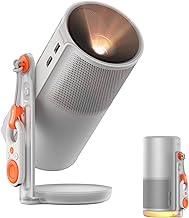
XGIMI MoGo 4 Portable Video Projector
Why We Love It

XGIMI MoGo 4 Laser Portable Projector Outdoor Collection
Why We Love It

XGIMI MoGo 2 Pro (New) 1080P Portable Projector
Why We Love It
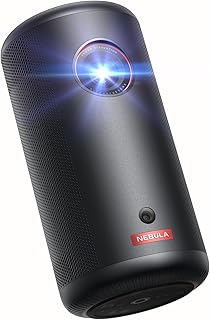
Soundcore NEBULA Capsule 3 1080p Mini Portable Projector
Why We Love It

Anker Nebula Cosmos 4K SE Portable Projector
Why We Love It

KODAK Luma 450 Portable Full HD Smart Projector | Wi-Fi
Why We Love It

XGIMI Horizon 20 4K RGB Triple Laser Home Projector
Why We Love It

CBDYWVR Carrying Case For MoGo 4 Projector
Why We Love It

Hard Carry Case for XGIMI MoGo 3 Pro 1080P Mini Projector
Why We Love It
Quick Pick
10 Best Mogo 4 Projectors Of 2026
Quick Pick
XGIMI MoGo 4 Laser Video Portable Projector with 4 Filters, 550 ISO Lumens | 360° Built-in Stand, Built-in Battery, 2.5 Hours of Playtime, Google TV with Licensed Netflix, 2×6W Harman Kardon
XGIMI MoGo 4 Portable Video Projector, 360° Adjustable, 450 ISO Lumens | GTV with Licensed Netflix, 2.5 Hours of Playtime, 12W Harman Kardon, Outdoor Projector, Include Magnetic Creative Filter
XGIMI MoGo 4 Laser Portable Projector Outdoor Collection, 550 ISO Lumens | Google TV with Official Netflix, All-in-One Home Cinema Kit with PowerBase Stand, 70" Screen, 4 Filters& Carry Case
XGIMI MoGo 2 Pro (New) 1080P Portable Projector, Supports 4K, Auto Focus | 430 ISO Lumens, Google TV with Licensed Netflix, WiFi and Bluetooth, 2X8W Speakers, Object Avoidance, Screen Adaption
soundcore NEBULA Capsule 3 1080p Mini Portable Projector with Google TV | 200 ANSI-Lumens, Built-In Netflix, Dolby Digital, 120-Inch Picture, Built-In Battery with 2.5 Hours of Playtime
Anker Nebula Cosmos 4K SE Portable Projector, HybridBeam (Laser + LED) | Dolby Vision, 1800 ANSI Lumens High Brightness, 200" Huge Screen, Enhanced Image Quality, Google TV, Official 4K Netflix
KODAK Luma 450 Portable Full HD Smart Projector | Wi-Fi, Bluetooth, HDMI & USB Compatible Mini Home Theater System Up to 150 | 1080p Native Resolution (4K), 200 Lumens | Tripod Included
XGIMI Horizon 20 4K RGB Triple Laser Home Projector, 3200 ISO Lumens, Google TV with Licensed Netflix, Optical Zoom & Lens Shift, IMAX Enhanced, Dolby Vision, 300" Display, 240Hz, 1ms Input Lag
CBDYWVR Carrying Case For MoGo 4 Projector, Waterproof & Shockproof
Hard Carry Case for XGIMI MoGo 3 Pro 1080P Mini Projector Travel Case for MoGo 3 Pro and Adjustable Stand, Storage for Remote Control, Charger and Other Accessories, blackone, 37 x 15.5 x 12 cm
Buying Guide: Mogo 4 Projectors
📋 Table of Contents
1What resolution do I need for a clear image?
For most home use, 1080p (1920x1080) is sufficient and balances quality and cost. If you want sharper images for large screens or 4K content, look for 4K UHD (3840x2160) projectors, but ensure your source material supports it for full benefit.
2How does brightness (lumens) affect my viewing experience?
Aim for at least 2000 lumens in a well-lit room and 1000-1500 lumens in a dim or dark space. Higher lumens help maintain image clarity in ambient light, but can drain battery life faster in portable models.
3What’s the difference between DLP and LCD projectors?
DLP projectors offer better motion handling and deeper blacks, ideal for movies and gaming, while LCD models provide brighter, more colorful images and are less prone to the 'rainbow effect'. Choose based on your content and environment.
4Is a short-throw lens worth the extra cost?
Yes, if you need to project a large image from a short distance, like in a small room. Short-throw projectors reduce the risk of shadows and glare from viewers and are more flexible for placement, but often cost more and may have lower brightness.
5What connectivity options should I look for?
At minimum, ensure your projector has HDMI and USB ports for devices like laptops and media players. Wireless connectivity (Wi-Fi or Bluetooth) adds convenience, but check compatibility with your devices and consider using a dongle if needed.
How we choose
Our editors are people who genuinely love testing and writing about products. We compare each product's real-world usability and strengths, then distill what matters most into our own "Why We Love It" points — so you get an honest, at-a-glance sense of what counts before you buy.