10 Best Mnn Portable Monitor Of 2026
Mnn Portable Monitor — Reviews, Recommendations & Updated Buying Guide November 2026


MNN 15.6" FHD 60Hz Portable Monitor USB-C HDMI IPS HDR
Why We Love It


ARZOPA Portable Monitor 15.6'' FHD 1080P Kickstand Portable
Why We Love It

Rii Portable Monitor 15.6"1080P USB-CHDMi Second External
Why We Love It

UPERFECT 14” Portable Monitor Touchscreen
Why We Love It

UPERFECT Portable Monitor 4K 16" | 1200 Nits Laptop Monitor
Why We Love It
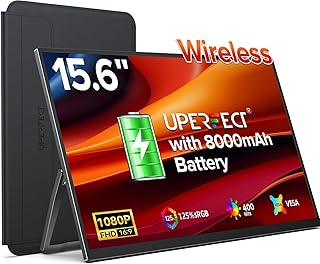
UPERFECT Wireless Portable Monitor with Battery 8000mAh
Why We Love It

UPERFECT Wireless Portable Monitor with 10000mAh Battery
Why We Love It

Yodoit Portable Monitor 15.6"
Why We Love It

Yodoit Portable Monitor 15.6"
Why We Love It

MagicRaven Portable Monitor 15.6"
Why We Love It
Quick Pick
10 Best Mnn Portable Monitor Of 2026
Quick Pick
MNN 15.6" FHD 60Hz Portable Monitor USB-C HDMI IPS HDR Gaming Laptop | 15.6" FHD IPS HDR, USB-C one-cable, PC/Mac/Phone/Switch, Smart Case,Laptop , low blue, work&game
ARZOPA Portable Monitor 15.6'' FHD 1080P Kickstand Portable Laptop Monitor IPS Computer External Screen USB C HDMI Display for PC MAC Phone Xbox PS5 - A1
Rii Portable Monitor 15.6"1080P USB-CHDMi Second External Monitor, Ultra-Slim Portable Computer Monitor, lPS Display for PC, MAC,Phone, Xbox, PS5
UPERFECT 14” Portable Monitor Touchscreen, 125% sRGB 1080P FHD IPS Ultra-Thin Travel Second Screen with 10-Point Touch, Built-in Speakers, VESA Mount & Smart Cover for Laptop, Phone & Game Console
UPERFECT Portable Monitor 4K 16" | 1200 Nits Laptop Monitor | 3840 * 2400 UHD | 1MS FreeSync 2000:1 Contrast | USB-C & HDMI | VESA & Smart Case | Travel Screen for Computer, Mini PC, Game Consoles
UPERFECT Wireless Portable Monitor with Battery 8000mAh, 15.6" 1080P FHD Ultra Slim Travel Monitor with Stand/VESA/Sleeve, External Second Screen for Laptop, PC, Phone, Support AirPlay Miracast
UPERFECT Wireless Portable Monitor with 10000mAh Battery, 18.5" QLED Display, 1080P 100Hz, 145% sRGB, AirPlay & Miracast, VESA, Sleeve Included, for Laptop, PC & Phone
Yodoit Portable Monitor 15.6", FHD 1080P Screen IPS 1920×1080 100% SRGB Display with Type C USB Port and Speakers with Smart Cover, Compatible with PC, Laptop, MacBook, Xbox
Yodoit Portable Monitor 15.6", FHD 1080P Screen IPS 1920×1080 100% SRGB Display with Type C USB Port and Speakers, Compatible with PC, Laptop, MacBook, Xbox
MagicRaven Portable Monitor 15.6", FHD 1080P Screen IPS 100% SRGB Display with Smart Cover USB-C HDMI Port, Compatible with PC, Laptop, MacBook, Xbox,Phone - 15.6"
Buying Guide: Mnn Portable Monitor
📋 Table of Contents
1What size portable monitor should I choose for my needs?
MNN portable monitors typically range from 13 to 17 inches—go with 13-15 inches if you travel frequently or work from cafes, and 15-17 inches if you want more screen real estate and don't mind extra weight. Consider your laptop size too, since you'll want the monitor to fit comfortably in your bag alongside it.
2What's the difference between IPS and TN panels in MNN monitors?
IPS panels offer better color accuracy and wider viewing angles, making them ideal if you do design or photo work, while TN panels are usually cheaper but have narrower viewing angles. For general productivity and streaming, either works fine, but IPS is worth the extra cost if color matters to your workflow.
3Does an MNN portable monitor need its own power supply or can it run on USB-C?
Most MNN models can draw power directly from your laptop's USB-C port, which is convenient since you need one cable for both power and video. However, larger models or those with higher brightness may require a separate power adapter, so check the specs for your exact model.
4What refresh rate matters for a portable monitor?
For work and general use, 60Hz is perfectly fine and what most MNN portables offer. Only consider 120Hz+ if you're gaming or doing video editing, as it adds cost and drains battery faster on battery-powered monitors.
5Should I choose a touchscreen MNN portable monitor or a standard one?
Touchscreen adds convenience for presentations and touch-based work, but it increases the price and can add glare and weight. Pick a touchscreen only if you genuinely use touch input regularly; otherwise, a standard non-touch model delivers better value and slightly better image quality.
How we choose
Our editors are people who genuinely love testing and writing about products. We compare each product's real-world usability and strengths, then distill what matters most into our own "Why We Love It" points — so you get an honest, at-a-glance sense of what counts before you buy.