10 Best Midi Controllers Of 2026
Midi Controllers — Reviews, Recommendations & Updated Buying Guide November 2026


Akai Professional MPK Mini IV 25-Key USB-C MIDI Keyboard
Why We Love It


M-AUDIO Keystation Mini 32 MK3 USB MIDI Controller
Why We Love It

M-AUDIO Keystation 49 MK3 USB MIDI Controller
Why We Love It

Nektar SE25
Why We Love It

Akai Professional Mpk Mini Mk3 25 Key Usb Midi Keyboard
Why We Love It

Akai Professional APC Mini MK2 USB MIDI Pad Controller
Why We Love It

Akai Professional LPD8 USB MIDI Pad Controller
Why We Love It
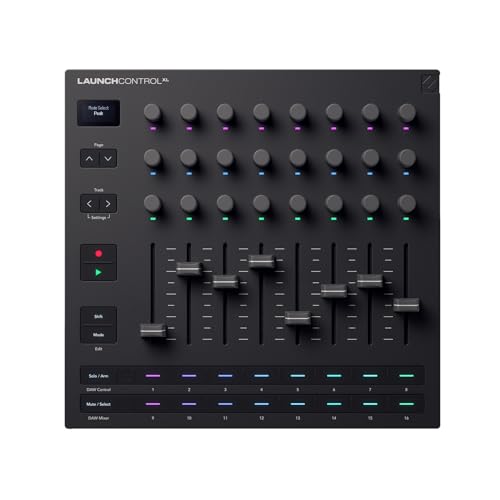
Novation Launch Control XL 3 USB MIDI Control Surface
Why We Love It

Akai Professional MPD218 UltraPortable USB BusPowered 16Pad
Why We Love It

Akai Professional APC40 MKII USB MIDI Pad Controller
Why We Love It
Quick Pick
10 Best Midi Controllers Of 2026
Quick Pick
Akai Professional MPK Mini IV 25-Key USB-C MIDI Keyboard Controller, Black
M-AUDIO Keystation Mini 32 MK3 USB MIDI Controller
M-AUDIO Keystation 49 MK3 USB MIDI Controller
Nektar SE25 | USB MIDI Controller Keyboard with Nektar DAW Integration Black
Akai Professional Mpk Mini Mk3 25 Key Usb Midi Keyboard Controller With 8 Backlit Drum Pads, Knobs And Music Production Software Included, Mpkmini3
Akai Professional APC Mini MK2 USB MIDI Pad Controller | 64 RGB Pads, 9 Faders, Drum and Note Mode, 1:1 Mapping for Ableton Live, for Live Performance and Music Production
Akai Professional LPD8 USB MIDI Pad Controller
Novation Launch Control XL 3 USB MIDI Control Surface
Akai Professional MPD218 UltraPortable USB BusPowered 16Pad USB/MIDI Pad Controller with MPC Pads, 6 Assignable Knobs, Note Repeat & Full Level Buttons, and Production Software Package Included
Akai Professional APC40 MKII USB MIDI Pad Controller
Buying Guide: Midi Controllers
📋 Table of Contents
1How many pads or keys do I actually need?
25-32 keys or pads suit most home producers and basic sequencing, while 49-61 keys offer more playability for live performance or complex arrangements. Go for 88 keys only if you want a full piano-like experience.
2What's the difference between velocity-sensitive and fixed pads?
Velocity-sensitive pads respond to how hard you press, adding dynamic expression to your music. Fixed pads are great for triggering loops or samples but lack expressive nuance, so choose based on your workflow.
3Should I prioritize USB or MIDI over Ethernet or Bluetooth?
USB is the most common and reliable for connecting to computers, while MIDI over Ethernet or Bluetooth offers more flexibility in studio setups. Most beginners will find USB-only models sufficient and easy to use.
4What are the most useful extra controls to look for?
Aftertouch, modulation wheels, and assignable knobs add real-time control for expressive sound shaping. For DAW control, transport buttons and faders can save time and streamline your workflow.
5Is a built-in sound engine or audio interface worth it?
Built-in sounds are handy for quick jamming or live use, but most users prefer to load their own samples or VSTs. A built-in audio interface is rare and usually low quality — better to invest in a separate one for better performance.
How we choose
Our editors are people who genuinely love testing and writing about products. We compare each product's real-world usability and strengths, then distill what matters most into our own "Why We Love It" points — so you get an honest, at-a-glance sense of what counts before you buy.