10 Best Microsoft Touchscreen Laptops Of 2026
Microsoft Touchscreen Laptops — Reviews, Recommendations & Updated Buying Guide November 2026


Microsoft Surface (Upgraded) Laptop (2025)
Why We Love It


Microsoft Surface Laptop 13.8"| 10 Core
Why We Love It

Microsoft Surface Laptop 15" (8th Edition
Why We Love It

Microsoft Surface Laptop Copilot+ PC
Why We Love It
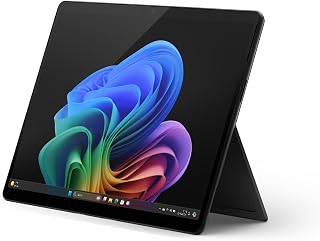
Microsoft Surface Pro 13" (Latest Version)
Why We Love It

MICR0S0FT Surface Laptop 4 | 16GB Ram
Why We Love It

MICR0S0FT Surface Laptop 4 | 11th Gen
Why We Love It

MICR0S0FT Surface Laptop 4 | 11th Gen
Why We Love It

Microsoft (Refurbished) Surface Laptop 3 13.5" Touchscreen
Why We Love It

MICR0S0FT Surface Laptop 4 | 16GB Ram
Why We Love It
Quick Pick
10 Best Microsoft Touchscreen Laptops Of 2026
Quick Pick
Microsoft Surface (Upgraded) Laptop (2025), Windows 11 Copilot+ PC, 13" Touchscreen Display, Snapdragon X Plus (8 core), 16GB RAM, 256GB SSD Storage, Platinum
Microsoft Surface Laptop 13.8"| 10 Core | Copilot+PC | 120Hz Touch Display | Snapdragon X Plus |16GB RAM | 512GB SSD | Platinum| UAE TRA Version | English/Arabic Keyboard
Microsoft Surface Laptop 15" (8th Edition - 2026 Model)|12 Core|Copilot+PC | 120Hz Touch Display | Snapdragon X2 Elite | 16GB RAM | 512GB SSD | Black |UAE TRA Version | Power Supply Sold Separately
Microsoft Surface Laptop Copilot+ PC, 13.8" Touchscreen (2304 x 1536), Snapdragon X Plus, 32GB Memory, 1TB Storage (7th Ed), Thunderbolt 4, Windows 11 Home, Black
Microsoft Surface Pro 13" (Latest Version) | 10 Core | Copilot+PC | 2 in 1 | 120Hz Display | Snapdragon X Plus | 16GB RAM | 512 SSD | Black | UAE TRA Version
MICR0S0FT Surface Laptop 4 | 16GB Ram, 512GB SSD | 11th Gen, Core™ i7-1185G7 processor | 13.5 Inches Touchscreen | Intel® Iris® Xe Graphics | With Charger For Microsoft Surface Laptop 4 (Renewed)
MICR0S0FT Surface Laptop 4 | 11th Gen, Core i5-1135G7 | 8GB RAM, 256GB SSD | 13.5-inch Touchscreen | Charger For Microsoft Surface Laptop 4 (Renewed)
MICR0S0FT Surface Laptop 4 | 11th Gen, Core i5-1135G7 | 16GB RAM, 256GB SSD | 13.5 Inches Touchscreen | Intel Iris Xe Graphics | With Charger For Microsoft Surface Laptop 4 (Renewed)
Microsoft (Refurbished) Surface Laptop 3 13.5" Touchscreen (2256 x 1504) IPS, Intel Core i7-10th Gen, 16GB DDR4 RAM, 512GB SSD, USB 3.0, Mini DisplayPort, SD Card Slot, Windows 11
MICR0S0FT Surface Laptop 4 | 16GB Ram, 256GB SSD | 11th Gen, Core™ i7-1185G7 processor | 13.5 Inches Touchscreen | Intel® Iris® Xe Graphics | With Charger For Microsoft Surface Laptop 4 (Renewed)
Buying Guide: Microsoft Touchscreen Laptops
📋 Table of Contents
1What's the difference between a Surface Pro and Surface Laptop with touchscreen?
Surface Pro is a 2-in-1 tablet that detaches from its keyboard, while Surface Laptop is a traditional notebook with a built-in touchscreen. Choose the Pro if you want flexibility and tablet mode, or the Laptop if you prefer a lighter, thinner device with better keyboard experience.
2Do I really need a touchscreen on a laptop, or is it just a gimmick?
Touchscreen is genuinely useful for note-taking, design work, and navigating Windows 11, but it's not essential for everyday tasks like browsing or typing. Consider it worth the cost if you use creative apps, take handwritten notes, or want a more responsive interface.
3What processor and RAM should I look for in a Microsoft touchscreen laptop?
Go for at least an Intel Core i5 or AMD Ryzen 5 with 8GB RAM for everyday use, or jump to i7 with 16GB if you do video editing, design work, or heavy multitasking. More RAM matters more than processor speed for touchscreen laptops since Windows 11 handles multiple inputs better with extra memory.
4Does screen size matter when buying a touchscreen laptop?
A 13-14 inch screen is portable and easier to hold for touch interactions, while 15+ inches gives you more working space but weighs more. Pick based on whether you'll frequently carry it—if you stay mostly at a desk, the larger screen is worth the trade-off.
5What should I check about the touchscreen quality before buying?
Look for at least 1080p resolution, IPS display panel for good viewing angles, and responsiveness without lag when using the stylus. Check user reviews specifically mentioning touch accuracy and whether the screen gets reflective in bright light, as these affect daily usability.
How we choose
Our editors are people who genuinely love testing and writing about products. We compare each product's real-world usability and strengths, then distill what matters most into our own "Why We Love It" points — so you get an honest, at-a-glance sense of what counts before you buy.