10 Best Microsoft Touchscreen Laptop With Pen Of 2026
Microsoft Touchscreen Laptop With Pen — Reviews, Recommendations & Updated Buying Guide November 2026


Microsoft Surface Laptop 15" (8th Edition
Why We Love It


Microsoft Surface Pro 7 12.3 Inch Tablet (Platinum)
Why We Love It

Microsoft Surface Laptop 7 AI Copilot+ PC for Business
Why We Love It

Microsoft Surface Pro 12" (Latest Version)
Why We Love It
Microsoft Surface Laptop 15" (8th Edition)
Why We Love It

Microsoft Surface Pro 13" (12th Edition
Why We Love It

Renewed Surface Pro 3 Laptop i5 Ram 8GB Storage 256GB 12"
Why We Love It
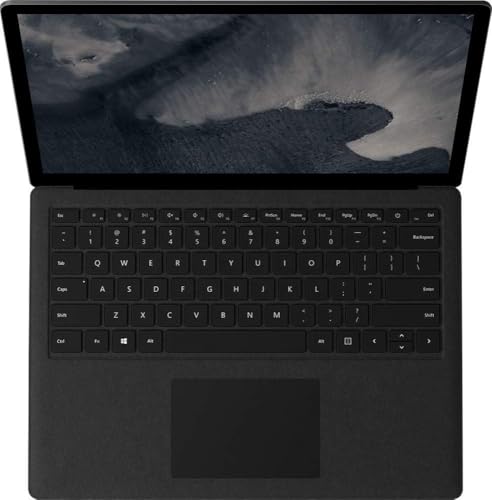
MICR0S0FT Surface Laptop 2 | 16GB Ram
Why We Love It

Renewed Surface Book 2 Laptop i7 8th Gen Ram 16GB Storage
Why We Love It

Renewed Surface Laptop 2 i5-8th Gen Ram 8GB Storage 256GB
Why We Love It
Quick Pick
10 Best Microsoft Touchscreen Laptop With Pen Of 2026
Quick Pick
Microsoft Surface Laptop 15" (8th Edition - 2026 Model)|12 Core|Copilot+PC | 120Hz Touch Display | Snapdragon X2 Elite | 16GB RAM | 512GB SSD | Black |UAE TRA Version | Power Supply Sold Separately
Microsoft Surface Pro 7 12.3 Inch Tablet (Platinum) - Intel 10th Generation Quad Core i5, 8GB RAM, 128GB SSD, Windows 10 Home, 2019 Edition
Microsoft Surface Laptop 7 AI Copilot+ PC for Business (13.8" 2K+ Touchscreen, Snapdragon X Plus, 16GB 8448MHz, 1TB SSD, IST Pen), 20-Hr Long Battery Life, Backlit, Wi-Fi 7, Webcam, Win 11 Pro, Dune
Microsoft Surface Pro 12" (Latest Version) | 8 Core | Copilot+PC | 2 in 1| Snapdragon X Plus | 16GB RAM | 512 SSD | Ocean | UAE TRA Version
Microsoft Surface Laptop 15" (8th Edition) | 12 Core | Copilot+PC | 120Hz Touch Display | Snapdragon X2 Elite | 32GB RAM | 1TB SSD | Black | UAE TRA Version | (Power Supply Sold Separately)
Microsoft Surface Pro 13" (12th Edition - 2026 Model)|OLED|12 Core| Copilot+PC | 120Hz Display | Snapdragon X2 Elite | 16GB RAM | 512GB SSD | Platinum |UAE TRA Version|Power Supply Sold Separately
Renewed Surface Pro 3 Laptop i5 Ram 8GB Storage 256GB 12" Touchscreen Detachable Keyboard Silver
MICR0S0FT Surface Laptop 2 | 16GB Ram, 512GB SSD | 8th Gen, Core i7-8650U processor | 13.5 Inches Touchscreen | Intel UHD Graphics 620 | With Charger For Microsoft Surface Laptop 2 (Renewed)
Renewed Surface Book 2 Laptop i7 8th Gen Ram 16GB Storage 512GB SSD 2GB Graphics Gtx 1050 13.5" Touchscreen Detachable Keyboard Silver
Renewed Surface Laptop 2 i5-8th Gen Ram 8GB Storage 256GB 13.5" Touchscreen Win 11 Silver
Buying Guide: Microsoft Touchscreen Laptop With Pen
📋 Table of Contents
1What's the difference between the Surface Pen pressure levels, and does it matter for my needs?
Higher pressure levels (4,096 vs 1,024) give smoother, more natural drawing and writing, especially for designers and artists. For note-taking and casual use, the difference is barely noticeable, so standard pressure support is usually enough.
2Should I choose a 2-in-1 detachable or a traditional laptop with touchscreen?
Detachables like the Surface Pro are lighter and more flexible for tablet mode, while traditional touchscreen laptops offer better stability on your lap and usually more ports. Pick detachable if you want maximum portability, traditional if you do more typing than tablet work.
3What processor and RAM do I need if I'm using the pen for design work?
For graphic design or photo editing, aim for at least an Intel i7 or Ryzen 7 with 16GB RAM to handle stylus input smoothly without lag. If you're just taking notes, an i5 with 8GB RAM handles it fine.
4Does the screen size matter for pen precision and comfort?
A 13-14 inch screen works well for everyday tasks and note-taking, while 15+ inches give you more space for detailed drawing and design work. Larger screens can feel cramped if you're using the pen in tablet mode from your lap.
5Is it worth paying extra for better display technology like AMOLED or high refresh rate?
If you're using the pen for creative work, a high-quality IPS or OLED display with good color accuracy is worth the investment. For everyday note-taking and doodling, a standard LCD screen performs just fine.
How we choose
Our editors are people who genuinely love testing and writing about products. We compare each product's real-world usability and strengths, then distill what matters most into our own "Why We Love It" points — so you get an honest, at-a-glance sense of what counts before you buy.