10 Best Microsoft Surface Pro Of 2026
Microsoft Surface Pro — Reviews, Recommendations & Updated Buying Guide November 2026


Microsoft Surface Pro 12" (Latest Version)
Why We Love It

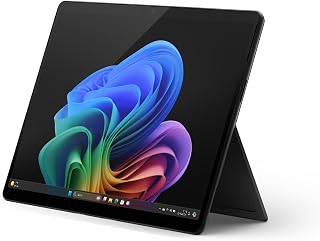
Microsoft Surface Pro 13"| OLED
Why We Love It

Microsoft Surface Pro 7 12.3 Inch Tablet (Platinum)
Why We Love It
Microsoft Surface Pro 13" (Latest Version)
Why We Love It

Microsoft Surface Pro, Copilot+ PC
Why We Love It

Microsoft Surface Pro 13" (12th Edition
Why We Love It

Microsoft (Renewed) Surface Pro 5 Tablet PC 12.3"
Why We Love It

Microsoft Surface Pro 13" Keyboard with Pen Storage
Why We Love It

Microsoft Surface Pro 9 with 2880 X 1920 (267 PPI)
Why We Love It

Microsoft Surface Pro 11 Copilot+ PC Tablet
Why We Love It
Quick Pick
10 Best Microsoft Surface Pro Of 2026
Quick Pick
Microsoft Surface Pro 12" (Latest Version) | 8 Core | Copilot+PC | 2 in 1| Snapdragon X Plus | 16GB RAM | 512 SSD | Ocean | UAE TRA Version
Microsoft Surface Pro 13"| OLED | 12 Core | Copilot+PC | 2 in 1 | 120Hz Display| Snapdragon X Elite| 16GB RAM | 512GB SSD | Black| UAE TRA Version
Microsoft Surface Pro 7 12.3 Inch Tablet (Platinum) - Intel 10th Generation Quad Core i5, 8GB RAM, 128GB SSD, Windows 10 Home, 2019 Edition
Microsoft Surface Pro 13" (Latest Version) | 10 Core | Copilot+PC | 2 in 1 | 120Hz Display | Snapdragon X Plus | 16GB RAM | 512 SSD | Black | UAE TRA Version
Microsoft Surface Pro, Copilot+ PC, Tablet Computer, 12 in LCD Touchscreen, Snapdragon X Plus, 16 GB Memory, 256 GB SSD, Platinum
Microsoft Surface Pro 13" (12th Edition - 2026 Model) | OLED | 12 Core | Copilot+PC | 120Hz Display | Snapdragon X2 Elite | 16GB RAM | 512GB SSD | Dune | UAE TRA Version | Power Supply Sold Separately
Microsoft (Renewed) Surface Pro 5 Tablet PC 12.3" (2736x1824), Core i5-7300U Surface Laptop Touchscreen, 8GB RAM, 256GB SSD, USB 3.0, DisplayPort, BT, WiFi, Windows 10 Pro
Microsoft Surface Pro 13" Keyboard with Pen Storage | Platinum | Compatible with Surface Pro (11th Edition), Surface Pro9, or Surface Pro8- English/Arabic
Microsoft Surface Pro 9 with 2880 X 1920 (267 PPI) PixelSense Display, Intel Core i5-1235U, Intel Integrated graphics, 8GB RAM, 256GB SSD, Windows 11 Home, Graphite - [QEZ-00025] Device Only
Microsoft Surface Pro 11 Copilot+ PC Tablet - 13" - Qualcomm Snapdragon X Plus - 16 GB - 512 GB SSD - Windows 11 Pro - Black
Buying Guide: Microsoft Surface Pro
📋 Table of Contents
1What screen size is best for daily use and portability?
Look for 10-12 inches for a balance between portability and productivity. Smaller screens (8-9 inches) are more compact but harder for typing, while larger screens (12+ inches) offer better media and multitasking but are less travel-friendly.
2How important is the hinge mechanism in a 2-in-1 tablet?
A 360-degree hinge with smooth, secure rotation is essential for switching between tablet and laptop modes. Cheaper hinges may feel flimsy or restrict angles, limiting usability in different positions or on uneven surfaces.
3What battery life should I expect for all-day use?
Aim for at least 8-10 hours of battery life for mixed use like web browsing, video streaming, and light work. Actual performance depends on screen brightness, app usage, and connectivity settings like Wi-Fi or Bluetooth.
4Is a stylus included or worth buying separately?
Many 2-in-1 tablets offer optional or included styluses, but they vary in pressure sensitivity and latency. A high-quality stylus with at least 1024 levels of pressure is ideal for drawing or note-taking, while basic models may feel unresponsive or laggy.
5What storage capacity do I need for apps, files, and media?
64GB is the minimum for light use, but 128GB or more is better for photos, videos, and app-heavy workflows. Consider expandable storage via microSD if you plan to store large files or work offline frequently.
How we choose
Our editors are people who genuinely love testing and writing about products. We compare each product's real-world usability and strengths, then distill what matters most into our own "Why We Love It" points — so you get an honest, at-a-glance sense of what counts before you buy.