10 Best Meko Touchscreen Laptop With Pen Of 2026
Meko Touchscreen Laptop With Pen — Reviews, Recommendations & Updated Buying Guide November 2026


Penyeah Stylus Pen
Why We Love It


2PCS Stylus Pens for Touch Screens
Why We Love It
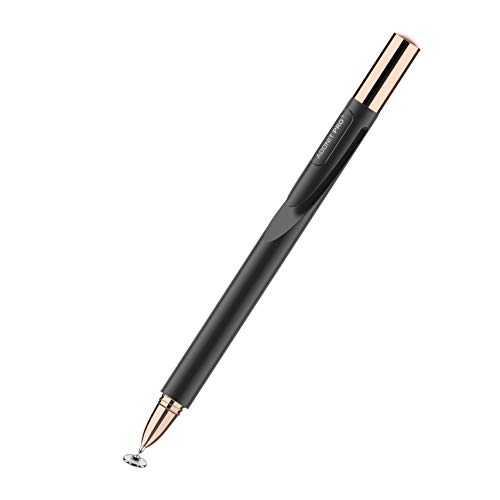
Adonit Pro 4 (Black) Luxury Capacitive Stylus Pen
Why We Love It

3Pcs Stylus Pens for Touch Screens
Why We Love It
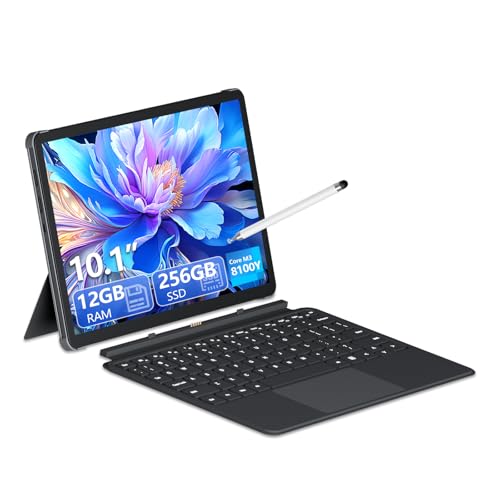
10.1" 2 in 1 Tablet/Laptop Computer
Why We Love It

HP OmniBook 3 16" WUXGA Touchscreen Laptop|AMD Ryzen 5 40
Why We Love It

Studio Neat Cosmonaut
Why We Love It

MEKO 2 in 1 Universal Stylus Pen for All Touch Screen with
Why We Love It

MEKO 2 in 1 Universal Stylus Pen for All Touch Screen
Why We Love It

MEKO 2 in 1 Universal Stylus Pen for All Touch Screen 5 Pack
Why We Love It
Quick Pick
10 Best Meko Touchscreen Laptop With Pen Of 2026
Quick Pick
Penyeah Stylus Pen, 4 in 1 Stylus Pen for Touch Screens Everyday Use -Black | High Precision & Sensitivity, Universal Capacitive Stylus, Stylist for Tablets,iPhone,iPad,Laptops,Switch, 4 Replacement Tips
2PCS Stylus Pens for Touch Screens, 3 in 1 Stylus High Sensitivity Universal Stylus Pencil, Stylus Pen Compatible with Android Phone Samsung Tablets Laptop Chromebook Touch Screen
Adonit Pro 4 (Black) Luxury Capacitive Stylus Pen, High Sensitivity Fine Point And Precision,Stylus For Ipad, Air, Mini, Android, Iphone, Surface, Other Touch Screens, Compatible For All Touchscreens
3Pcs Stylus Pens for Touch Screens,3 in 1 Stylus Universal High Sensitivity and Pencil for iPad,Compact and Light Pen for All Touch Screen Devices Accessories (Black)
10.1" 2 in 1 Tablet/Laptop Computer, 12GB RAM+256GB SSD, Win 11 Touchscreen Laptops with Stylus and Keyboard, M3-8100Y Processor(up to 3.40GHz), Backlit Keyboard,WiFi 5, BT 5, HDMI, Dual Camera
HP OmniBook 3 16" WUXGA Touchscreen Laptop|AMD Ryzen 5 40 Processor|Copilot AI|AMD Radeon 610M Graphics| Silver|Windows 11 Home |Bundle with Stylus Pen | MS Office (16GB RAM + 1TB SSD)
Studio Neat Cosmonaut - Wide-Grip Stylus for Capacitive Touch Screen Tablets (iPad Air, iPad mini, Surface, Kindle Fire, etc.)
MEKO 2 in 1 Universal Stylus Pen for All Touch Screen with Rubber Tips | Capacitive Tablet Pen with 6 Replace Tips for Switch/iPhone/iPad/pro/Mini/Air/Samsung/Tablet, Black+Rose Gold
MEKO 2 in 1 Universal Stylus Pen for All Touch Screen Black+Silver | Capacitive قلم ايباد with 8 Replace Tips for Switch/iPhone/iPad/pro/Mini/Air/Samsung/Huawei/Xiaomi/Tablet
MEKO 2 in 1 Universal Stylus Pen for All Touch Screen 5 Pack | Capacitive قلم ايباد with 10 Replace Tips for Switch/iPhone/iPad/pro/Mini/Air/Samsung/Huawei/Xiaomi/Tablet
Buying Guide: Meko Touchscreen Laptop With Pen
📋 Table of Contents
1What screen size should I choose for a Meko touchscreen laptop?
Go for 13-14 inches if you travel frequently and need portability, or 15-16 inches if you'll use it mainly at a desk for design work and detailed tasks. The larger screen gives you more workspace for pen input, but the smaller sizes are lighter and easier to carry.
2How important is pen pressure sensitivity when choosing a Meko touchscreen laptop?
Pressure sensitivity matters significantly if you're doing digital art, note-taking, or design work—aim for at least 1024 pressure levels, ideally 2048 or higher. For casual use like annotations and basic sketching, lower pressure levels are fine.
3What processor and RAM do I need in a Meko touchscreen laptop?
If you're multitasking or running design software, get an Intel i5/i7 or equivalent with at least 8GB RAM; 16GB is better for heavy creative work. For web browsing, document editing, and light tasks, an i3 or mid-range processor with 4-8GB RAM is sufficient.
4Does the included pen come with replacement nibs, and should I buy extras?
Most Meko pens come with a few spare nibs, but if you use the pen daily for writing or drawing, buying an extra pack is wise since nibs wear out. Check the product listing to see what's included and compare the cost of replacement nibs before buying.
5Is storage speed (SSD vs HDD) important for a touchscreen laptop with pen input?
SSD is essential—it makes the whole system feel responsive, which matters when you're drawing or writing, as lag ruins the experience. Avoid any Meko model with just an HDD; even a smaller SSD gives better performance for pen-based tasks.
How we choose
Our editors are people who genuinely love testing and writing about products. We compare each product's real-world usability and strengths, then distill what matters most into our own "Why We Love It" points — so you get an honest, at-a-glance sense of what counts before you buy.