10 Best Macbook Photo Adapters Of 2026
Macbook Photo Adapters — Reviews, Recommendations & Updated Buying Guide November 2026


UGREEN USB to USB C Adapter 10Gbps for iPhone
Why We Love It


USB C Hub, 8 in 1 Type C Hub Multiport Adapter with 4K HDMI
Why We Love It

UGREEN USB C to USB 3.1 Adapter Braided Type C Male to USB
Why We Love It

Acer SD Card Reader
Why We Love It

UGREEN USB C Hub
Why We Love It

UGREEN USB C Hub
Why We Love It

Acer USB C Adapter
Why We Love It

Memory Card Reader
Why We Love It

SD Card Reader for iPhone 15 USB C
Why We Love It
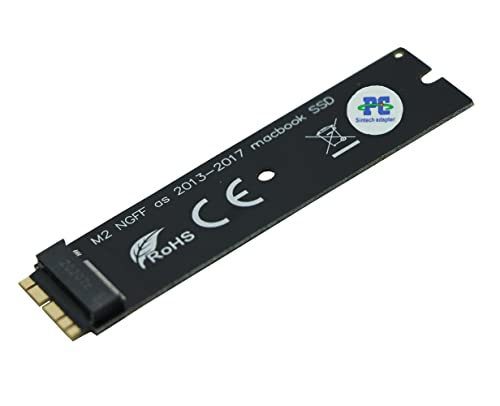
Sintech NGFF M.2 nVME SSD Adapter Card
Why We Love It
Quick Pick
10 Best Macbook Photo Adapters Of 2026
Quick Pick
UGREEN USB to USB C Adapter 10Gbps for iPhone, iPad, MacBook, Galaxy Grey | USB 3.2 Thunderbolt 5/4 OTG Converter for iPhone 17 Pro Max, MacBook Pro, iPad Mini Air/Mac Mini, Samsung Galaxy S26, Grey
USB C Hub, 8 in 1 Type C Hub Multiport Adapter with 4K HDMI, PD Power Delivery, USB-C, Ethernet, 2 USB, SD/TF Card Reader Compatible with Mac Book Pro XPS and More Type C Devices
UGREEN USB C to USB 3.1 Adapter Braided Type C Male to USB Female | 5Gbps, OTG Cable, Nylon Braided, Aluminium, Compatible with iPhone 17 Pro Max Air 16 15 Galaxy S26 MacBook Air iPad
Acer SD Card Reader, USB C & USB 3.0 Memory Card Reader Adapter | Supports SD/Micro SD/SDHC/SDXC/MMC, Compatible with iPhone 17 16 Series, MacBook Pro/Air, iPad Pro, Galaxy S26, XPS 13, etc.
UGREEN USB C Hub, 6 in 1Revodok 4K@60Hz HDMI USB-C Multiport Adaptor | Type-C to HDMI Adapter, 4x 10Gbps USB-A & C Data Port, 100W PD, Aluminum Dock for MacBook Neo/Air/Pro, HP Laptops
UGREEN USB C Hub, 7-in-1 4K HDMI to USB-C 100WPD USB Hub for Laptops | microSD SD Card Reader for Laptops, 3x USB-A/C Ports, Compact Aluminum Multiport Adapter for MacBook Neo/Air/Pro, HP, Dell
Acer USB C Adapter, 3-in-1 Multiport Hub with 4K HDMI Output, USB 3.0 | PD 100W, USB-C Digital AV Multiport Adaptor Hub for MacBook Pro/Neo/Air, iPad, iPhone 17, Laptop, Tablet, Surface (Silver)
Memory Card Reader, BENFEI 4in1 USB 3.0 and USB-C to SD Micro SD MS CF Card Reader Adapter, 4 Cards Simultaneously Read and Write, Compatible with iPhone 15 Series, MacBook Pro/Air 2023, and More
SD Card Reader for iPhone 15 USB C, 3 in 1 Memory Card Reader with SD TF Card Slot and USB Port, Camera Card Adapter for iPad, for MacBook, for Huawei, Plug and Play Photo Video Transfer
Sintech NGFF M.2 nVME SSD Adapter Card, for Upgrade 2013-2015 Year Macs(Not Fit Early 2013 MacBook Pro)
Buying Guide: Macbook Photo Adapters
📋 Table of Contents
1What resolution and color accuracy should I look for in a MacBook photo adapter?
For photo editing, aim for at least 2560x1600 resolution and 100% sRGB or Adobe RGB color coverage. Higher resolution and wider color gamuts ensure accurate color representation, which is essential for professional work or print-ready images.
2Is a USB-C or Thunderbolt connection better for my MacBook photo adapter?
Thunderbolt 3 or 4 offers faster data transfer speeds (up to 40Gbps) and supports higher-resolution displays, making it ideal for large photo files or 4K/5K monitors. USB-C is more common and still fast (up to 10Gbps), but may bottleneck performance with very large files or multi-display setups.
3Can I use a MacBook photo adapter for multiple monitors, and what should I check?
Some adapters support daisy-chaining or multi-display setups, but check the port type and bandwidth. Thunderbolt 3/4 and DisplayPort outputs are best for driving multiple high-res screens. USB-C-only adapters may struggle with more than one monitor at full resolution.
4What are the most important features for a portable photo adapter on the go?
Look for compact, bus-powered designs with no need for an external power source. Prioritize USB-C or Thunderbolt ports, support for at least 4K resolution, and compatibility with your MacBook model. Avoid adapters with too many features that may compromise portability or performance.
5Are there common mistakes to avoid when choosing a photo adapter for my MacBook?
Avoid adapters that don’t support your MacBook’s GPU or that use passive rather than active chips — they may cause lag or poor color. Also, don’t assume all USB-C ports are the same; check if your MacBook supports DisplayPort over USB-C for external monitor use.
How we choose
Our editors are people who genuinely love testing and writing about products. We compare each product's real-world usability and strengths, then distill what matters most into our own "Why We Love It" points — so you get an honest, at-a-glance sense of what counts before you buy.