10 Best Mac Drawing Tablet Of 2026
Mac Drawing Tablet — Reviews, Recommendations & Updated Buying Guide November 2026


XP-Pen Deco 01 V3 Drawing Tablet
Why We Love It


HUION HS64 Graphics Drawing Tablet Battery-Free Stylus
Why We Love It

XP-Pen®G640 6 x 4 inch Graphic Drawing Tablet for OSU!
Why We Love It

HUION H950P Graphics Drawing Tablet 8.7x5.4 inches 8192
Why We Love It

XP-PEN Deco mini7 7" Portable Graphic Drawing Tablet with
Why We Love It

HUION HS610 Graphics Drawing Tablet with Battery-Free Stylus
Why We Love It
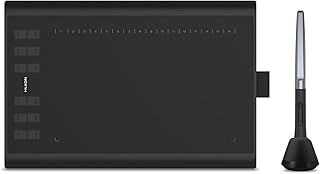
HUION Inspiroy H1060P Graphics Drawing Tablet
Why We Love It

XP-Pen Star03 V2 12 Inch Graphic Tablet with Passive Stylus
Why We Love It

Wacom Intuos M Black–with Pen
Why We Love It

HUION Inspiroy 2 Large Drawing Tablet with 3-Group 8
Why We Love It
Quick Pick
10 Best Mac Drawing Tablet Of 2026
Quick Pick
XP-Pen Deco 01 V3 Drawing Tablet, 10x6.25 Inch, 16384 Levels Pressure | Graphic Tablet, Battery-Free Stylus with Tilt Function, 8 Shortcut Keys, Compatible with PC, Chromebook, Android, MAC
HUION HS64 Graphics Drawing Tablet Battery-Free Stylus Android Windows macOS with 6.3 x 4 in Working Area Pen Tablet for Linux, Mac, Windows PC and Android
XP-Pen®G640 6 x 4 inch Graphic Drawing Tablet for OSU! Digital Tablet Gameplay with Our Battery-Free Stylus Design
HUION H950P Graphics Drawing Tablet 8.7x5.4 inches 8192 Pressure Sensitivity with 8 Express Keys Battery-Free Stylus Suit for Windows, Mac OS, Android OS, Linux
XP-PEN Deco mini7 7" Portable Graphic Drawing Tablet with Passive Stylus Supports Windows, Mac and Android
HUION HS610 Graphics Drawing Tablet with Battery-Free Stylus with 10x6.25inch Working Area Pen Tablet for Android Windows MAC OS
HUION Inspiroy H1060P Graphics Drawing Tablet, 10 x 6.25 in, 12+16 Hot Keys | 8192 Pressure Levels, Battery-Free Stylus, Digital Art Tablet Works with Mac, Windows PC and Android
XP-Pen Star03 V2 12 Inch Graphic Tablet with Passive Stylus 8192 Levels and 8 Shortcuts Digital Drawing Tablet
Wacom Intuos M Black–with Pen, Stylus Battery-Free & Pressure-Sensitive, Compatible with Windows, Mac & Android, Perfect Tablet for Drawing, Graphics or Remote Working | Graphics tablet (PC required), Wacom natural pencil experience and precise control for drawing, painting and editing photos
HUION Inspiroy 2 Large Drawing Tablet with 3-Group 8 Customized ExpressKeys | 10.5x6.56" Art Tablet with Scroll Wheel, Battery-Free Stylus, Graphics Tablet for Drawing, Design, Work with Mac, PC & Mobile
Buying Guide: Mac Drawing Tablet
📋 Table of Contents
1What should I look for in a Mac drawing tablet?
Look for compatibility with macOS, pressure sensitivity levels, and a responsive, accurate stylus. Ensure it has good software support for creative apps.
2What are the key specifications to consider?
Key specs include screen size, resolution, stylus pressure sensitivity (8192 levels is ideal), battery life, and connectivity options like USB-C or Bluetooth.
3How do I ensure the tablet is compatible with my Mac?
Check the tablet's system requirements and ensure it supports macOS versions your Mac is running. Use USB-C or Bluetooth connectivity for compatibility.
4When should I pay more for a higher-end model?
Pay more if you need higher resolution, better stylus precision, or additional features like a built-in display or advanced creative software.
5What are common mistakes to avoid when buying a Mac drawing tablet?
Avoid buying a tablet with poor stylus latency or low pressure sensitivity, and ensure it works with your specific Mac model before purchasing.
How we choose
Our editors are people who genuinely love testing and writing about products. We compare each product's real-world usability and strengths, then distill what matters most into our own "Why We Love It" points — so you get an honest, at-a-glance sense of what counts before you buy.