10 Best Logitech Mx Keys Of 2026
Logitech Mx Keys — Reviews, Recommendations & Updated Buying Guide November 2026


Logitech MX Keys S Wireless Keyboard
Why We Love It


Logitech MX Keys Mini Minimalist Wireless Illuminated
Why We Love It

Logitech MX Keys S Combo
Why We Love It

Logitech MX Keys S Combo Performance Wireless Keyboard and
Why We Love It

Logitech MX Keys Advanced Illuminated Wireless Keyboard for
Why We Love It

Logitech MX Keys S Advanced Full size Wireless Scissor
Why We Love It

Logitech MX Keys Mini Wireless Illuminated Keyboard for
Why We Love It

Logitech MX Keys Mini Minimalist Wireless Illuminated
Why We Love It
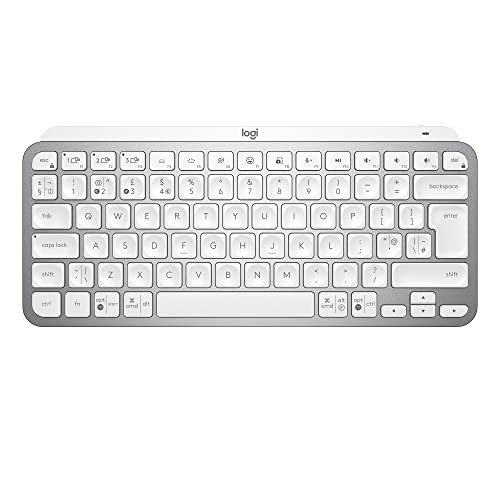
Logitech MX Keys Mini Minimalist Wireless Illuminated
Why We Love It

Logitech MX Keys S Key Set
Why We Love It
Quick Pick
10 Best Logitech Mx Keys Of 2026
Quick Pick
Logitech MX Keys S Wireless Keyboard, Low Profile, Fluid Precise Quiet Typing, Programmable Keys, Backlighting, Bluetooth, USB C Rechargeable, for Windows PC, Linux, Chrome, Mac - Graphite, INT Layout
Logitech MX Keys Mini Minimalist Wireless Illuminated Keyboard, Compact, Bluetooth, Backlit, USB-C, Compatible with Apple macOS, iOS, Windows, Linux, Android, Metal Build, Arabic Keyboard - Graphite
Logitech MX Keys S Combo - Performance Wireless Keyboard and Mouse with Palm Rest, Customizable Illumination, Fast Scrolling, Bluetooth, USB C, for Windows, Linux, Chrome, Mac - Graphite, ARA Layout
Logitech MX Keys S Combo Performance Wireless Keyboard and Mouse Combo, Graphite
Logitech MX Keys Advanced Illuminated Wireless Keyboard for Business, Logi Bolt USB Receiver, Bluetooth, Backlit Keys, Rechargeable, Windows/Mac/Linux - Graphite
Logitech MX Keys S Advanced Full size Wireless Scissor Keyboard with Backlit keys - Black
Logitech MX Keys Mini Wireless Illuminated Keyboard for Business, Compact, Logi Bolt Technology, Backlit, Rechargeable, Globally Certified, Windows/Mac/Chrome/Linux - Graphite
Logitech MX Keys Mini Minimalist Wireless Illuminated Keyboard, Graphite
Logitech MX Keys Mini Minimalist Wireless Illuminated Keyboard, Compact, Bluetooth, Backlit, USB-C, Compatible with Apple macOS, iOS, Windows, Linux, Android, Metal Build, US Intl Layout - Pale Grey
Logitech MX Keys S Key Set - Performance Wireless Keyboard and Mouse with Hand Rest
Buying Guide: Logitech Mx Keys
📋 Table of Contents
1What battery life should I look for in a wireless keyboard?
Aim for at least 2-3 months of regular use on a single charge for most models, or 1-2 weeks for high-use scenarios. Keyboards with low-power Bluetooth or mechanical switches may drain faster, so check the manufacturer's stated usage time under typical conditions.
2Is a wired charging option better than replaceable batteries?
Wired charging (via USB-C) is more convenient for frequent users and avoids battery replacement hassles, while AA/AAA batteries suit travel or backup use. Replaceable batteries offer flexibility but require ongoing purchases and disposal, which may not be ideal for eco-conscious buyers.
3What connection type is best for my needs: Bluetooth or USB receiver?
Bluetooth is great for connecting to multiple devices and is built into most modern laptops and tablets. A USB receiver (like a nano dongle) often provides lower latency and is better for gaming or high-performance tasks. Some keyboards offer both for added versatility.
4How important is key travel and switch type for comfort?
Key travel (how far a key moves when pressed) and switch type (linear, tactile, or clicky) affect typing feel. Mechanical switches offer durability and a satisfying feel, while membrane or scissor switches are quieter and lighter. Choose based on your typing style and noise tolerance.
5What size keyboard is best for portability and desk space?
Full-size keyboards (104 keys) offer all function keys and a numpad but take up more space. Tenkeyless (TKL) models (87 keys) save room while keeping arrow and function keys. Compact 60% or smaller layouts are ultra-portable but require learning shortcuts and may lack dedicated number keys.
How we choose
Our editors are people who genuinely love testing and writing about products. We compare each product's real-world usability and strengths, then distill what matters most into our own "Why We Love It" points — so you get an honest, at-a-glance sense of what counts before you buy.