10 Best Logitech Mouse Of 2026
Logitech Mouse — Reviews, Recommendations & Updated Buying Guide November 2026


Logitech MX Master 4
Why We Love It


Logitech M171 Wireless Mouse for PC
Why We Love It

Logitech Lift Vertical Ergonomic Mouse
Why We Love It

Logitech MX Master 3S
Why We Love It

Logitech G PRO X2 SUPERSTRIKE
Why We Love It

Logitech Signature Comfort M840 L Wireless Mouse
Why We Love It

Logitech MX Anywhere 3S Compact Wireless Mouse
Why We Love It
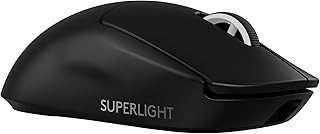
Logitech G PRO X SUPERLIGHT 2 LIGHTSPEED Wireless Gaming
Why We Love It

Logitech G305 Lightspeed Wireless Gaming Mouse
Why We Love It

Logitech M330 SILENT PLUS Wireless Mouse
Why We Love It
Quick Pick
10 Best Logitech Mouse Of 2026
Quick Pick
Logitech MX Master 4, Ergonomic Wireless Mouse with Advanced Performance Haptic Feedback, Ultra-Fast Scrolling, USB-C Charging, Bluetooth, Windows, MacOS - Graphite
Logitech M171 Wireless Mouse for PC, Mac, Laptop, 2.4 GHz with USB Mini Receiver, Optical Tracking, 12-Months Battery Life, Ambidextrous - Black
Logitech Lift Vertical Ergonomic Mouse, Wireless, Bluetooth or Logi Bolt USB Receiver, Quiet clicks, 4 Buttons, Compatible with Windows/macOS/iPadOS, Laptop, PC-Graphite | Wireless, Bluetooth or Logi Bolt, Silent clicks, 4 buttons, Windows/macOS/iPadOS, Laptop, PC - Grey
Logitech MX Master 3S - Performance Wireless Mouse with Ultra-fast Scrolling, Ergo, 8K DPI, Track on Glass, Quiet Clicks, Bluetooth, Windows, Linux, Chrome - Graphite
Logitech G PRO X2 SUPERSTRIKE,LIGHTSPEED Wireless Gaming Mouse | Ultra-fast, Ultra-Lightweight (61g), Customizable Click Haptic Feedback, USB-C Charging, for PC/Mac - White
Logitech Signature Comfort M840 L Wireless Mouse, Bluetooth Mouse with Silent Clicks, SmartWheel, Customisable Buttons, Multi-Device Compatibility for Windows, MacOS, iPadOS - Graphite
Logitech MX Anywhere 3S Compact Wireless Mouse, Fast Scrolling, 8K DPI Any-Surface Tracking, Quiet Clicks, Programmable Buttons, USB C, Bluetooth, Windows PC, Linux, Chrome, Mac - Graphite | Fast Scrolling, 8K DPI Tracking, Quiet Clicks, Programmable Buttons, USB C, Bluetooth, Windows PC, Linux, Chrome, Mac
Logitech G PRO X SUPERLIGHT 2 LIGHTSPEED Wireless Gaming Mouse, Lightweight, LIGHTFORCE Hybrid Switches, HERO 2 Sensor, 32,000 DPI, 5 Programmable Buttons, USB-C Charging, PC & Mac - Black
Logitech G305 Lightspeed Wireless Gaming Mouse, HERO Sensor, 12,000 DPI, Lightweight, 6 Programmable Buttons, 250h Battery Life, On-Board Memory, Compatible with PC/Mac - White
Logitech M330 SILENT PLUS Wireless Mouse, 2.4GHz with USB Nano Receiver, 1000 DPI Optical Tracking, 2-year Battery Life, Compatible with PC, Mac, Laptop, Chromebook - Black | 2.4GHz with USB Nano Receiver, 1000 DPI, 2-year Battery Life, PC/Mac/Laptop/Chromebook - Black
Buying Guide: Logitech Mouse
📋 Table of Contents
1What should I look for in a Logitech mouse for everyday use?
Look for a mouse with a comfortable grip, responsive click buttons, and a reliable sensor for smooth cursor movement. Wireless models with long battery life are also ideal for daily use.
2What are the key specifications to consider when buying a Logitech mouse?
Key specs include DPI (dots per inch) for sensitivity, battery life for wireless models, connectivity type (wired or wireless), and compatibility with your operating system (Windows, macOS, or both).
3How do I ensure the Logitech mouse is compatible with my computer?
Check the product description for supported operating systems and ensure your computer has the necessary ports (USB or Bluetooth) for connectivity. Some models may require a USB receiver or Bluetooth pairing.
4When should I pay more for a Logitech mouse?
Pay more for a mouse with higher DPI for precision tasks, ergonomic design for extended use, or advanced features like customizable buttons and programmable settings for productivity or gaming.
5What are common mistakes people make when buying a Logitech mouse?
Common mistakes include ignoring compatibility with the operating system, not checking for the right connectivity type, and overlooking ergonomic design, which can lead to discomfort during long use.
How we choose
Our editors are people who genuinely love testing and writing about products. We compare each product's real-world usability and strengths, then distill what matters most into our own "Why We Love It" points — so you get an honest, at-a-glance sense of what counts before you buy.