10 Best Logitech Mice Of 2026
Logitech Mice — Reviews, Recommendations & Updated Buying Guide November 2026


Logitech Lift Vertical Ergonomic Mouse
Why We Love It


Logitech MX Master 4
Why We Love It

Logitech Signature Comfort M840 L Wireless Mouse
Why We Love It

Logitech M171 Wireless Mouse for PC
Why We Love It

Logitech Pebble Mouse 2 M350s Fine Wireless Bluetooth
Why We Love It

Logitech MX Master 3S
Why We Love It

Logitech G305 Lightspeed Wireless Gaming Mouse
Why We Love It

Logitech M330 SILENT PLUS Wireless Mouse
Why We Love It

Logitech M720 Triathalon Full Size Multi-Device Wireless
Why We Love It
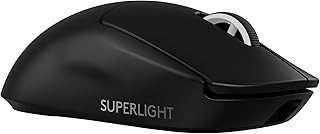
Logitech G PRO X SUPERLIGHT 2 LIGHTSPEED Wireless Gaming
Why We Love It
Quick Pick
10 Best Logitech Mice Of 2026
Quick Pick
Logitech Lift Vertical Ergonomic Mouse, Wireless, Bluetooth or Logi Bolt USB Receiver, Quiet clicks, 4 Buttons, Compatible with Windows/macOS/iPadOS, Laptop, PC-Graphite | Wireless, Bluetooth or Logi Bolt, Silent clicks, 4 buttons, Windows/macOS/iPadOS, Laptop, PC - Grey
Logitech MX Master 4, Ergonomic Wireless Mouse with Advanced Performance Haptic Feedback, Ultra-Fast Scrolling, USB-C Charging, Bluetooth, Windows, MacOS - Graphite
Logitech Signature Comfort M840 L Wireless Mouse, Bluetooth Mouse with Silent Clicks, SmartWheel, Customisable Buttons, Multi-Device Compatibility for Windows, MacOS, iPadOS - Graphite
Logitech M171 Wireless Mouse for PC, Mac, Laptop, 2.4 GHz with USB Mini Receiver, Optical Tracking, 12-Months Battery Life, Ambidextrous - Black
Logitech Pebble Mouse 2 M350s Fine Wireless Bluetooth, Portable, Lightweight, Customizable Buttons, Discrete Clicks, Easy-Switch Windows/MacOS/iPadOS/Android/ChromeOS - Graphite
Logitech MX Master 3S - Performance Wireless Mouse with Ultra-fast Scrolling, Ergo, 8K DPI, Track on Glass, Quiet Clicks, Bluetooth, Windows, Linux, Chrome - Graphite
Logitech G305 Lightspeed Wireless Gaming Mouse, HERO Sensor, 12,000 DPI, Lightweight, 6 Programmable Buttons, 250h Battery Life, On-Board Memory, Compatible with PC/Mac - White
Logitech M330 SILENT PLUS Wireless Mouse, 2.4GHz with USB Nano Receiver, 1000 DPI Optical Tracking, 2-year Battery Life, Compatible with PC, Mac, Laptop, Chromebook - Black | 2.4GHz with USB Nano Receiver, 1000 DPI, 2-year Battery Life, PC/Mac/Laptop/Chromebook - Black
Logitech M720 Triathalon Full Size Multi-Device Wireless Mouse - Black | Connect via Bluetooth or included USB-A receiver, pair up to 3 devices, Logitech Flow compatible, 6 customizable buttons
Logitech G PRO X SUPERLIGHT 2 LIGHTSPEED Wireless Gaming Mouse, Lightweight, LIGHTFORCE Hybrid Switches, HERO 2 Sensor, 32,000 DPI, 5 Programmable Buttons, USB-C Charging, PC & Mac - Black
Buying Guide: Logitech Mice
📋 Table of Contents
1What's the difference between Logitech's wired and wireless mice?
Wireless mice offer more freedom of movement and a cleaner desk setup, but require battery changes or charging. Wired mice never need power management and have zero input lag, making them better for competitive gaming, though they limit how far you can sit from your computer.
2How do I know what DPI range I actually need?
For everyday office work and browsing, 400-1600 DPI is plenty; anything higher is useful mainly for gaming or design work where you need quick, precise movements. Check what your current mouse feels like and match or slightly adjust from there rather than chasing high numbers.
3Should I buy a gaming mouse or an office mouse?
Gaming mice have faster response times and adjustable DPI, which office work doesn't require but won't hurt. If you do both gaming and work, a gaming mouse works fine for office tasks, but a basic office mouse will feel sluggish if you game regularly.
4What's the practical difference between Logitech's budget and premium mouse lines?
Premium Logitech mice offer longer battery life, more customizable buttons, and better build quality, while budget models cover the basics well enough for casual use. Spend more if you use your mouse 8+ hours daily or need programmable buttons for specific tasks.
5How important is hand size when choosing a Logitech mouse?
Hand size matters significantly—small hands struggle with oversized gaming mice while large hands feel cramped on compact designs. Check the dimensions (usually listed as length and width) against your palm size, or test in-store if possible, since this affects comfort during long use sessions.
How we choose
Our editors are people who genuinely love testing and writing about products. We compare each product's real-world usability and strengths, then distill what matters most into our own "Why We Love It" points — so you get an honest, at-a-glance sense of what counts before you buy.