10 Best Logitech Ergonomic Wireless Mice Of 2026
Logitech Ergonomic Wireless Mice — Reviews, Recommendations & Updated Buying Guide November 2026


Logitech Lift Vertical Ergonomic Mouse
Why We Love It


Logitech MX Master 4
Why We Love It
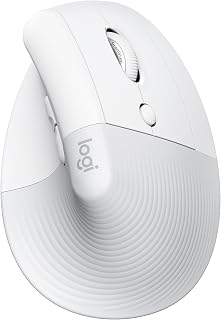
Logitech Lift Vertical Ergonomic Mouse
Why We Love It

Logitech MX Vertical Ergonomic Mouse
Why We Love It

Logitech Lift Vertical Ergonomic Mouse
Why We Love It

Logitech ERGO M575S Wireless Trackball Mouse
Why We Love It

Logitech MX Master 4
Why We Love It

Logitech Wave Keys & Lift Vertical Mouse
Why We Love It

Logitech M171 Wireless Mouse for PC
Why We Love It

Logitech Lift Left Vertical Ergonomic Mouse
Why We Love It
Quick Pick
10 Best Logitech Ergonomic Wireless Mice Of 2026
Quick Pick
Logitech Lift Vertical Ergonomic Mouse, Wireless, Bluetooth or Logi Bolt USB Receiver, Quiet clicks, 4 Buttons, Compatible with Windows/macOS/iPadOS, Laptop, PC-Graphite | Wireless, Bluetooth or Logi Bolt, Silent clicks, 4 buttons, Windows/macOS/iPadOS, Laptop, PC - Grey
Logitech MX Master 4, Ergonomic Wireless Mouse with Advanced Performance Haptic Feedback, Ultra-Fast Scrolling, USB-C Charging, Bluetooth, Windows, MacOS - Graphite
Logitech Lift Vertical Ergonomic Mouse, Wireless, Bluetooth or Logi Bolt USB Receiver, Quiet clicks, 4 Buttons, Compatible with Windows/macOS/iPadOS, Laptop, PC-White | Wireless, Bluetooth, Logi Bolt USB Receiver, Silent Clicks, 4 Buttons, Windows/macOS/iPadOS, Laptop, PC - White
Logitech MX Vertical Ergonomic Mouse, Multi-Device, Bluetooth or 2.4GHz Wireless with USB Unifying Receiver, 4000 DPI Optical Tracking, 4 Buttons, Fast Charging, Laptop/PC/Mac/iPad OS- Black
Logitech Lift Vertical Ergonomic Mouse, Wireless, Bluetooth or Logi Bolt USB Receiver, Quiet clicks, 4 Buttons, Compatible with Windows/macOS/iPadOS, Laptop, PC-Pink | Wireless, Bluetooth, Logi Bolt USB, Quiet clicks, 4 buttons, Windows/macOS/iPadOS, Laptop, PC - Pink
Logitech ERGO M575S Wireless Trackball Mouse, Wireless Ergonomic Mouse With Bluetooth and Encrypted Dongle, Comfortable Thumb Control, Precise and Smooth Tracking, for PC/Mac - Graphite | Wireless Ergonomic Mouse, Bluetooth, Encrypted Dongle, Thumb Control, Smooth Tracking, PC/Mac - Graphite
Logitech MX Master 4, Ergonomic Wireless Mouse | Advanced Performance Haptic Feedback, Ultra-Fast Scrolling, USB-C Charging, Bluetooth, Windows, macos - Pale grey
Logitech Wave Keys & Lift Vertical Mouse - Ergonomic Wireless Keyboard and Mouse Combo - with Cushioned Palm Rest, Easy-Switch, Bluetooth, for Multi-OS, Windows/Mac, US/INTL - Graphite
Logitech M171 Wireless Mouse for PC, Mac, Laptop, 2.4 GHz with USB Mini Receiver, Optical Tracking, 12-Months Battery Life, Ambidextrous - Black
Logitech Lift Left Vertical Ergonomic Mouse | Left-handed Wireless Bluetooth/Logi Bolt USB Mouse, Quiet clicks, 4 buttons, Win/macOS/iPadOS, Laptop/PC - Grey
Buying Guide: Logitech Ergonomic Wireless Mice
📋 Table of Contents
1How important is battery life for a wireless mouse?
Look for at least 12–24 months of battery life on a single charge or set of AA/AAA batteries. Mice with low-power Bluetooth or energy-saving modes last longer, while high-performance models with RGB lighting or extra sensors may drain faster.
2What sensor type should I choose for accuracy?
Optical sensors work well on most surfaces, while laser sensors offer higher precision and are better for glossy or reflective surfaces. For gaming or high-precision tasks, look for a mouse with a 16,000+ DPI optical sensor and adjustable tracking sensitivity.
3Are wired backup modes worth considering?
Some wireless mice include a wired mode via a USB cable for uninterrupted use during long sessions or if the battery runs low. This is especially useful for work or gaming where lag or disconnection is a concern.
4How many programmable buttons do I actually need?
Basic browsing and office work usually needs 3–5 buttons, while gamers or power users benefit from 6–12 customizable buttons for shortcuts or in-game actions. More buttons don’t always mean better — look for software that lets you assign functions easily.
5What should I look for in a comfortable design?
Choose a shape that fits your hand size and grip style — vertical designs reduce wrist strain for long use, while compact mice suit smaller hands or travel. Look for soft rubber grips and adjustable weights for a personalized feel.
How we choose
Our editors are people who genuinely love testing and writing about products. We compare each product's real-world usability and strengths, then distill what matters most into our own "Why We Love It" points — so you get an honest, at-a-glance sense of what counts before you buy.