10 Best Logitech Ergonomic Gaming Mice Of 2026
Logitech Ergonomic Gaming Mice — Reviews, Recommendations & Updated Buying Guide November 2026


Logitech Lift Vertical Ergonomic Mouse
Why We Love It


Logitech G305 Lightspeed Wireless Gaming Mouse
Why We Love It

Logitech MX Master 4
Why We Love It

Logitech G PRO X2 SUPERSTRIKE
Why We Love It

Logitech G502 X Wired Gaming Mouse
Why We Love It

Logitech G PRO X SUPERLIGHT 2 SE Wireless Gaming Mouse
Why We Love It

Razer Basilisk V3 Customizable RGB Wired Ergonomic Gaming
Why We Love It

UGREEN Wireless Ergonomic Mouse
Why We Love It

Logitech G203 LIGHTSYNC Gaming Mouse with Customizable RGB
Why We Love It
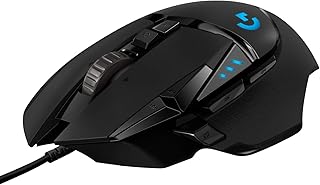
Logitech G502 Hero Wired Gaming Mouse - Black
Why We Love It
Quick Pick
10 Best Logitech Ergonomic Gaming Mice Of 2026
Quick Pick
Logitech Lift Vertical Ergonomic Mouse, Wireless, Bluetooth or Logi Bolt USB Receiver, Quiet clicks, 4 Buttons, Compatible with Windows/macOS/iPadOS, Laptop, PC-Graphite | Wireless, Bluetooth or Logi Bolt, Silent clicks, 4 buttons, Windows/macOS/iPadOS, Laptop, PC - Grey
Logitech G305 Lightspeed Wireless Gaming Mouse, Hero 12K Sensor, 12,000 DPI, Lightweight, 6 Programmable Buttons, 250h Battery Life, On-Board Memory, PC/Mac - Black
Logitech MX Master 4, Ergonomic Wireless Mouse with Advanced Performance Haptic Feedback, Ultra-Fast Scrolling, USB-C Charging, Bluetooth, Windows, MacOS - Graphite
Logitech G PRO X2 SUPERSTRIKE,LIGHTSPEED Wireless Gaming Mouse | Ultra-fast, Ultra-Lightweight (61g), Customizable Click Haptic Feedback, USB-C Charging, for PC/Mac - White
Logitech G502 X Wired Gaming Mouse - LIGHTFORCE hybrid optical-mechanical primary switches, HERO 25K gaming sensor, compatible with PC - macOS/Windows - Black | HERO 25K gaming sensor, compatible with PC - macOS/Windows - Black
Logitech G PRO X SUPERLIGHT 2 SE Wireless Gaming Mouse | 60 g pro-grade mouse, 5 programmable buttons, 44K DPI sensor, 888+ IPS, 1 kHz report rate, USB-C charging for PC/Mac - White
Razer Basilisk V3 Customizable RGB Wired Ergonomic Gaming Mouse, White
UGREEN Wireless Ergonomic Mouse, 2.4G USB, 1600 DPI Optical Tracking, Silent Mice, ≤40dB, 12-Month Battery Life for Laptop, MacBook, Chromebook
Logitech G203 LIGHTSYNC Gaming Mouse with Customizable RGB Lighting, 6 Programmable Buttons, Gaming Grade Sensor, 8K DPI Tracking, Lightweight - White | Customizable, 6 Programmable Buttons, Gaming Sensor, 8,000 DPI Tracking, Low Weight - White
Logitech G502 Hero Wired Gaming Mouse - Black | High Performance, 25,600 DPI, RGB, Adjustable Weights, 11 Programmable Buttons, On-Board Memory, PC/Mac Compatible
Buying Guide: Logitech Ergonomic Gaming Mice
📋 Table of Contents
1What DPI range is best for competitive gaming?
Aim for 400-1600 DPI for most games, as higher settings can cause inconsistency. Some mice offer up to 20,000 DPI, but software calibration is key to avoid jitter or oversensitivity in fast-paced titles.
2How many programmable buttons do I really need?
6-12 buttons suit most gamers, especially for MMOs or complex workflows. For FPS or casual play, 3-5 extra buttons are often enough. Avoid overloading with buttons you won’t use regularly.
3Is a wired or wireless mouse better for performance?
Wired mice offer zero latency and are ideal for competitive play, while wireless models provide freedom and modern ones have near-zero lag. Look for a 2.4GHz or wired connection if every millisecond counts.
4What sensor type should I prioritize for accuracy?
Optical or laser sensors are standard, but a high-quality optical sensor (like those from PixArt) is more reliable on most surfaces. Avoid budget laser sensors, which can struggle on glossy or reflective areas.
5How important is weight for a gaming mouse?
Lighter mice (60-80g) reduce hand fatigue during long sessions, but some gamers prefer heavier models for better control. Look for adjustable weights if you want to customize the feel to your grip style.
How we choose
Our editors are people who genuinely love testing and writing about products. We compare each product's real-world usability and strengths, then distill what matters most into our own "Why We Love It" points — so you get an honest, at-a-glance sense of what counts before you buy.