10 Best Live Streaming Switchers Of 2026
Live Streaming Switchers — Reviews, Recommendations & Updated Buying Guide November 2026


FoMaKo 4K HDMI Video Mixer Switcher
Why We Love It


Blackmagic Design ATEM Mini Pro HDMI Live Stream Switcher
Why We Love It

Mixer Plus Compact Video Switcher 4 HDMI with 4''Built-in
Why We Love It

OSEE GoStream Deck HDMI/USB Live Streaming Video Switcher
Why We Love It

RØDE RØDECaster Video S
Why We Love It
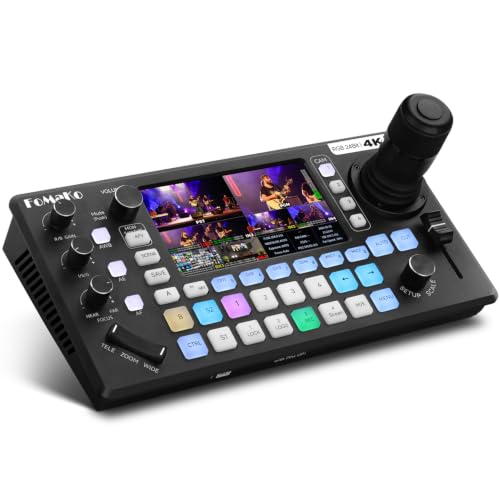
FoMaKo 4K HDMI Multi-Camera Streaming Video Mixer Switcher
Why We Love It

Blackmagic Design Atem Mini Pro HDMI Live Stream Switcher
Why We Love It

YoloLiv
Why We Love It

Osee GoStream Deck HDMI Pro Live Streaming Multi Camera
Why We Love It

Osee GoStream Deck 4xHDMI Switcher
Why We Love It
Quick Pick
10 Best Live Streaming Switchers Of 2026
Quick Pick
FoMaKo 4K HDMI Video Mixer Switcher, 10.1 Inch FHD LCD Screen, 5-CH Live Streaming Switcher, 4K 60FPS Input, 1080p 60FPS Output, Support PTZ Controller, SDI + HDMI Video Switcher,M6(NDI Upgradeable)
Blackmagic Design ATEM Mini Pro HDMI Live Stream Switcher
Mixer Plus Compact Video Switcher 4 HDMI with 4''Built-in Screen, Portable Live Streaming Switcher for Multi-Camera, Online Class, Event, YouTube, OBS, Zoom
OSEE GoStream Deck HDMI/USB Live Streaming Video Switcher
RØDE RØDECaster Video S – Podcast Video Switcher and Audio Interface –
FoMaKo 4K HDMI Multi-Camera Streaming Video Mixer Switcher, Integrated 4D Joystick PTZ Camera Controller, 5.5" LCD Screen, XLR Audio and USB/SD Recording,4K 60FPS Input, 1080p 60FPS Output,KC800
Blackmagic Design Atem Mini Pro HDMI Live Stream Switcher (Authorized Reseller)
YoloLiv
osee GoStream Deck HDMI Pro Live Streaming Multi Camera Video Mixer Switcher
Osee GoStream Deck 4xHDMI Switcher, Video Mixer Live
Buying Guide: Live Streaming Switchers
📋 Table of Contents
1How many input sources do I actually need for my setup?
For solo streamers, 4-6 inputs (webcam, phone, screen, mic) are usually enough. Teams or creators with multiple cameras and screens may need 8+ inputs. Check if the switcher allows expansion via USB or HDMI for future upgrades.
2What’s the difference between hardware and software switchers?
Hardware switchers offer faster, more reliable switching with physical buttons and are ideal for live events. Software switchers run on a computer and offer more advanced editing but require a powerful system. Choose based on your technical skills and streaming complexity.
3Do I need 4K support for my live streams?
4K is overkill for most platforms, which cap at 1080p. However, if you plan to record in 4K or use high-res cameras, a 4K-capable switcher ensures future-proofing. Look for models with at least 1080p60 for smooth, high-quality live output.
4What audio features should I prioritize in a switcher?
Look for at least 4 audio channels, a built-in mixer with gain control, and support for XLR or 3.5mm inputs. Some models offer automatic audio leveling, which helps keep your stream’s sound consistent without manual adjustments.
5Are USB capture cards worth adding to my switcher setup?
Yes, if you want to include devices like smartphones, tablets, or game consoles. USB capture cards convert HDMI or SDI signals into a format your switcher can use. Choose one with low latency and compatibility with your switcher’s input type for seamless integration.
How we choose
Our editors are people who genuinely love testing and writing about products. We compare each product's real-world usability and strengths, then distill what matters most into our own "Why We Love It" points — so you get an honest, at-a-glance sense of what counts before you buy.