10 Best Liquid Cooled Gaming Desktop Computers Of 2026
Liquid Cooled Gaming Desktop Computers — Reviews, Recommendations & Updated Buying Guide November 2026

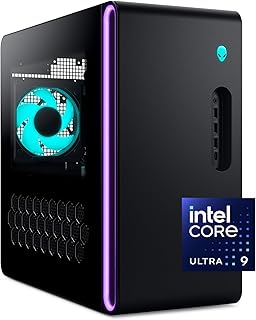
Alienware Aurora Gaming Desktop
Why We Love It


IDEALS GAMING PC LIQUID COOLED: CORE i7 Processor
Why We Love It

IDEALS GAMING/WORKSTATION LIQUID COOLED TOWER PC (RYZEN 7 +
Why We Love It

NovaRift Gaming PC – Ryzen 5 7600X
Why We Love It

(RTX 3080 10GB) LIQUID COOLED GAMING PC CORE I7 7700K
Why We Love It

AURIX Gaming PC, Core i5-12400F
Why We Love It

SNO Gaming PC, Core i7-14700KF
Why We Love It

IDEALS MAX AIR GAMING & WORKSTATION LIQUID COOLED TOWER PC:
Why We Love It

TitanVolt Gaming PC, Ryzen 7 9600X
Why We Love It
VortexNova Gaming PC – Ryzen 5 7600X
Why We Love It
Quick Pick
10 Best Liquid Cooled Gaming Desktop Computers Of 2026
Quick Pick
Alienware Aurora Gaming Desktop, RTX 5080, Intel Core Ultra 9 285 | NVIDIA GeForce, 32GB DDR5, 1TB SSD, Wi‑Fi 7, Bluetooth, Windows 11 Home, Integrated HD Audio, ACT1250
iDEALS GAMING PC LIQUID COOLED: CORE i7 Processor | GPU OPTION | 16GB RAM | 1TB SSD NMVE/SATA | Windows 10/11 | WIFI 6 INTERNET READY (CORE I7 + GTX 1660 SUPER 6GB GRAPHICS)
iDEALS GAMING/WORKSTATION LIQUID COOLED TOWER PC (RYZEN 7 + RTX 5050 8GB DLSS) | 32GB RAM | 1TB NVME/SATA SSD | Windows 10/11 | BT AND WIFI READY
NovaRift Gaming PC – Ryzen 5 7600X, RX 9060 XT 8GB Graphics, 32GB DDR5 RAM, 1TB NVMe SSD, B650 Motherboard, 360mm Liquid Cooling, 750W PSU, WiFi & Bluetooth, Windows 11 Pro Desktop Computer
(RTX 3080 10GB) LIQUID COOLED GAMING PC CORE I7 7700K | GPU OPTIONS | 16GB RAM | 2TB SSD | WIN 11 | WIFI 6 | IDEALS BUDGET GAMING PC/WORKSTATION
AURIX Gaming PC, Core i5-12400F, RTX 3050 8GB Graphics, 16GB DDR4, 1TB NVMe SSD, 240mm AIO Liquid Cooling, WiFi, Bluetooth, Windows 11 Pro Desktop Computer
SNO Gaming PC, Core i7-14700KF, RTX 5070 12GB, 32GB DDR5, 1TB SSD, Liquid Cooled, 750W PSU, USB-, Windows 11 | High Performance Desktop Computer
iDEALS MAX AIR GAMING & WORKSTATION LIQUID COOLED TOWER PC: CORE I7 9700F Processor | GPU OPTION | 32GB RAM | 1TB NVME/SATA SSD | Windows 10 (CORE I7 9700F + RTX 5060 8GB)
TitanVolt Gaming PC – Ryzen 7 9600X | RTX 5070 12GB | 32GB DDR5 RAM | 2TB NVMe SSD | 240mm Liquid Cooling | B650 Motherboard | 750W PSU | WiFi & Bluetooth | Windows 11 Pro
VortexNova Gaming PC – Ryzen 5 7600X, RTX 5060 8GB Graphics, 32GB DDR5 RAM, 2TB NVMe SSD, B650 Motherboard, 360mm Liquid Cooler, 750W PSU, WiFi & Bluetooth, Windows 11 Pro Desktop Computer
Buying Guide: Liquid Cooled Gaming Desktop Computers
📋 Table of Contents
1How much better is liquid cooling compared to air cooling in gaming desktops?
Liquid cooling typically reduces CPU and GPU temperatures by 10-20°C under load compared to air cooling, allowing for more stable overclocking and quieter operation. It's especially beneficial for high-end GPUs like RTX 4090 or Threadripper CPUs that generate intense heat during extended gaming sessions.
2What components in a liquid cooled system should I prioritize upgrading first?
Start with the CPU and GPU, as they generate the most heat and benefit most from liquid cooling. A high-quality AIO (All-In-One) liquid cooler for the CPU and a custom loop or closed-loop GPU cooler will maximize performance and thermal efficiency in a gaming rig.
3Is a custom liquid cooling loop worth the extra cost and complexity?
Custom loops offer superior cooling and aesthetics but require more setup, maintenance, and investment—expect to spend $300–$600+ on pumps, radiators, and tubing. They're ideal for enthusiasts or those building a showpiece PC, not for casual gamers on a budget.
4What size radiator do I need for a high-end gaming build?
For a single GPU and CPU, a 240mm or 280mm radiator is usually sufficient. If you're cooling multiple components or overclocking heavily, a 360mm radiator provides better heat dissipation and keeps temperatures lower during long gaming sessions or rendering tasks.
5Can I upgrade to liquid cooling in an existing gaming desktop case?
It depends on case size and clearance—most mid-tower cases support 240–360mm radiators, but smaller cases may not fit them. Check your case's manual for AIO cooler compatibility and ensure there's enough space for tubing and airflow around the radiator and GPU.
How we choose
Our editors are people who genuinely love testing and writing about products. We compare each product's real-world usability and strengths, then distill what matters most into our own "Why We Love It" points — so you get an honest, at-a-glance sense of what counts before you buy.