10 Best Lightning Usb Data Transfer Cable Of 2026
Lightning Usb Data Transfer Cable — Reviews, Recommendations & Updated Buying Guide November 2026

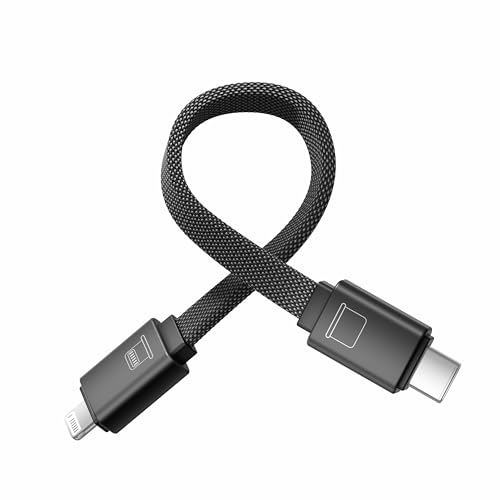
ROMOSS USB-C TO LIGHTNING 3A DATA CHARGING NYLON BRAIDED
Why We Love It


Porodo USB-C to Lightning Cable
Why We Love It

UGREEN USB C to Lightning Cable 1M
Why We Love It

Multi USB Charging Adapter Cable Kit
Why We Love It

Promate USB-A to Lightning Cable
Why We Love It

Promate USB-A to Lightning Cable
Why We Love It

Aioneus USB-A to Lightning Cable 2M [MFi Certified] iPhone
Why We Love It

Promate USB-A to Lightning Cable
Why We Love It

4 Pack Lightning to USB C Adapter for iPhone 17
Why We Love It

Baseus Superior Series PD 2.4A USB to Lightning Fast
Why We Love It
Quick Pick
10 Best Lightning Usb Data Transfer Cable Of 2026
Quick Pick
ROMOSS USB-C TO LIGHTNING 3A DATA CHARGING NYLON BRAIDED CABLE 15CM BLACK
Porodo USB-C to Lightning Cable, Data Transfer & Fast Charge Braided Cable, Power Delivery Type-C to iPhone cable, 25cm Tangle-Free Braided USB-C to Lightning Wire, PD 30W, iPhone 17-11 Series & more
UGREEN USB C to Lightning Cable 1M, Apple MFi Certified, Type C PD Fast Charging iPhone Charger Silicone Braided Cord, for iPhone 14 Pro Max/13/12, iPad Pro/Air/Mini, AirPods, Black
Multi USB Charging Adapter Cable Kit, USB C to Ligh-ting Adapter Box, Conversion Set USB A Type C Lightn-ing Micro Adapter Kit,60W Charging and Data Transfer Cable Kit Sim Tray Eject Tool Slots
Promate USB-A to Lightning Cable, Durable 10W USB-A to Lightning Charger with 480 Mbps Data Transfer, 10000 Bend Test and 100 cm Anti-Tangle Silicone Cord for iPhone 14, iPad, XCord-Ai Black
Promate USB-A to Lightning Cable, Durable 10W USB-A to Lightning Charger with 480 Mbps Data Transfer, 10000 Bend Test and 100 cm Anti-Tangle Silicone Cord for iPhone 14, iPad, XCord-Ai White
Aioneus USB-A to Lightning Cable 2M [MFi Certified] iPhone Charger Cable,Nylon Braided iPhone Charging Cord Compatible with iPhone 14 13 12 11 Pro Max Mini XS XR X 8 7 Plus 6 Series,iPad,AirPods
Promate USB-A to Lightning Cable, Durable 10W USB-A to Lightning Charger with 480 Mbps Data Transfer, 10000 Bend Test and 100 cm Anti-Tangle Silicone Cord for iPhone 14, iPad, XCord-Ai Navy
4 Pack Lightning to USB C Adapter for iPhone 17, Charging & Data Transfer | Lightning Female to USB C Male Adapter, Type C Charger Connector Cable for iPhone 15/16 Pro Max ,Samsung S25, Not for Audio
Baseus Superior Series PD 2.4A USB to Lightning Fast Charging Cable, High-Speed 480Mbps Data Transfer Cable Compatible with iPhone 14 13 12 11 Pro Max XS XR X 8 7 6, iPad, Airpods & More (2M) – Blue
Buying Guide: Lightning Usb Data Transfer Cable
📋 Table of Contents
1What should I look for when buying a Lightning USB data transfer cable?
Look for cables with a certified MFi (Made for iPhone) logo to ensure compatibility and safety with Apple devices. Avoid cheap, unbranded cables that may not meet quality standards.
2What are the key specifications to check?
Check the cable length, connector type (Lightning to USB-A or USB-C), data transfer speed, and whether it supports fast charging. Ensure it is compatible with your specific device model.
3How do I ensure the cable is the right size and compatible with my device?
Verify that the cable has a Lightning connector on one end and the correct USB type on the other. Check your device's specifications or look for compatibility information on the product packaging or description.
4When should I pay more for a Lightning USB data transfer cable?
Pay more for cables that are MFi-certified, have reinforced build quality, and offer features like fast charging or high-speed data transfer, especially if you use the cable frequently or with expensive devices.
5What are common mistakes people make when buying this type of cable?
Common mistakes include buying non-certified cables that may damage devices, choosing the wrong USB type, or overlooking the need for a longer cable if you frequently use it with a desktop computer.
How we choose
Our editors are people who genuinely love testing and writing about products. We compare each product's real-world usability and strengths, then distill what matters most into our own "Why We Love It" points — so you get an honest, at-a-glance sense of what counts before you buy.