10 Best Lg Ultragear Of 2026
Lg Ultragear — Reviews, Recommendations & Updated Buying Guide November 2026


LG 24G411A-B Ultragear Full HD (1920x1080) IPS Gaming
Why We Love It


LG 27GS50F-B 27-inch FHD (1920 x 1080) Ultragear Gaming
Why We Love It

LG Ultragear G4 Gaming Monitor 27G411A-B
Why We Love It

LG 27GX700A-B 27-inch Ultragear QHD (2560 x 1440) OLED
Why We Love It

LG Gaming Monitor LG Ultragear 27G810A-B 27 inch / 4K UHD
Why We Love It

LG Ultragear™ 45GX950A-B 45" Gaming Screen
Why We Love It

LG Ultragear 27-inch 4th Gen
Why We Love It

LG Monitor UltraGear 27GS75Q-B 27GS75QB (27GS75Q-B.AEU)
Why We Love It

LG Ultragear 24G411A-B.AEU 24-Inch Gaming Monitor
Why We Love It
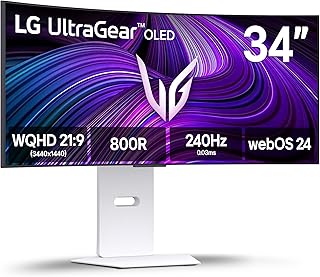
LG 34GX90SA-W 34 Inch OLED Curved Gaming Monitor 3440 x 1440
Why We Love It
Quick Pick
10 Best Lg Ultragear Of 2026
Quick Pick
LG 24G411A-B Ultragear Full HD (1920x1080) IPS Gaming Monitor, 144Hz (O/C), 1ms MBR Compatible, NVIDIA G-Sync, AMD FreeSync, HDR10, HDMI, DisplayPort, Slim Support, Black
LG 27GS50F-B 27-inch FHD (1920 x 1080) Ultragear Gaming Monitor with 180Hz, 1ms MBR, HDR10, AMD FreeSync, HDMI, DisplayPort, 3-Side Virtually Borderless Design, Black
LG Ultragear G4 Gaming Monitor 27G411A-B, 27 Inch, 1080p, 144Hz Overclocked, 5ms, IPS Display, HDR 10, NVIDIA G-Sync Compatible & AMD FreeSync, Smart Energy Saving, DisplayPort, HDMI
LG 27GX700A-B 27-inch Ultragear QHD (2560 x 1440) OLED Gaming Monitor, 280Hz, 0.03ms, NVIDIA G-Sync, AMD FreeSync Premium Pro, VESA DisplayHDR TrueBlack500, with up to DCI-P3 99.5%, HDMI 2.1, Black
LG Gaming Monitor LG Ultragear 27G810A-B 27 inch / 4K UHD /180Hz / IPS / 1ms GtG, Dual-Mode/VESA DisplayHDR 400 / HDMI 2.1 / NVIDIA G-SYNC Compatible, AMD FreeSync Premium/DCI-P3 95%
LG Ultragear™ 45GX950A-B 45" Gaming Screen - OLED Panel WUHD (5120 x 2160), 0.03ms 165Hz, DisplayHDR™400 True Black, DCI-P3 98.5% (CIE1976), FreeSync Premium Pro, G-Sync Compatible
LG Ultragear 27-inch 4th Gen. OLED QHD Gaming Monitorㅣ27GX790B with Dual-Mode(720Hz@HD, 540Hz@QHD), 0.02ms(GtG), DP2.1, VESA DisplayHDR™ True Black 500, NVIDIA G-SYNC Compatible, FreeSync Premium Pro
LG Monitor UltraGear 27GS75Q-B 27GS75QB (27GS75Q-B.AEU)
LG Ultragear 24G411A-B.AEU 24-Inch Gaming Monitor - IPS Panel FHD (1920x1080), 5ms GtG 144Hz, HDR 10, sRGB 99% (CIE1931), AMD FreeSync, Tilting, DisplayPort 1.4, HDMI 2.0
LG 34GX90SA-W 34 Inch OLED Curved Gaming Monitor 3440 x 1440 cm 240 Hz 1ms Compatible with NVIDIA G-Sync, AMD FreeSync Premium, VESA DisplayHDR True Black 400, WebOS, USB Type-C, White
Buying Guide: Lg Ultragear
📋 Table of Contents
1What refresh rate do I actually need for gaming?
For casual gaming, 60Hz is sufficient, but 144Hz or higher is ideal for fast-paced games like FPS or racing titles. Higher refresh rates reduce motion blur and input lag, making gameplay feel smoother and more responsive.
2Is a curved monitor better for gaming than a flat one?
Curved monitors can enhance immersion and reduce distortion at the edges, especially for wide-screen setups. However, they may cause discomfort for some users or look odd in smaller spaces, so it depends on your personal preference and desk size.
3What panel type should I choose: IPS, TN, or VA?
IPS offers the best color accuracy and wide viewing angles, ideal for competitive and creative gaming. TN panels have the fastest response times, great for FPS, while VA provides deep blacks and high contrast, perfect for dark scenes in RPGs or horror games.
4How important is response time for a gaming monitor?
A response time of 1ms to 5ms is best for competitive gaming to avoid ghosting and motion blur. While 5ms or higher is acceptable for casual play, lower numbers ensure sharper visuals during fast action sequences.
5What resolution should I look for in a gaming monitor?
1080p is suitable for budget setups and older games, while 1440p offers a better balance of performance and detail. 4K is ideal for high-end systems and future-proofing, but requires a powerful GPU to run games smoothly at higher settings.
How we choose
Our editors are people who genuinely love testing and writing about products. We compare each product's real-world usability and strengths, then distill what matters most into our own "Why We Love It" points — so you get an honest, at-a-glance sense of what counts before you buy.