10 Best Lg 24-inch Monitor Of 2026
Lg 24-inch Monitor — Reviews, Recommendations & Updated Buying Guide November 2026

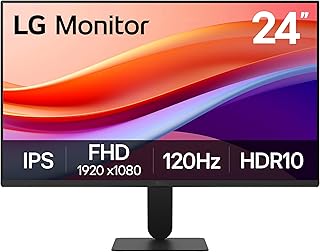
LG 24U411A-B 24-inch Full HD (1920 x 1080) IPS Computer
Why We Love It


LG 24GS50F-B 24-inch FHD (1920 x 1080) UltraGear Gaming
Why We Love It

LG Monitor 24U411A-B - FHD 1080p IPS 24 inch
Why We Love It

LG 24G411A-B Ultragear Full HD (1920x1080) IPS Gaming
Why We Love It

LG 24U421A-B Monitor PC 60.5 cm [23.8] 1920 x 1080 pixels
Why We Love It

LG 24-inch IPS Full HD Monitor Virtually Borderless
Why We Love It

LG 24U421A‑B 24″ FHD (1920×1080) Curved VA Monitor
Why We Love It

LG 24MR400-B 3-Side Borderless 100Hz IPS FHD Monitor with
Why We Love It

LG Ultragear 24G411A-B.AEU 24-Inch Gaming Monitor
Why We Love It

LG Electronics UltraGear Gaming Monitor 24GQ50F-B
Why We Love It
Quick Pick
10 Best Lg 24-inch Monitor Of 2026
Quick Pick
LG 24U411A-B 24-inch Full HD (1920 x 1080) IPS Computer Monitor, 120Hz, HDR10, Reader Mode, Flicker Safe, HDMI, Slim Stand Base, Black
LG 24GS50F-B 24-inch FHD (1920 x 1080) UltraGear Gaming monitor with 180Hz, 1ms MBR, HDR10, AMD FreeSync, HDMI, DisplayPort, 3-Side Virtually Borderless Design, Black
LG Monitor 24U411A-B - FHD 1080p IPS 24 inch, 120Hz, 5ms GtG, Computer desktop display with VRR, HDR10, Smart Energy Saving, Anti-Glare, D-Sub, HDMI, Matte Black
LG 24G411A-B Ultragear Full HD (1920x1080) IPS Gaming Monitor, 144Hz (O/C), 1ms MBR Compatible, NVIDIA G-Sync, AMD FreeSync, HDR10, HDMI, DisplayPort, Slim Support, Black
LG 24U421A-B Monitor PC 60.5 cm [23.8] 1920 x 1080 pixels Full HD LED Nero (24U421A 24IN VA FHD [1920X1080] - 16:9 5MS 3000:1 HDMI/USB TYPE-C)
LG 24-inch IPS Full HD Monitor Virtually Borderless,AMD FreeSync,Eye-care- 24MP400-B
LG 24U421A‑B 24″ FHD (1920×1080) Curved VA Monitor, 100 Hz, 5 ms, HDR10, USB‑C (15 W PD) + HDMI, 3‑Side Borderless Design
LG 24MR400-B 3-Side Borderless 100Hz IPS FHD Monitor with AMD FreeSync, 24 Inch Size, Black
LG Ultragear 24G411A-B.AEU 24-Inch Gaming Monitor - IPS Panel FHD (1920x1080), 5ms GtG 144Hz, HDR 10, sRGB 99% (CIE1931), AMD FreeSync, Tilting, DisplayPort 1.4, HDMI 2.0
LG Electronics UltraGear Gaming Monitor 24GQ50F-B - 23.8 inch, VA Panel, 165Hz, 1ms MBR, 1920 x 1080 px, AMD FreeSync Premium, Gaming UI
Buying Guide: Lg 24-inch Monitor
📋 Table of Contents
1Is a 24-inch monitor big enough for work and gaming?
24 inches works well for most people—it's compact enough for tight desks but gives you enough screen real estate for spreadsheets, browsing, and gaming. If you're doing detailed design work or trading multiple windows, you might want to consider a larger size.
2What refresh rate do I need for gaming on an LG 24-inch?
For casual gaming, 60Hz is fine, but if you play competitive games, aim for 144Hz or higher for smoother gameplay. LG offers both options, so choose based on what you actually play.
3What's the difference between IPS and VA panels on LG monitors?
IPS panels give you better color accuracy and wider viewing angles, making them ideal for creative work and office use. VA panels offer deeper blacks and better contrast, which some gamers prefer, but colors shift more when viewed from the side.
4Should I pay more for a 1440p monitor instead of 1080p at 24 inches?
At 24 inches, 1080p looks sharp enough for most people and saves you money, but 1440p gives you more screen space for productivity if you're doing detailed work. The difference is noticeable but subtle at this screen size.
5What connections should I look for on an LG 24-inch monitor?
Make sure it has HDMI and USB-C or DisplayPort depending on your devices—USB-C is especially useful if you want to charge a laptop at the same time. Check that the refresh rate is maintained on whichever connection you plan to use.
How we choose
Our editors are people who genuinely love testing and writing about products. We compare each product's real-world usability and strengths, then distill what matters most into our own "Why We Love It" points — so you get an honest, at-a-glance sense of what counts before you buy.