10 Best Large Print Backlit Keyboard Of 2026
Large Print Backlit Keyboard — Reviews, Recommendations & Updated Buying Guide November 2026


Large Print Backlit Keyboard for Seniors and Low Vision
Why We Love It


Large Print Computer Keyboard
Why We Love It

Perixx PERIBOARD-317 Wired Backlit USB Keyboard
Why We Love It

Perixx PERIBOARD-317R Wired Backlit USB Keyboard
Why We Love It

Macally Large Print Keyboard for Mac (Dual USB-C & USB-A)
Why We Love It

Perixx PERIBOARD-732B Wireless Backlit Mini Keyboard
Why We Love It

BERGUF Large Print Backlit Keyboard
Why We Love It

Large Print Wireless Keyboard and Mouse
Why We Love It

Large Print Wireless Keyboard and Mouse - Backlit Key board
Why We Love It
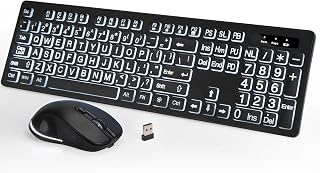
Wireless Keyboard and Mouse - Large Print Wireless Keyboard
Why We Love It
Quick Pick
10 Best Large Print Backlit Keyboard Of 2026
Quick Pick
Large Print Backlit Keyboard for Seniors and Low Vision Black | High Contrast Oversized Letters Full Size USB Wired Computer Keyboard with Silicone Cover, Wrist Rest & White LED.No Glare
Large Print Computer Keyboard,High Contrast Big Letter Keyboard for Seniors Visually Impaired Low Vision,Laser Etched Non-Fade Keys,Wired USB Full Size with Wrist Rest for Windows(No Backlit) | Keyboard for elderly Low Vision,Non Fade Letter,Wired USB Full Size with Wrist Rest for Windows(No Backlit)
Perixx PERIBOARD-317 Wired Backlit USB Keyboard, Big Print Letter with White Illuminated LED, US English Layout,Black
Perixx PERIBOARD-317R Wired Backlit USB Keyboard - Big Print Letter - Tri-Color Illuminated LED - Stylish Round Keycaps - US English
Macally Large Print Keyboard for Mac (Dual USB-C & USB-A) – Backlit Small Wired Keyboard, Compact Mini USB Keyboard with Quiet Scissor Switch Keys, Compatible with MacBook Air & Mac mini
Perixx PERIBOARD-732B Wireless Backlit Mini Keyboard - X Type Scissor Keys - White Backlit - US English
BERGUF Large Print Backlit Keyboard, Wired USB Lighted Computer Keyboards with 7-Color Backlit, Oversize Letters Keys Easy to See and Type, Quiet Keyboard Compatible for PC, Laptop (Large)
Large Print Wireless Keyboard and Mouse - White Backlit Keyboard, Oversize Letters Keys Easy to See and Type, Rechargeable Keyboard and Mouse with Light Up Key, Compatible for PC (Single Color)
Large Print Wireless Keyboard and Mouse - Backlit Key board, Oversize Letters Keys Easy to See and Type, Rechargeable Keyboard and Mouse with Light Up Key, Compatible for PC (RGB, Large)
Wireless Keyboard and Mouse - Large Print Wireless Keyboard, BERGUF 2.4G Full Size Keyboard and Mouse Set with Big Letters and Backlight Key for Seniors, Compatible for Windows, Laptop, PC, Black
Buying Guide: Large Print Backlit Keyboard
📋 Table of Contents
1What size and spacing of the keys should I look for?
Opt for keyboards with 19mm or larger keycaps and at least 18mm between key centers for easier typing. Larger spacing and key size reduce errors and fatigue, especially for those with limited dexterity or vision challenges.
2How does backlit brightness affect usability?
Look for adjustable brightness levels with at least three settings — low for dim environments, medium for general use, and high for bright rooms. Some models offer color-changing LEDs, which can be useful for mood or task differentiation but aren't essential for basic use.
3What type of backlighting is best for a large print keyboard?
Side-lit or underglow lighting provides even illumination across the entire keyboard, reducing eye strain. Avoid top-lit models, which can create harsh shadows and uneven lighting, especially with larger keycaps.
4Are wireless or wired models better for this type of keyboard?
Wired models are more reliable and typically have lower latency, which is ideal for frequent use. Wireless options offer convenience but may require regular battery changes or charging, which can be a drawback for heavy users.
5What additional features should I consider for accessibility?
Look for models with tactile feedback, anti-ghosting for multi-key presses, and compatibility with voice or screen readers. Some keyboards also include dedicated function keys or shortcut keys for common tasks, which can enhance usability for those with visual impairments.
How we choose
Our editors are people who genuinely love testing and writing about products. We compare each product's real-world usability and strengths, then distill what matters most into our own "Why We Love It" points — so you get an honest, at-a-glance sense of what counts before you buy.