10 Best Laptop External Cooling Fan Of 2026
Laptop External Cooling Fan — Reviews, Recommendations & Updated Buying Guide November 2026


TopMate C11 Laptop Cooling Pad RGB Gaming Notebook Cooler
Why We Love It


WEETOTUNG Laptop Cooling Pad Stand for Gaming
Why We Love It

Laptop Gaming Cooling Pad Stand
Why We Love It

IETS Laptop Fan Cooler with Temperature Display
Why We Love It

TopMate C5 Laptop Cooling Pad Gaming Notebook Cooler
Why We Love It

Llano V10 Gaming Laptop Cooling Pad
Why We Love It

Llano Laptop Cooler
Why We Love It
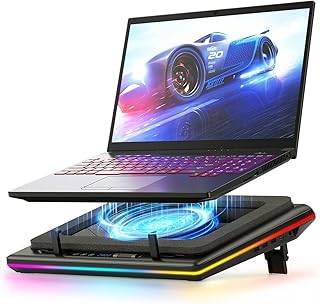
Llano V12 RGB Laptop Cooling Pad with Powerful Turbofan
Why We Love It

Llano V12 Gaming Laptop Cooling Pad Cooler Stand with
Why We Love It

Laptop Cooling Pad
Why We Love It
Quick Pick
10 Best Laptop External Cooling Fan Of 2026
Quick Pick
TopMate C11 Laptop Cooling Pad RGB Gaming Notebook Cooler, Laptop Fan Stand | Adjustable Height with 6 Quiet Fans and Phone Holder, Computer Chill Mat, for 15.6-17.3 Inch Laptops - Blue LED Light
WEETOTUNG Laptop Cooling Pad Stand for Gaming - Quiet Fan Height Adjustable Stand with USB Interfaces Charging and Cooler Power Charging Port - Turbofan for Gaming Notebook and Office Laptops
Laptop Gaming Cooling Pad Stand - Height Adjustable Stand with Two Quiet Fan with USB Interfaces Charging and Cooler Power Charging Port - Turbofan for Gaming Notebook and Office Laptops
IETS Laptop Fan Cooler with Temperature Display,Side-Draft Portable Intelligent Notebook Radiator,Rapid Cooling, Adjustable Speed Auto-Temp Detection
TopMate C5 Laptop Cooling Pad Gaming Notebook Cooler, Laptop Fan Cooling Stand Adjustable Height with 5 Quiet Fans Blue LED Light, Computer Chill Mat with LCD Controller, for 10-15.6 Inch Laptops
llano V10 Gaming Laptop Cooling Pad, RGB Laptop Cooler Stand | External Powerful Cooling Fan, Rapid Cooling Computer 13-17.3in, Action Button Control, 3 Adjustable Stand, 4-Port USB C&A
llano Laptop Cooler, Gaming Laptop Cooling Pad with 3500RPM Turbofan, 4.72 Inch External Fan Laptop Stand, Adjustable Variable Speed, Button Control, Seal Foam for Rapid Laptop13-17.3in, V10, Black | 4.72 inch turbo fan, button control, sealing foam, no USB ports, fast cooling for 13-17.3 inch laptop
llano V12 RGB Laptop Cooling Pad with Powerful Turbofan Gaming Cooler | Infinitely Variable Speed, Touch Control, LCD Screen, 3-Port USB Hub, Seal Foam for Notebook Computer 15-19in, Black
llano V12 Gaming Laptop Cooling Pad Cooler Stand with 5.5inch External Fan | Adjustable Speed Touch Control 3-Port USB Rapid Temperature Regulation for Computer Notebook 15-19in (V12 No RGB)
Laptop Cooling Pad, RGB Lights Laptop Cooler 8 Fans for 12.1-17.3 Inch Laptops, Gaming Laptop Fan Cooling Pad with 5 Height Stands and Phone Holder
Buying Guide: Laptop External Cooling Fan
📋 Table of Contents
1What airflow capacity (CFM) should I look for in a laptop cooling fan?
Look for at least 10-20 CFM (cubic feet per minute) for effective cooling. Higher CFM means better airflow, which is crucial for high-performance laptops or during intensive tasks like gaming or video editing.
2Are there differences between USB-powered and AC-powered cooling fans?
USB-powered fans are portable and convenient for on-the-go use but may have lower airflow. AC-powered models typically offer stronger, more consistent cooling, making them better for sustained use during heavy workloads.
3What materials are best for durability and heat dissipation?
Fans with aluminum or copper heat sinks and blades made from durable plastic or metal are more effective at dissipating heat. Avoid fans with cheap, flimsy plastic that may warp or degrade over time.
4How many fan blades are ideal for optimal performance?
Fans with 4-6 blades usually offer a good balance of airflow and noise. Too few blades may not cool effectively, while too many can increase noise and reduce efficiency due to added drag.
5Are additional features like LED lights or adjustable speed worth it?
Adjustable speed can help balance cooling performance with noise levels, while LED lights are mostly for aesthetics. Prioritize these features only if they align with your specific needs, like quiet operation during late-night work sessions.
How we choose
Our editors are people who genuinely love testing and writing about products. We compare each product's real-world usability and strengths, then distill what matters most into our own "Why We Love It" points — so you get an honest, at-a-glance sense of what counts before you buy.