10 Best Lacie Rugged Mini Of 2026
Lacie Rugged Mini — Reviews, Recommendations & Updated Buying Guide November 2026

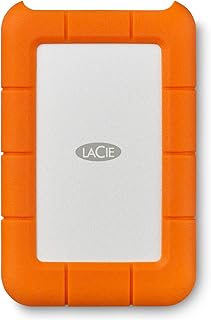
LaCie Rugged Mini, 2TB
Why We Love It


LaCie 5TB Rugged Mini Portable Hard Drive
Why We Love It

LaCie Rugged Mini SSD 500GB — shock‑resistant
Why We Love It

LaCie Rugged USB-C, 5TB
Why We Love It

LaCie Rugged USB-C 4TB External Hard Drive Portable HDD
Why We Love It
LaCie Rugged Mini, 4TB
Why We Love It

LaCie STFR2000800 2 TB Rugged Mini USB 3.1 (USB-C + USB 3.0)
Why We Love It

LaCie Rugged Mini 4TB external hard drive 6.35cm (2.5")
Why We Love It

LaCie Mobile Drive Moon
Why We Love It
LaCie 2TB Mobile Drive External Portable Hard Drive with
Why We Love It
Quick Pick
10 Best Lacie Rugged Mini Of 2026
Quick Pick
LaCie Rugged Mini, 2TB, 2.5'', Portable External Hard Drive, for PC and Mac, Shock, Drop and Pressure Resistant, 2 Year Rescue Services (LAC9000298) | Outdoor portable HDD, drop, pressure & rain proof, bus-powered. Adobe CC Trial 3 year warranty + rescue
LaCie 5TB Rugged Mini Portable Hard Drive | USB 3.0 (STJJ5000400)
LaCie Rugged Mini SSD 500GB — shock‑resistant, USB‑C Portable External SSD, for Mac & Windows — Rescue Data Recovery included
LaCie Rugged USB-C, 5TB, Portable External Hard Drive, Drop, Shock, Dust, Rain Resistant, for Mac & PC, 3 Year Rescue Services (STFR5000800) | All-terrain portable HDD, drop, crush & rain resistant, bus-powered. Adobe CC trial included. 3-Year Warranty + 3-Year Rescue
LaCie Rugged USB-C 4TB External Hard Drive Portable HDD – USB 3.0, Drop Shock Dust Rain Resistant Shuttle Drive, for Mac and PC Computer Desktop Workstation Laptop, 1 Month Adobe CC (STFR4000800)
LaCie Rugged Mini, 4TB,2.5'', Portable External Hard Drive, for PC and Mac, Shock, Drop and Pressure Resistant, 2 Year Rescue Services (LAC9000633) | All-terrain portable HDD, drop, crush & rain resistant, bus-powered. Adobe CC trial included. 3-Year Warranty + 3-Year Rescue
LaCie STFR2000800 2 TB Rugged Mini USB 3.1 (USB-C + USB 3.0) Portable 2.5 Inch Shock, Drop and Crush Resistant External Hard Drive for PC and Mac
LaCie Rugged Mini 4TB external hard drive 6.35cm (2.5") USB-A (USB 3.2 Gen 1) Silver,Orange 9000
LaCie Mobile Drive Moon, 5TB, External Hard Drive Portable, Silver, USB-C 3.2, PC, Mac, with Adobe Creative Cloud, 3 Years Rescue Services (STLP5000400) | Portable HDD with 25% recycled materials, one-click backup. Adobe CC trial included. 3-Year Warranty + 3-Year Rescue
LaCie 2TB Mobile Drive External Portable Hard Drive with USB-C Cable, Moon Silver
Buying Guide: Lacie Rugged Mini
📋 Table of Contents
1What storage capacity do I actually need?
For most users, 1-2TB is sufficient for files, photos, and media. If you work with large video files or need backups, 4TB or more is better. Consider how much data you have now and how quickly it will grow over time.
2Should I choose USB 3.0, USB-C, or Thunderbolt?
USB 3.0 is widely compatible and fast enough for most tasks. USB-C is future-proof and supports faster speeds, while Thunderbolt is ideal for professionals needing ultra-fast transfers. Match the port type to your device and speed needs.
3Is an SSD-based external drive worth the extra cost?
Yes, if speed matters — SSDs are much faster than traditional HDDs, especially for large files. However, they cost more per gigabyte and are usually available in smaller capacities. HDDs are better for budget-friendly, high-capacity storage.
4How important is shock resistance and durability?
If you travel or work in rough environments, look for drives with rubber casing or built-in shock absorption. HDDs are more fragile than SSDs, so portability and protection matter more for mechanical drives in active use.
5What software or features come with the drive?
Some drives include backup software, encryption tools, or cloud integration. These can be handy for automation and security, but most modern OSes handle file transfers without extra software. Check if the included tools match your workflow.
How we choose
Our editors are people who genuinely love testing and writing about products. We compare each product's real-world usability and strengths, then distill what matters most into our own "Why We Love It" points — so you get an honest, at-a-glance sense of what counts before you buy.