10 Best Kvm Usb C Docking Station Of 2026
Kvm Usb C Docking Station — Reviews, Recommendations & Updated Buying Guide November 2026

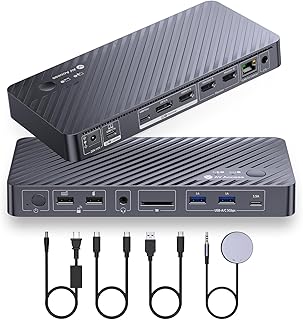
AV Access Docking Station Dual Monitor for Laptop & Desktop
Why We Love It


AV Access KVM Switch Docking Station for MacBook
Why We Love It

AV Access 8K Docking Station KVM Switch 2 Monitors 2
Why We Love It

AV Access KVM Switch Dock 2 Monitors 2 Laptops
Why We Love It

Startech.com USB C KVM Docking Station
Why We Love It

Unitek 13-in-2 Universal KVM Docking Station (USB-C 10Gbps +
Why We Love It

KVM Switch 2 Monitors for 1 Laptop and 1 Desktop 4K@60Hz
Why We Love It

StarTech.com Dual-Laptop USB-C KVM Docking Station
Why We Love It

UNITEK Universal Dual 4K KVM Docking Station
Why We Love It

UGREEN Laptop Docking Station
Why We Love It
Quick Pick
10 Best Kvm Usb C Docking Station Of 2026
Quick Pick
AV Access Docking Station Dual Monitor for Laptop & Desktop, KVM Switch 2 Monitors 2 Computers with Ethernet, EDID, 4K@60Hz Dual Display, 4xUSB, 1xUSB-C, Power Supply for Laptop, Audio, SD
AV Access KVM Switch Docking Station for MacBook, USB C KVM Switch 2 Monitors 2 Computers, 4K Dual HDMI Displays, 1 Laptop&1 Desktop Switching, Plug&Play, Ethernet, 100W Power Delivery, EDID Emulation
AV Access 8K Docking Station KVM Switch 2 Monitors 2 Computers for Laptop & Gaming PC/Mac mini, 100W PD, GbE, 4xUSB 3.2 10Gbps USB C Hub, Dual Monitor 8K@60Hz/4K@165Hz, Audio, SD, Remote Switch
AV Access KVM Switch Dock 2 Monitors 2 Laptops, 4K KVM Switch Dual Monitor, 2 USB C MST Ports, 60W PD for Each PC, 1G Ethernet, EDID Emulation, 2K@144Hz, 1080P@240Hz, Ideal for Home Office & Gaming
Startech.com USB C KVM Docking Station, 129N-USBC-KVM-DOCK
Unitek 13-in-2 Universal KVM Docking Station (USB-C 10Gbps + USB-A 10 Gbps + 2*USB-A 5Gbps + USB-C 5Gbps + 2*HDMI + DP 4K 60Hz with MST + SD/Micro SD + Audio + Gigabit Ethernet + PD 100W), Black
KVM Switch 2 Monitors for 1 Laptop and 1 Desktop 4K@60Hz, USB C HDMI Dual Monitor KVM Switch,Docking Station KVM Switches with 4 USB 3.0 Port, 80W PD Charging, Wired Remote and USB-C Cable Included
StarTech.com Dual-Laptop USB-C KVM Docking Station, Dual-Monitor 4K 60Hz DisplayPort Dock, 5x USB Hub, GbE, 90W/45W Power Delivery to Two Laptops, Windows/macOS, 2-Host KVM Dock (129UE-USBC-KVM-DOCK)
UNITEK Universal Dual 4K KVM Docking Station, 13 Ports, DisplayLink Technology, 60Hz Display Support, Black
UGREEN Laptop Docking Station, 13-in-1 Triple 4K Display Dock (2 HDMI + DP) | 100W Max PD, 27W Max USB-C, 10Gbps USB-C/A, Ethernet, SD/TF, Audio, for Dell/Lenovo/HP (Windows Only, Included 140W Adapter)
Buying Guide: Kvm Usb C Docking Station
📋 Table of Contents
1What USB-C port speed should I look for in a KVM USB-C docking station?
Opt for a docking station with at least USB 3.1 Gen 2 (10 Gbps) or Thunderbolt 3 (40 Gbps) for faster data transfer. Higher speeds are crucial for external storage, 4K video editing, or high-resolution displays, while USB 3.0 (5 Gbps) may be sufficient for basic use but slower for intensive tasks.
2How many video outputs are typically needed for a KVM USB-C docking station?
Most users benefit from at least one HDMI and one DisplayPort output for dual-monitor setups. If you need more screens or higher resolutions, look for models with multiple video outputs or support for USB-C to USB-C daisy chaining for extended displays.
3What is the importance of a built-in USB-C power delivery feature?
A built-in USB-C power delivery (PD) feature allows you to charge your laptop through the docking station, eliminating the need for a separate charger. Look for at least 60W or higher for most laptops, and up to 100W or more for high-performance devices like gaming laptops or workstations.
4Should I choose a KVM docking station with or without a switchable keyboard/mouse?
If you're using multiple computers, a KVM (Keyboard, Video, Mouse) docking station with switchable inputs is essential. It lets you control multiple devices with a single set of peripherals. Avoid models without this feature if you need to toggle between computers frequently.
5What are the key differences between active and passive USB-C docking stations?
Active docking stations have their own power supply and can support higher power delivery, multiple video outputs, and more peripherals. Passive docks rely on the laptop’s power and may have limited functionality. Choose active for full-featured use, passive for lightweight, low-power needs.
How we choose
Our editors are people who genuinely love testing and writing about products. We compare each product's real-world usability and strengths, then distill what matters most into our own "Why We Love It" points — so you get an honest, at-a-glance sense of what counts before you buy.