10 Best Kvm Cables Of 2026
Kvm Cables — Reviews, Recommendations & Updated Buying Guide November 2026


StarTech.com DP4N1USB6 182.8 cm 4-in-1 USB DisplayPort KVM
Why We Love It


StarTech.com 10 ft 2-in-1 Universal USB KVM Cable
Why We Love It
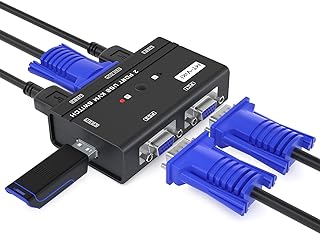
MT-VIKI VGA KVM Switch
Why We Love It

StarTech.com SVPS23N1_6 6 ft 3-in-1 PS/2 KVM Cable
Why We Love It

MT-VIKI KVM Switch VGA
Why We Love It

Avocent KVM Cable 10' DVI-I/USB/Audio for SV340 (CBL0121)
Why We Love It

StarTech.com 4 Port Black USB KVM Switch Kit with Cables and
Why We Love It

StarTech.com 10ft (3m) DisplayPort and USB 5Gbps KVM Cable
Why We Love It

MT-VIKI KVM Switch 8 Port
Why We Love It

DGODRT HDMI USB KVM Switch 2 Port Selector Box for 2
Why We Love It
Quick Pick
10 Best Kvm Cables Of 2026
Quick Pick
StarTech.com DP4N1USB6 182.8 cm 4-in-1 USB DisplayPort KVM Switch Cable with Audio and Microphone 10 ft / 3m - VGA SVECONUS10
StarTech.com 10 ft 2-in-1 Universal USB KVM Cable - 10ft VGA KVM Cable - 10ft USB KVM Cable - 10ft KVM Switch Cable (SVUSB2N1_10),Black
MT-VIKI VGA KVM Switch, 2 Port USB VGA KVM Switch for 2 Computers Share 1 Monitor Keyboard Mouse Printer, + 2 KVM Cables
StarTech.com SVPS23N1_6 6 ft 3-in-1 PS/2 KVM Cable
MT-VIKI KVM Switch VGA, 4 Port KVM Switch for 4 Computers Share One Monitor Keyboard Mouse Printer, 3 USB 2.0 Hub, Included 4 VGA KVM Cables, Black
Avocent KVM Cable 10' DVI-I/USB/Audio for SV340 (CBL0121)
StarTech.com 4 Port Black USB KVM Switch Kit with Cables and Audio - desktop KVM Switch - VGA KVM Switch - USB KVM Switch 4 Port (SV411KUSB)
StarTech.com 10ft (3m) DisplayPort and USB 5Gbps KVM Cable, 4K 60Hz, DP and USB Combo Cable for KVM Switch
MT-VIKI KVM Switch 8 Port, 8X1 Rackmount KVM Switch VGA, Included 8 2-in-1 KVM Cables & Wire-Desktop Selector, Fit 1U 19'' Rack
DGODRT HDMI USB KVM Switch 2 Port Selector Box for 2 Computers Share Keyboard Mouse Printer and 1 HD 4K Monitor, 2 KVM Cables Included
Buying Guide: Kvm Cables
📋 Table of Contents
1What's the difference between USB and PS/2 KVM cables?
USB KVM cables work with modern computers and peripherals, while PS/2 cables are for older systems — most new setups use USB. If you're connecting legacy equipment, check what ports your devices actually have before buying.
2How do I know what cable length I need?
Measure the distance between your computer and monitor/keyboard setup, then add a bit of slack for movement and cable routing. Most people find 1.5 to 3 meters sufficient for desk setups, but longer cables are available if your equipment is spread out.
3Does cable quality affect performance with KVM switches?
Better shielding in quality cables reduces interference and signal loss, which matters if you're running long distances or in electrically noisy environments. For short, standard desk setups under 2 meters, a basic cable works fine.
4What's the difference between 2-in-1 and separate KVM cables?
2-in-1 cables bundle keyboard and mouse lines together, keeping your setup cleaner but offering less flexibility if one line fails. Separate cables cost slightly more but let you mix and match different lengths for keyboard and mouse.
5Should I buy branded cables or generic ones?
Branded cables from KVM switch manufacturers often guarantee compatibility, while quality generics work just as well if they match your switch's specifications. Check reviews and return policies — a cheap cable that doesn't work is worse than spending a bit more on reliable hardware.
How we choose
Our editors are people who genuinely love testing and writing about products. We compare each product's real-world usability and strengths, then distill what matters most into our own "Why We Love It" points — so you get an honest, at-a-glance sense of what counts before you buy.