10 Best Ktc Gaming Monitor 2k Qhd Of 2026
Ktc Gaming Monitor 2k Qhd — Reviews, Recommendations & Updated Buying Guide November 2026


KTC 32 Inch Curved Monitor VA 1500R
Why We Love It


KTC 24 Inch QHD 2K Computer Monitor
Why We Love It

KTC 32 Inch 2K Computer Monitor
Why We Love It

GAMEON 27 Inch QHD Gaming Monitor 180Hz IPS Panel 1ms
Why We Love It

Z-EDGE 27inch Gaming Monitor
Why We Love It

GAMEON GOAE24QHD180IPS 24 Inch Gaming Monitor QHD 2K 180Hz
Why We Love It

KTC 27 Inch Computer Monitor
Why We Love It
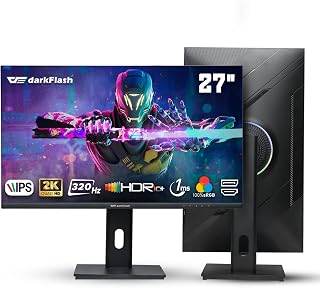
DarkFlash S275QT 27 Inch 2K(QHD) 320Hz 1MS Fast IPS Gaming
Why We Love It

KOORUI 27-inch QHD 260Hz 1ms IPS Gaming Monitor
Why We Love It

27 inch QHD, 165Hz
Why We Love It
Quick Pick
10 Best Ktc Gaming Monitor 2k Qhd Of 2026
Quick Pick
KTC 32 Inch Curved Monitor VA 1500R, 2K QHD 1440P@180Hz Gaming Monitor | 1ms MPRT FreeSync Premium G-Sync HDR10 122%sRGB VESA HMDI 2.0 DP 1.4 Compatible with Desktop, Laptop, PS5, Xbox and More
KTC 24 Inch QHD 2K Computer Monitor, 100Hz Zero-Frame Gaming Office Monitor | Adaptive Sync, HDR10, VESA, Tilt Adjustable, Low Blue Light, DisplayPort, HDMI 2560x1440 IPS H24T27
KTC 32 Inch 2K Computer Monitor, IPS 1440p Monitor 120Hz H32T13 | Ultra-Thin Bezels HDR10 Freesync/G-sync HDMI/DP Ports Tilt Adjustable Eyecare Ideal for Business, Office, and Casual Gaming
GAMEON 27 Inch QHD Gaming Monitor 180Hz IPS Panel 1ms Response Time 2560x1440 Resolution FreeSync Premium PC PS5 Xbox Display HDMI DisplayPort
Z-EDGE 27inch Gaming Monitor,IPS,Max 180Hz,QHD 2560×1440,1ms,Black,UG27QF | FreeSync/Frameless/1ms/Brightness 350cd/m²/HDR/VESA Compatible/HDMI & DisplayPort/for Game,Office
GAMEON GOAE24QHD180IPS 24 Inch Gaming Monitor QHD 2K 180Hz Fast IPS Computer Monitor, 0.5ms MPRT, HDMI 2.1, HDR, 99% sRGB, G-Sync & FreeSync Compatible, Built-in Speakers, PS5 & Console Ready, Black
KTC 27 Inch Computer Monitor, QHD 2K 120Hz Monitor, IPS Panel, H27D9 | 2560x1440 Display, Adaptive Sync, 123%sRGB, HDR, HDMI DP, Eye-care Screen PC Moniter for Work Office Gaming, VESA Mount
DarkFlash S275QT 27 Inch 2K(QHD) 320Hz 1MS Fast IPS Gaming Monitor, HDR10+, 100% sRGB,1.07B Colors,Compatible with HDMI 2.1, ARGB Backlight Computer Monitor for Gamers (27 Inch 320hz QHD)
KOORUI 27-inch QHD 260Hz 1ms IPS Gaming Monitor, Flat PC Screen, HDR400, 99% sRGB, HDMI/DP, Black - Ideal for Competitive Gaming & Home Office
27 inch QHD, 165Hz, 0.5ms (2560x1440) 2K Flat IPS Gaming Monitor With G-Sync & FreeSync - (HDMI 2.1 Console Compatible) GOAEP27QHD165 Black
Buying Guide: Ktc Gaming Monitor 2k Qhd
📋 Table of Contents
1What refresh rate should I look for in a KTC 2K gaming monitor?
For smooth gaming, aim for at least 144Hz—this gives you a noticeable improvement over 60Hz in fast-paced games. If your graphics card can push higher, 165Hz or 240Hz models offer even better fluidity, but 144Hz is the sweet spot for most gamers at 2K resolution.
2What's the difference between IPS and VA panels in KTC gaming monitors?
IPS panels offer better colour accuracy and wider viewing angles, making them great for competitive gaming where response time matters less. VA panels deliver deeper blacks and higher contrast, which some gamers prefer for immersive single-player games, though they have slightly slower response times.
3Is a 27-inch or 32-inch KTC 2K monitor better for gaming?
A 27-inch monitor is the standard for 2K gaming—it gives you sharp image quality without needing to move your eyes too much. A 32-inch screen stretches the pixel density, making text softer, so it's better suited for 4K than 2K.
4What response time should I check when buying a KTC gaming monitor?
Look for 1ms to 4ms response time to avoid ghosting and motion blur in competitive games. Anything faster than 1ms won't make a practical difference, and values above 4ms can feel noticeably sluggish during fast gameplay.
5Do I need a monitor with DisplayPort or will HDMI work for my KTC 2K gaming monitor?
DisplayPort is better for high refresh rates at 2K—it supports up to 240Hz+ without compression issues. HDMI 2.1 can handle 144Hz at 2K smoothly, but older HDMI versions (2.0) may struggle with higher refresh rates, so check your cable compatibility.
How we choose
Our editors are people who genuinely love testing and writing about products. We compare each product's real-world usability and strengths, then distill what matters most into our own "Why We Love It" points — so you get an honest, at-a-glance sense of what counts before you buy.