10 Best Ktc 32 Inch Computer Monitor Of 2026
Ktc 32 Inch Computer Monitor — Reviews, Recommendations & Updated Buying Guide November 2026


KTC 32 Inch Curved Monitor VA 1500R
Why We Love It


KTC 32 inch 240Hz Curved Gaming Monitor 1500R 1080P 125%
Why We Love It

KTC 32 Inch 2K Computer Monitor
Why We Love It

KOORUI 32 Inch 4K UHD VA Monitor
Why We Love It

Lenovo D32-40(C22320FD0) 32 Inch PC Monitor | FHD
Why We Love It

LG 32G600A-B 32-inch Ultragear QHD (2560 x 1440) Curved
Why We Love It
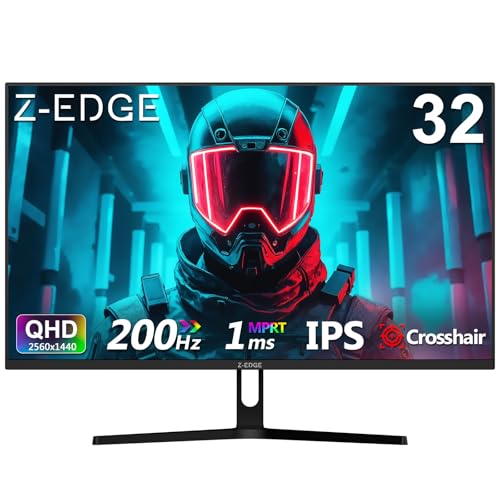
Z-Edge 32 Inch Gaming Monitor
Why We Love It

MOUNTUP Single Monitor Desk Mount Holds Screen up to 32 inch
Why We Love It

Samsung 32" Odyssey G5 G55C QHD Curved Gaming Monitor
Why We Love It

Samsung 32" ViewFinity S6 S60UD QHD Monitor Flat
Why We Love It
Quick Pick
10 Best Ktc 32 Inch Computer Monitor Of 2026
Quick Pick
KTC 32 Inch Curved Monitor VA 1500R, 2K QHD 1440P@180Hz Gaming Monitor | 1ms MPRT FreeSync Premium G-Sync HDR10 122%sRGB VESA HMDI 2.0 DP 1.4 Compatible with Desktop, Laptop, PS5, Xbox and More
KTC 32 inch 240Hz Curved Gaming Monitor 1500R 1080P 125% sRGB 1ms | Freesync/G-sync HDR10,HDMI/DP/USB Ports VESA,Tilt Adjustable,Xbox PS5 Switch,Black
KTC 32 Inch 2K Computer Monitor, IPS 1440p Monitor 120Hz H32T13 | Ultra-Thin Bezels HDR10 Freesync/G-sync HDMI/DP Ports Tilt Adjustable Eyecare Ideal for Business, Office, and Casual Gaming
KOORUI 32 Inch 4K UHD VA Monitor, 3840x2160, 95% DCI-P3 & 99% sRGB, 10Bit 1.07B Colors, 3500:1 Contrast, HDR10, 60Hz, 3ms GTG, Speakers, HDMI/DP, VESA for Home & Gaming
Lenovo D32-40(C22320FD0) 32 Inch PC Monitor | FHD, 1080p, 60Hz, 5ms, HDMI, DP
LG 32G600A-B 32-inch Ultragear QHD (2560 x 1440) Curved Gaming Monitor, 180Hz, 1ms, AMD FreeSync, HDMI, DisplayPort, Tilt/Height/Swivel Adjustable Stand, Black
Z-Edge 32 Inch Gaming Monitor, QHD 2K 200Hz,IPS LED,FreeSync,100% sRGB,UG32
MOUNTUP Single Monitor Desk Mount Holds Screen up to 32 inch, Height Adjustable Monitor Arm, Computer Monitors Stand with Clamp/Grommet Base, VESA Mounts Fit 2-9kg Computer, Black, MU0004
Samsung 32" Odyssey G5 G55C QHD Curved Gaming Monitor, 165Hz refresh rate and 1ms response time (MPRT), 1000R Curved Screen, AMD FreeSync, Middle East Version (New Launch) - LS32CG552EMXUE
Samsung 32" ViewFinity S6 S60UD QHD Monitor Flat, IPS, USB-C Charging Power 90W, Ethernet (LAN), Black,100Hz,PIP
Buying Guide: Ktc 32 Inch Computer Monitor
📋 Table of Contents
1Is a 32-inch monitor too big for a desk?
It depends on your desk depth and viewing distance—you'll want to sit at least 75-90cm away to avoid neck strain and see the entire screen comfortably. If your desk is cramped or you sit close to your monitor, a 27-inch might be better, but 32 inches works fine for most setups with proper positioning.
2What refresh rate do I need on a KTC 32-inch monitor?
For office work and general use, 60Hz is perfectly sufficient. If you game or do fast-paced work, look for 144Hz or higher, though this affects price and availability—prioritize panel type and resolution first unless gaming is your main use.
3What's the difference between IPS and VA panels on KTC monitors?
IPS panels offer better color accuracy and wider viewing angles, making them ideal for design and content creation work. VA panels deliver deeper blacks and higher contrast, which is better for gaming and entertainment—choose based on your primary task.
4Do I need 4K resolution on a 32-inch KTC monitor?
1440p (2K) is often the sweet spot for 32-inch monitors, offering sharp enough image quality without demanding as much from your graphics card. Jump to 4K only if you do professional design work or have a high-end GPU, as it impacts performance and power consumption.
5What connection ports should I check for on a KTC 32-inch monitor?
Look for HDMI and DisplayPort inputs at minimum—DisplayPort is better for newer graphics cards and higher refresh rates. USB ports and a USB-C connection are bonus features if you want to reduce cable clutter, though they're not essential for most users.
How we choose
Our editors are people who genuinely love testing and writing about products. We compare each product's real-world usability and strengths, then distill what matters most into our own "Why We Love It" points — so you get an honest, at-a-glance sense of what counts before you buy.