10 Best Koncept Laptop Docking Station Of 2026
Koncept Laptop Docking Station — Reviews, Recommendations & Updated Buying Guide November 2026


Dell WD19TBS Thunderbolt Dock
Why We Love It


HP Docking Station for Laptop Dual Monitor and Charging
Why We Love It

HP Docking Station for Laptop Dual Monitor and Charging
Why We Love It

UGREEN Laptop Docking Station Dual Monitor
Why We Love It

Lenovo 40AF0135UK ThinkPad Hybrid USB-C with USB-A Dock
Why We Love It

UGREEN Revodok Pro 207 USB C Docking Station Dual Monitor
Why We Love It

UGREEN Steam Deck Dock 4K@120Hz HDMI 6-in-1 USB C Docking
Why We Love It

Charging Type-c Hub, USB Docking Station Laptop Stand
Why We Love It

UD22 Dell Universal Docking Station USB-C/USB-A Supports
Why We Love It
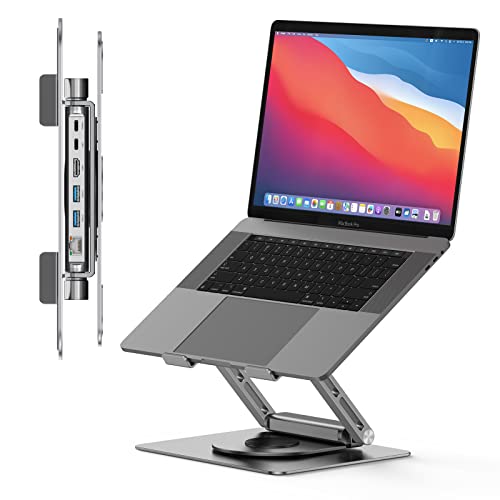
TobenONE USB C Laptop Docking Station Stand for MacBook
Why We Love It
Quick Pick
10 Best Koncept Laptop Docking Station Of 2026
Quick Pick
Dell WD19TBS Thunderbolt Dock - USB C Docking Station Dual Monitor with 180, HDMI Cable, DisplayPort Cable - Laptop & Computer Docking Station (New WD19TBS-)
HP Docking Station for Laptop Dual Monitor and Charging - 5TW10AA / 5TW10UT / 5TW10AA#ABB USB-C G5 Dock with 120W AC Adap TER + HDMI Cable + DisplayPort Cable + Cleaning Cloth
HP Docking Station for Laptop Dual Monitor and Charging - 5TW10AA / 5TW10UT / 5TW10AA#ABB USB-C G5 Dock with 120W + HDMI Cable + DisplayPort Cable (26D32AA)
UGREEN Laptop Docking Station Dual Monitor, 10-in-1 Dual 4K@60Hz USB C Hub | 2x HDMI, Single 8K, 100W PD, 1Gbps Ethernet, 4x 5Gbps USB-A/C Data, SD/TF, Revodok Pro Aluminum USB-C Dock for Dell/HP/Lenovo
Lenovo 40AF0135UK ThinkPad Hybrid USB-C with USB-A Dock - Docking station - USB-C - GigE - 135 Watt - GB - for ThinkPad L480 L580 T480s X1 Yoga X280 - (Laptops > Laptop Docking Stations)
UGREEN Revodok Pro 207 USB C Docking Station Dual Monitor, 7-in-1 Dock with 4K@60Hz HDMI, 10Gbps 2 Type C and A Data Ports, 100W PD Port for PC, Laptop, Dell XPS, HP, Thinkpad, and More | 100W PD Ports, Aluminium Revodok Pro 207 USB C Dock Compatible with PC, Laptop, XPS, HP, ThinkPad, Surface, Chromebook, etc
UGREEN Steam Deck Dock 4K@120Hz HDMI 6-in-1 USB C Docking Station | 100W PD, 1Gbps Ethernet, USB-A & C Ports, Adjustable Stand, Detachable USB-C Cable for Steam Deck, ROG Xbox Ally X, Legion Go
Charging Type-c Hub, USB Docking Station Laptop Stand, Multiport 3.0 Tf Card Slot, 4K 60HZ Hdmi-Compatible Aluminum Alloy Type C Docking Station 8 in 1 Ethernet Laptop Stand Holder
UD22 Dell Universal Docking Station USB-C/USB-A Supports Dual/Triple & 4 Monitors – Dock with 130W, HDMI, DisplayPort Cables & Cleaning Cloth – 4K Display Support
TobenONE USB C Laptop Docking Station Stand for MacBook Pro/Air/Dell/HP/Surface/Lenovo, Detachable USB C Hub, 4K HDMI, 2 USB 3.0, RJ45, PD 3.0, Universal Laptop Dock with 360 Rotating Base Grey
Buying Guide: Koncept Laptop Docking Station
📋 Table of Contents
1What ports do I need on a docking station for my workflow?
Check what devices you connect regularly—USB-A for peripherals, USB-C for charging, HDMI or DisplayPort for monitors, and Ethernet if you need wired internet. Most Koncept docks offer multiple port options, so match the configuration to your actual setup rather than buying extra ports you won't use.
2Will a Koncept docking station work with my specific laptop model?
Koncept docks typically work with any laptop that has USB-C or Thunderbolt, but verify the power delivery wattage matches your laptop's charging requirement—using an underpowered dock will charge slowly or not at all. Check the product specs against your laptop's manual to confirm compatibility.
3What's the difference between Koncept's basic and premium docking station models?
Premium models usually offer more USB ports, faster data transfer speeds, better build quality, and higher power delivery for larger laptops. The basic versions work fine if you only need a monitor connection and a few USB devices, but upgrading makes sense if you use multiple monitors or high-power peripherals.
4Can I daisy-chain or connect multiple Koncept docking stations?
Most docking stations aren't designed for daisy-chaining, as your laptop only has one USB-C port. If you need multiple workspaces, you'll either need separate docks for each setup or invest in a higher-port-count single dock.
5Does the docking station's build quality justify spending more?
A sturdier Koncept dock with aluminum housing is worth the extra investment if you're plugging and unplugging frequently, as cheaper plastic versions wear out faster. However, if it stays stationary on your desk, a budget model performs just as well functionally.
How we choose
Our editors are people who genuinely love testing and writing about products. We compare each product's real-world usability and strengths, then distill what matters most into our own "Why We Love It" points — so you get an honest, at-a-glance sense of what counts before you buy.