10 Best Jsaux Laptop Docking Station Of 2026
Jsaux Laptop Docking Station — Reviews, Recommendations & Updated Buying Guide November 2026


JSAUX 4K@120Hz Docking Station for Steam Deck/OLED/ROG Ally
Why We Love It


UGREEN Laptop Docking Station Dual Monitor
Why We Love It

J5create USB-C® Dual 4K HDMI™ Docking Station with PD 3.1
Why We Love It

UGREEN Revodok Pro 207 USB C Docking Station Dual Monitor
Why We Love It

UGREEN Docking Station Triple Monitors with 2×4K@60Hz HDMI
Why We Love It

UGREEN Laptop Docking Station Dual Monitor
Why We Love It
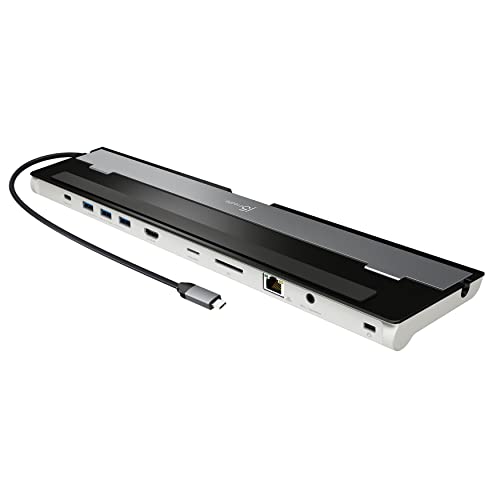
J5create USB-C 4K HDMI Docking Station (9-in-1)
Why We Love It

Dell WD19TBS Thunderbolt Dock
Why We Love It

UGREEN Steam Deck Dock 4K@120Hz HDMI 6-in-1 USB C Docking
Why We Love It
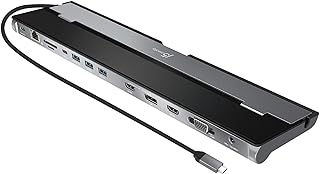
J5create USB C 13 in 1 4K Triple Display Docking Station
Why We Love It
Quick Pick
10 Best Jsaux Laptop Docking Station Of 2026
Quick Pick
JSAUX 4K@120Hz Docking Station for Steam Deck/OLED/ROG Ally X/Legion Go (S)/MSI Claw, 6-in-1 Dock for Steam Deck with HDMI 2.0, Gigabit Ethernet, 3 USB A 3.0, 100W USB C Charging Port-HB0603S Upgraded | 6-in-1 Dock for Steam Deck OLED with HDMI 2.0, Gigabit Ethernet, 3 USB A 3.0, 100W USB C Charging Port-HB0603S
UGREEN Laptop Docking Station Dual Monitor, 10-in-1 Dual 4K@60Hz USB C Hub | 2x HDMI, Single 8K, 100W PD, 1Gbps Ethernet, 4x 5Gbps USB-A/C Data, SD/TF, Revodok Pro Aluminum USB-C Dock for Dell/HP/Lenovo
J5create USB-C® Dual 4K HDMI™ Docking Station with PD 3.1 Pass-Through Charging, Gigabit Ethernet, SD/microSD, 140W Power Adapter(JCD3199P)
UGREEN Revodok Pro 207 USB C Docking Station Dual Monitor, 7-in-1 Dock with 4K@60Hz HDMI, 10Gbps 2 Type C and A Data Ports, 100W PD Port for PC, Laptop, Dell XPS, HP, Thinkpad, and More | 100W PD Ports, Aluminium Revodok Pro 207 USB C Dock Compatible with PC, Laptop, XPS, HP, ThinkPad, Surface, Chromebook, etc
UGREEN Docking Station Triple Monitors with 2×4K@60Hz HDMI, 4K@120Hz DP | 2×Type-C 3.2, 2×USB-A 2.0 Data, 170MB/s SD/TF, 1Gbps Ethernet, 3.5mm Audio, 100W PD, 12-in-1 Dock for Laptop, HP, Thinkpad
UGREEN Laptop Docking Station Dual Monitor, Dual 4K@60Hz 10-in-1 USB C Hub | 3x 10Gbps USB-A/C Data Ports, 100W PD, 1Gbps Ethernet, SD/TF Card Reader, Aluminum USB-C Dock for Dell, HP, ThinkPad Laptops
j5create USB-C 4K HDMI Docking Station (9-in-1), 4K HDMI, 5Gbps USB-A x3, Card Reader, PD 100W, Gigabit Ethernet, Combo Audio Jack, for MacBook, and Windows USB-C Laptop (JCD533)
Dell WD19TBS Thunderbolt Dock - USB C Docking Station Dual Monitor with 180, HDMI Cable, DisplayPort Cable - Laptop & Computer Docking Station (New WD19TBS-)
UGREEN Steam Deck Dock 4K@120Hz HDMI 6-in-1 USB C Docking Station | 100W PD, 1Gbps Ethernet, USB-A & C Ports, Adjustable Stand, Detachable USB-C Cable for Steam Deck, ROG Xbox Ally X, Legion Go
j5create USB C 13 in 1 4K Triple Display Docking Station - Resolution Support 4K HDMI, 1080p VGA, 4K DisplayPort outputs, 100W Power Delivery, USB 3.0 ports (1 USB-C and 3 USB Type-A ports) - JCD543
Buying Guide: Jsaux Laptop Docking Station
📋 Table of Contents
1Will a JSAUX docking station work with my laptop?
JSAUX makes docking stations for USB-C and Thunderbolt laptops, so check your laptop's port type first. Most models work with MacBooks, Dell XPS, and other USB-C devices, but verify compatibility on the product specs before buying.
2What's the difference between JSAUX's USB-C hub models?
The main differences are the number of ports (some have 5-7 ports, others have 11+), power delivery wattage, and whether they include HDMI or DisplayPort. Choose based on how many devices you need to connect simultaneously and if you need video output.
3Does the docking station charge my laptop while it's docked?
Most JSAUX docking stations support pass-through power delivery, but wattage varies by model—check if it matches your laptop's charger requirement. A 100W model works for most laptops, but larger devices may need higher wattage.
4How many external monitors can I connect with a JSAUX dock?
This depends on the model; some support only one monitor via HDMI or DisplayPort, while premium models support dual displays. Check the specific product listing for video output specifications if multi-monitor setup is important to you.
5Is a JSAUX docking station better than a simple USB-C hub?
Docking stations typically offer more ports, better cooling, and more stable connections for permanent desk setups, while hubs are more portable. If you dock your laptop daily with multiple peripherals, a docking station is worth it; if you travel often, a hub may be enough.
How we choose
Our editors are people who genuinely love testing and writing about products. We compare each product's real-world usability and strengths, then distill what matters most into our own "Why We Love It" points — so you get an honest, at-a-glance sense of what counts before you buy.