10 Best Ip Kvm Switches Of 2026
Ip Kvm Switches — Reviews, Recommendations & Updated Buying Guide November 2026

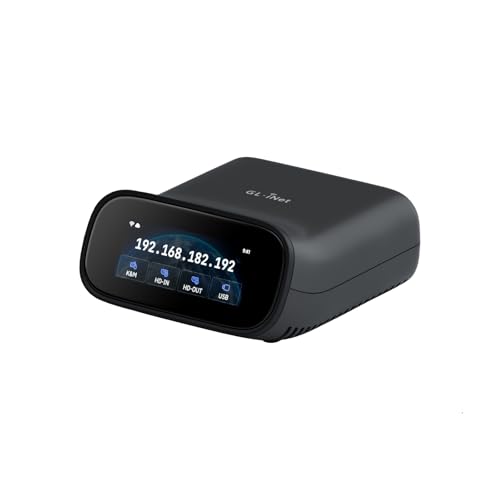
GL.iNet GL-RM10 Comet Pro Remote KVM Over Wi-Fi 6 Dual Band
Why We Love It


ATEN CN9850 1-Local Remote Share Access Single Port 4K HDMI
Why We Love It

XYKJOBC 200M HDMI KVM IP Extender
Why We Love It

Aten CN9950 1-Local Remote Share Access Single Port 4K
Why We Love It

TRIPP LITE 8-Port Steel Rackmount IP KVM Switch with
Why We Love It

300M IP HDMI KVM Extende
Why We Love It

Azonee KVM Switch, KVM Switch 1 Monitors 2 Computers
Why We Love It

JetKVM IP KVM Over IP PC Remote Control
Why We Love It

NALACAL KVM Switch HDMI 2 Port Box
Why We Love It
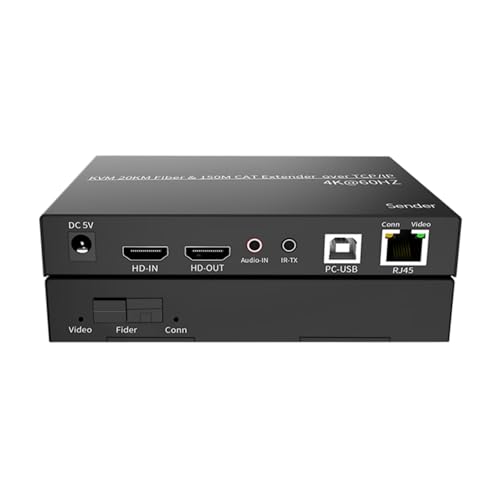
USB Signal Extender,20KM Fiber Extender Over TCP/IP 4K 60Hz
Why We Love It
Quick Pick
10 Best Ip Kvm Switches Of 2026
Quick Pick
GL.iNet GL-RM10 Comet Pro Remote KVM Over Wi-Fi 6 Dual Band 4K Passthrough
ATEN CN9850 1-Local Remote Share Access Single Port 4K HDMI KVM Over IP Switch
XYKJOBC 200M HDMI KVM IP Extender, Over IP RJ45 Ethernet CAT6 6A Transmitter Receiver 1 TX to 20 RX and Cascade Connection USB Keyboard Mouse Over UTP/STP H.264 Plug and play … (TX+RX)
Aten CN9950 1-Local Remote Share Access Single Port 4K DisplayPort KVM Over IP Switch
TRIPP LITE 8-Port Steel Rackmount IP KVM Switch with On-Screen Display (B022-U08-IP), Black
300M IP HDMI KVM Extende,HDMI Extender over IP Rj45 Cat6 Ethernet Cable 1080P HDMI KVM Extender Muitlpoint Connect Network Switch Support Mouse Keyboard for PC DVR TV (300M IP Extender)
Azonee KVM Switch, KVM Switch 1 Monitors 2 Computers, KVM Switches HDMI for 2 Computers Share 1 Monitor, Supports 4K @60 Hz, 2 HDMI Cables and 2 USB Cables Included
JetKVM IP KVM Over IP PC Remote Control, Open-Source Network KVM Switch with Touchscreen LCD, Ultra-Low Latency Remote BIOS Access for Computer Server Home Lab Data Center
NALACAL KVM Switch HDMI 2 Port Box, USB 3.0 and HDMI Switch 4K@60Hz for 2 Computers Share 1 Monitor, 4 USB 3.0 Devices for 2 Computers Sharing Monitor Keyboard Mouse Hard Drives Printer
USB Signal Extender,20KM Fiber Extender Over TCP/IP 4K 60Hz HDMI-compatible RJ45 interface to 150M USB KVM Fiber Transceiver Support Mouse Keyboard
Buying Guide: Ip Kvm Switches
📋 Table of Contents
1What port types and resolutions should I look for in an IP KVM switch?
Choose a model with at least HDMI or DisplayPort for high-resolution video, and USB 3.0 or later for peripheral support. Look for 4K@60Hz compatibility if you work with graphics or video editing to avoid lag or pixelation.
2How many devices can I realistically control with one IP KVM switch?
Entry-level models typically support 2-4 devices, while professional-grade units can handle 8-16 or more. Consider your current and future needs — adding more devices later may require a more expensive or modular setup.
3Is IP remote access essential, and what should I check for security?
IP remote access is crucial for off-site management, but ensure the switch uses HTTPS, SSH, or RDP for secure connections. Look for models with two-factor authentication and firmware updates to prevent unauthorised access.
4What latency levels are acceptable for real-time use?
For most tasks, under 100ms latency is ideal. If you need real-time control — like in gaming or live video — aim for sub-50ms. Avoid budget models that may introduce noticeable lag or stuttering.
5Are audio and USB peripheral support worth prioritising?
Yes, if you need to share audio or use devices like webcams, printers, or storage drives. Ensure the switch supports USB 3.0 or higher and has dedicated audio channels for seamless, high-quality performance.
How we choose
Our editors are people who genuinely love testing and writing about products. We compare each product's real-world usability and strengths, then distill what matters most into our own "Why We Love It" points — so you get an honest, at-a-glance sense of what counts before you buy.