10 Best Instant Photo Wireless Color Printer Of 2026
Instant Photo Wireless Color Printer — Reviews, Recommendations & Updated Buying Guide November 2026


HP Sprocket 3x4 (8.9x10.8 cm) Portable Photo Printer
Why We Love It


Xiaomi Portable Photo Printer
Why We Love It

KODAK Step Instant Smartphone Photo Printer
Why We Love It

HP Hpisppr Sprocket Portable Instant Photo Printer (Lilac)
Why We Love It

KODAK Step Instant Smartphone Photo Printer
Why We Love It

KODAK Barbie x Step Slim Wireless Instant Portable Photo
Why We Love It

HP Envy 6120e All in One Printer | Perfect for Home | Colour
Why We Love It
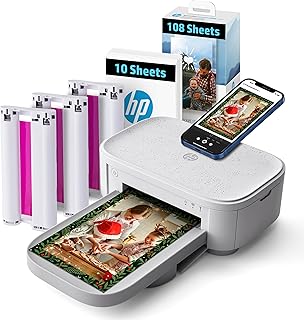
HP Sprocket Studio Plus 4x6 Instant Photo Printer
Why We Love It

Liene 2x3” Photo Printer
Why We Love It

KODAK Smile+ 2-in-1 Digital Instant Camera with
Why We Love It
Quick Pick
10 Best Instant Photo Wireless Color Printer Of 2026
Quick Pick
HP Sprocket 3x4 (8.9x10.8 cm) Portable Photo Printer, Instant Print Pictures and Scrapbook with Zink Sticky-Backed Paper from your iOS & Android Device, For Home Use or On the Go, White
Xiaomi Portable Photo Printer, 1S, Inkless Colour Printing, Thin, 6.3 Oz (180 G), Ultra Lightweight, Bluetooth Connection, Multiple Users Simultaneously, Sealing Film, Includes 5 Dedicated Films | Lightweight and Portable, Self-Adhesive Photo Paper, Personalised Border and Watermark, 8 Handy Filter, Connect via Bluetooth
KODAK Step Instant Smartphone Photo Printer - Portable Mini Color Wireless Mobile Printer - Zink 2x3 Inch Sticky-Back Photos - Bluetooth Compatible with iOS & Android Devices - Fun Editing App - Black
HP Hpisppr Sprocket Portable Instant Photo Printer (Lilac) Print Pictures on Zink Sticky-Backed from Your iOS & Android Device, 2X3 Inch
KODAK Step Instant Smartphone Photo Printer, Portable Mini Color Wireless Mobile Printer, Zink 2x3” (5.1x7.5 cm) Sticky-Back Photos, Bluetooth Compatible with iOS & Android Devices, Editing App, White
KODAK Barbie x Step Slim Wireless Instant Portable Photo Mobile Printer – Full Color Prints in Zink 2x3” Sticky-Backed Photos from iOS & Android Devices via Bluetooth in The App – Iconic Style
HP Envy 6120e All in One Printer | Perfect for Home | Colour | Wireless | Print, Scan & Copy | 3 Months of free Instant Ink | Easy Setup & Reliable Wi-Fi | White
HP Sprocket Studio Plus 4x6 Instant Photo Printer – 118 Sheets & Cartridge Bundle - Wireless, Wi-Fi, Premium Dye Sublimation - Vibrant Color Pictures - Editing App for Fun, Creative Photos
Liene 2x3” Photo Printer, Mini Photo Printer w/ 10 Zink Adhesive Photo Paper, Bluetooth 5.2, Compatible w/iOS & Android, Portable Color Mono Instant Photo Printer for iPhone, Smartphone, Pearl White
KODAK Smile+ 2-in-1 Digital Instant Camera with Effect-Changing Lens, 2x3” Sticky-Backed Photo Prints, and Zink Printing Technology, Compatible with iOS and Android Devices - White
Buying Guide: Instant Photo Wireless Color Printer
📋 Table of Contents
1What print resolution do I need for clear, vibrant photos?
Look for at least 300dpi for decent quality, but 600dpi or higher (like 1440dpi) ensures sharp, professional-looking color photos. Higher resolution is especially important if you plan to print larger images or share them digitally later.
2How long does a printed photo last before fading?
Most instant photo printers use dye-based inks that fade in 1-3 years under normal light. For longer-lasting prints, choose a model with ZINK (Zebra Imaging) or dye-sublimation technology, which can last up to 100+ years in storage or 5+ years in display.
3What battery life should I expect from a portable model?
Portable instant printers typically last 50-100 prints on a single charge, depending on usage. Look for at least 200mAh-500mAh battery capacity for all-day use, and check if the printer supports USB-C fast charging for quicker top-ups on the go.
4Is a color printer worth the extra cost over a black-and-white model?
Yes, if you want to print social media photos, selfies, or colorful event shots. Color printers add 20-50% to the price but are essential for vibrant, lifelike prints. Black-and-white models are cheaper but limited to grayscale and basic text or line art.
5What connectivity options are most useful for everyday use?
Bluetooth and Wi-Fi are standard for phone and tablet printing, with Bluetooth being faster and more stable for short-range use. NFC (tap-to-print) is a nice convenience feature, but not essential. Avoid models that only support USB or SD card, as they’re less flexible for modern use.
How we choose
Our editors are people who genuinely love testing and writing about products. We compare each product's real-world usability and strengths, then distill what matters most into our own "Why We Love It" points — so you get an honest, at-a-glance sense of what counts before you buy.