10 Best Indoor Security Camera No Installation Required Of 2026
Indoor Security Camera No Installation Required — Reviews, Recommendations & Updated Buying Guide November 2026


TP-Link Tapo Pan/Tilt Smart Security Camera
Why We Love It


Eufy Security 2K Indoor Cam Pan & Tilt
Why We Love It
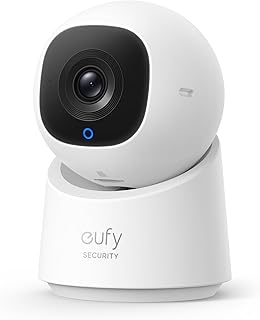
Eufy Security Indoor Cam C220
Why We Love It

TP-Link Tapo Smart Cam Pan Tilt Home WiFi Camera
Why We Love It

Tapo C210 2K 3MP Pan/Tilt Indoor Security Camera Pet Camera
Why We Love It

Tapo TC60 Full HD Indoor Security Camera Pet Camera Baby
Why We Love It

Imou 2K Camera for Home
Why We Love It

Imou 1080P Security Camera for Home Smart Camera Indoor
Why We Love It

Eufy Security Indoor Cam S350
Why We Love It

Tapo TC82, 2K Smart Wire-Free Indoor/Outdoor Security
Why We Love It
Quick Pick
10 Best Indoor Security Camera No Installation Required Of 2026
Quick Pick
TP-Link Tapo Pan/Tilt Smart Security Camera, Indoor CCTV, 360 Rotational Views, Works with Alexa&Google Home, No Hub Required, 1080p, 2-Way Audio, Night Vision, SD Storage, Device Sharing (TC70)
eufy Security 2K Indoor Cam Pan & Tilt, Home Security Indoor Camera, Human and Pet AI, Works with Voice Assistants, Motion Tracking, Night Vision, MicroSD Card Required, HomeBase Not Required.
eufy Security Indoor Cam C220, 2K Resolution Security Camera with 360° PTZ, Plug-in Security Indoor Camera with 2.4G Wi-Fi, Human/Motion AI, Night Vision, AI Tracking, HomeBase S380 Compatible
TP-Link Tapo Smart Cam Pan Tilt Home WiFi Camera | Wireless Indoor Security Camera 1080p (Full HD) | Up to 30 ft Night Vision | Up to 128 GB microSD Card Slot | Works w/Alexa and Google (Tapo C200)
Tapo C210 2K 3MP Pan/Tilt Indoor Security Camera Pet Camera House Security | CCTV Camera, Dog Cat Camera, Baby Camera, 360° View, No Monthly Fee, Night Vision, AI Motion Detection, Two-Way Audio, Alexa
Tapo TC60 Full HD Indoor Security Camera Pet Camera Baby Camera | Dog Cat Camera House Security, Motion Detection, Night Vision, Two-Way Audio, Sound & Light Alarm, No Monthly Fee, Alexa
Imou 2K Camera for Home, 3MP Security Camera with Call Button, Indoor Cameras WIFI6 2.4GHz& 5GHz Dual-band Wifi Cameras, UHD CCTV Camera for Home, Smart Baby Monitor with Alexa(Ranger 2C Pro 2K)
Imou 1080P Security Camera for Home Smart Camera Indoor Surveillance Home Camera 360° Motorized, IR Night Vision Baby Monitor Abnormal Sound, Two-way Talk, Pet Camera, Built-in Siren (DK2 1080P)
eufy Security Indoor Cam S350, Dual Cameras, 4K UHD Resolution Security Camera with 8× Zoom and 360° PTZ, Human/Pet AI, Ideal for Baby Monitor/Pet Camera/Home Security, Dual-Band Wi-Fi 6, Plug in
Tapo TC82, 2K Smart Wire-Free Indoor/Outdoor Security Camera|Smart Person Detection|Color Night Vision|Battery-Powered|Up to 180-Day Battery Life|No Hub Required|Up to 512 GB Local microSD Storage
Buying Guide: Indoor Security Camera No Installation Required
📋 Table of Contents
1What features should I look for in a no-installation-required indoor security camera?
Look for features like motion detection, night vision, two-way audio, and cloud storage options. A wide field of view and easy mobile app integration are also important for usability.
2What are the key specifications to consider?
Key specs include resolution (1080p or higher), battery life, Wi-Fi compatibility, and whether it offers local storage or cloud storage. Some models also include smart alerts and person detection.
3How do I ensure the camera is compatible with my home network?
Check that the camera supports your Wi-Fi frequency (2.4 GHz or 5 GHz) and is compatible with your router's security protocols, such as WPA2 or WPA3. Most modern cameras work with standard home networks.
4When should I pay more for a higher-end model?
Pay more if you need advanced features like 4K resolution, longer battery life, better night vision, or integration with smart home systems. These features can enhance security and convenience significantly.
5What are common mistakes people make when buying these cameras?
Common mistakes include ignoring battery life, not checking the field of view, or assuming all models work with the same app. Also, some may overlook the need for a stable Wi-Fi connection for consistent performance.
How we choose
Our editors are people who genuinely love testing and writing about products. We compare each product's real-world usability and strengths, then distill what matters most into our own "Why We Love It" points — so you get an honest, at-a-glance sense of what counts before you buy.