10 Best Idock C20 Of 2026
Idock C20 — Reviews, Recommendations & Updated Buying Guide November 2026

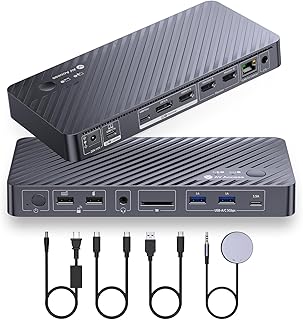
AV Access Docking Station Dual Monitor for Laptop & Desktop
Why We Love It


UGREEN 2 in 7 USB C Switch
Why We Love It

Anker Prime Docking Station (DL7400)
Why We Love It

Startech.com USB C KVM Docking Station
Why We Love It

Acer Docking Station 3 Monitors with 3 HDMI
Why We Love It

WAVLINK Displaylink Docking Station Dual 4K@60Hz Monitor for
Why We Love It

Plugable USB-C Docking Station Dual Monitor 4K 60Hz (2×HDMI)
Why We Love It

AV Access 8K KVM Switch 3 Monitors 2 Computers
Why We Love It

AV Access KVM Switch Docking Station for MacBook
Why We Love It

UGREEN USB 3.0 Switch for 2 Computers
Why We Love It
Quick Pick
10 Best Idock C20 Of 2026
Quick Pick
AV Access Docking Station Dual Monitor for Laptop & Desktop, KVM Switch 2 Monitors 2 Computers with Ethernet, EDID, 4K@60Hz Dual Display, 4xUSB, 1xUSB-C, Power Supply for Laptop, Audio, SD
UGREEN 2 in 7 USB C Switch, 10Gbps USB 3.2 Switcher, 2PC Share | 3 x Type C & 4 x Type A Devices Switch with Desktop Controller & 2 x C Cables & C to A Adapter for Keyboard, Mouse, Printer
Anker Prime Docking Station (DL7400), 14-in-1 Triple Display, DisplayLink | 140W Max, Smart Display, Triple 4K@60Hz (2 HDMI+1 DP), for Windows Laptops (The Latest DisplayLink Driver Must Installed)
Startech.com USB C KVM Docking Station, 129N-USBC-KVM-DOCK
Acer Docking Station 3 Monitors with 3 HDMI, 13-in-1 USB C Hub for Laptop
WAVLINK Displaylink Docking Station Dual 4K@60Hz Monitor for Mac, Windows
Plugable USB-C Docking Station Dual Monitor 4K 60Hz (2×HDMI), 65W Charging, Gigabit Ethernet, USB-C & 3×USB-A 5Gbps, Audio, Driverless for Windows/ChromeOS (UD-MSTH2)
AV Access 8K KVM Switch 3 Monitors 2 Computers, Laptop + Desktop KVM Docking Station, 100W PD, GbE, 2xUSB 3.2 10Gbps USB C Hub, SD Reader & Remote Switcher for HP, Dell, Chromebook, PC, and More
AV Access KVM Switch Docking Station for MacBook, USB C KVM Switch 2 Monitors 2 Computers, 4K Dual HDMI Displays, 1 Laptop&1 Desktop Switching, Plug&Play, Ethernet, 100W Power Delivery, EDID Emulation
UGREEN USB 3.0 Switch for 2 Computers, 4-Port USB-C and USB-A Switcher | Shares USB-C and USB-A Devices, Keyboard, Mouse, Printer and Scanner; Includes 2 USB 3.0 Cables and Remote
Buying Guide: Idock C20
📋 Table of Contents
1What should I look for when choosing an idock C20?
Look for a model that supports your device's charging requirements and has a secure, stable design to prevent accidental disconnections.
2What are the key specifications to consider?
Check for compatibility with your device, charging speed, build quality, and whether it includes features like wireless charging or USB-C support.
3How do I ensure the idock C20 is the right size for my setup?
Measure your device and the space where you plan to place the dock to ensure it fits comfortably and securely.
4When should I pay more for an idock C20?
Consider spending more if you need advanced features like fast charging, durability, or compatibility with multiple devices.
5What are common mistakes to avoid when buying an idock C20?
Avoid buying a dock that doesn't support your device's charging standards or one that lacks proper ventilation, which can cause overheating.
How we choose
Our editors are people who genuinely love testing and writing about products. We compare each product's real-world usability and strengths, then distill what matters most into our own "Why We Love It" points — so you get an honest, at-a-glance sense of what counts before you buy.