10 Best Huion Wireless Drawing Tablets Of 2026
Huion Wireless Drawing Tablets — Reviews, Recommendations & Updated Buying Guide November 2026


HUION HS64 Graphics Drawing Tablet Battery-Free Stylus
Why We Love It


HUION HS610 Graphics Drawing Tablet with Battery-Free Stylus
Why We Love It
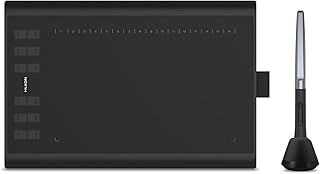
HUION Inspiroy H1060P Graphics Drawing Tablet
Why We Love It

HUION Inspiroy 2 Large Drawing Tablet with 3-Group 8
Why We Love It

HUION WH1409 Wireless Graphic Drawing Tablet 8192 Pen
Why We Love It

HUION Inspiroy Keydial KD200 Wireless Graphics Drawing
Why We Love It

HUION Inspiroy Frego Medium Wireless Drawing Tablet
Why We Love It

HUION Inspiroy Giano G930L Wireless Graphics Drawing Tablet
Why We Love It

HUION Inspiroy Dial 2 Bluetooth Wireless Graphics Drawing
Why We Love It

HUION Note 2-in-1 Digital Notebook Drawing Tablet With
Why We Love It
Quick Pick
10 Best Huion Wireless Drawing Tablets Of 2026
Quick Pick
HUION HS64 Graphics Drawing Tablet Battery-Free Stylus Android Windows macOS with 6.3 x 4 in Working Area Pen Tablet for Linux, Mac, Windows PC and Android
HUION HS610 Graphics Drawing Tablet with Battery-Free Stylus with 10x6.25inch Working Area Pen Tablet for Android Windows MAC OS
HUION Inspiroy H1060P Graphics Drawing Tablet, 10 x 6.25 in, 12+16 Hot Keys | 8192 Pressure Levels, Battery-Free Stylus, Digital Art Tablet Works with Mac, Windows PC and Android
HUION Inspiroy 2 Large Drawing Tablet with 3-Group 8 Customized ExpressKeys | 10.5x6.56" Art Tablet with Scroll Wheel, Battery-Free Stylus, Graphics Tablet for Drawing, Design, Work with Mac, PC & Mobile
HUION WH1409 Wireless Graphic Drawing Tablet 8192 Pen Pressure Pen Tablet with 12 Press Keys
HUION Inspiroy Keydial KD200 Wireless Graphics Drawing Tablet, 8.9x5.6inch | Bluetooth 5.0-Wireless, with Keyboard Dial, 5 Customized Express Keys, Battery-Free Stylus PW517 Tilt, PC, Mac, Android
HUION Inspiroy Frego Medium Wireless Drawing Tablet, 10 x 6.25 inch | Bluetooth Graphics Tablet,Portable for Design,Writing,Photo Editing,Teaching,Compatible with Windows, Mac, Android and Linux
HUION Inspiroy Giano G930L Wireless Graphics Drawing Tablet with Smart Mini LCD Screen and PW517 8192 Levels Pressure Battery-Free Stylus, 13.6 inches Bluetooth Digital Pen Tablet
HUION Inspiroy Dial 2 Bluetooth Wireless Graphics Drawing Tablet with Dual Dials,6 Progammable Shortcut Keys,Battery-Free Digital Pen PW517 for Mac,Windows PC, Linux and Android
HUION Note 2-in-1 Digital Notebook Drawing Tablet With Battery-free Pen, Bluetooth Wireless Paper Tablet Electronic Writing Pad for Note-taking, Digital Art & Meeting, Refillable A5 Notepad, 9.5x7inch | 2-in-1 Bluetooth Digital Notepad Drawing Tablet, Wireless Smart Notebook for Note-taking, Digital Art, Sketching & Meeting
Buying Guide: Huion Wireless Drawing Tablets
📋 Table of Contents
1What screen size is best for my needs?
For detailed work and portability, 10-13 inches is ideal. Larger screens (16+ inches) suit studio use and multitasking, while smaller ones (8-10 inches) are better for travel and quick sketches. Consider your workspace and mobility when choosing.
2How important is pressure sensitivity for drawing?
Look for at least 8192 levels of pressure sensitivity for smooth shading and fine details. Lower levels (1024-4096) may feel limiting for professional artists, but are fine for casual sketching or beginners learning the basics.
3Do I need a stylus with eraser functionality?
A stylus with a built-in eraser is convenient for quick edits, especially on the go. However, many tablets allow you to use a shortcut or button to switch to erasing, so it's not essential if you prefer a lighter stylus or use software shortcuts.
4What should I look for in a tablet's display?
A high-resolution, color-accurate display (1080p or higher) with a matte finish reduces glare and improves visibility. A 120Hz refresh rate is ideal for smooth drawing, while a 60Hz screen may feel laggy for fast strokes or animation work.
5Are extra buttons and touchpads worth it?
Customizable buttons and a touchpad can speed up your workflow by letting you assign shortcuts or navigate the canvas. They're especially useful for digital painting and photo editing, but not necessary for basic sketching or illustration.
How we choose
Our editors are people who genuinely love testing and writing about products. We compare each product's real-world usability and strengths, then distill what matters most into our own "Why We Love It" points — so you get an honest, at-a-glance sense of what counts before you buy.