10 Best Huion Kamvas 13.3 Inch Of 2026
Huion Kamvas 13.3 Inch — Reviews, Recommendations & Updated Buying Guide November 2026


HUION KAMVAS Pro 16 Graphics Drawing Tablet with Screen
Why We Love It


HUION KAMVAS 13 Graphics Drawing Tablet with Full-Laminated
Why We Love It

HUION Kamvas 13 (Gen 3) Drawing Tablet with Screen
Why We Love It

HUION KAMVAS Pro 13 Graphics Drawing Tablet Pen Display with
Why We Love It
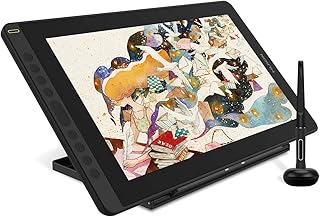
2021 HUION Drawing Tablet KAMVAS 16 Graphic Pen Display with
Why We Love It

HUION Kamvas 13 (Gen 3) Drawing Tablet with Screen
Why We Love It

HUION Kamvas 13 Gen 3 Drawing Tablet with Screen
Why We Love It

HUION KAMVAS 16 (Gen 3) 2.5K QHD Drawing Tablet with Screen
Why We Love It

HUION Kamvas 13 (Gen 3) Drawing Tablet with Screen
Why We Love It

HUION KAMVAS 22 Plus Graphics Drawing Tablet Pen Display
Why We Love It
Quick Pick
10 Best Huion Kamvas 13.3 Inch Of 2026
Quick Pick
HUION KAMVAS Pro 16 Graphics Drawing Tablet with Screen Full-Laminated Graphics Monitor with Battery-Free Stylus Tilt 8192 Pen Pressure 6 Hot Keys Touch Bar with Stand - 15.6 inch for PC/MAC/Linux
HUION KAMVAS 13 Graphics Drawing Tablet with Full-Laminated Screen Battery-Free Stylus PW517 Tilt 8 Press Keys, 13.3 inch Pen Display for Android, Mac, Linux and Windows PC, Black
HUION Kamvas 13 (Gen 3) Drawing Tablet with Screen, Dual Dial, 13.3", Black | Full Lamination, Canvas Glass 2.0, 99% sRGB, PenTech 4.0 16384 Levels, Works with PC, Mac and Android, With Stand
HUION KAMVAS Pro 13 Graphics Drawing Tablet Pen Display with Full Lamination Screen Battery-Free Stylus 8192 Pen Pressure - 13.3 inch Monitor with Stand for Linux, Windows and Mac-GT-133
2021 HUION Drawing Tablet KAMVAS 16 Graphic Pen Display with Screen, Black | 15.6inch Full-Laminated Screen, Battery-Free Stylus Tilt, 10 Press Keys, Full-Featured Type C Cable and an Adjustable Stand
HUION Kamvas 13 (Gen 3) Drawing Tablet with Screen, 13.3 Inch Canvas Glass Graphic Drawing Monitor, 99% sRGB Coverage, New PenTech 4.0, 16384 Pen Pressure, Dual Dials and 5 Express Keys, Black
HUION Kamvas 13 Gen 3 Drawing Tablet with Screen, Dual Dial, 13.3", Black
HUION KAMVAS 16 (Gen 3) 2.5K QHD Drawing Tablet with Screen PenTech 4.0 | 15.8 inch, Canvas Glass 2.0, Full Laminated, Anti-Sparkle, 99% sRGB, 16384 Pen Pressure, Dual Dials, Work with Mac/PC/Android
HUION Kamvas 13 (Gen 3) Drawing Tablet with Screen, 13.3 Inch Canvas Glass Graphic Drawing Monitor, 99% sRGB Coverage, New PenTech 4.0, 16384 Pen Pressure, Dual Dials and 5 Express Keys, Pink
HUION KAMVAS 22 Plus Graphics Drawing Tablet Pen Display with Full-Laminated QD LCD Screen 140% s RGB Android Support Battery-Free Stylus 8192 Pen Pressure Tilt Adjustable Stand - 21.5inch
Buying Guide: Huion Kamvas 13.3 Inch
📋 Table of Contents
1What pen pressure sensitivity level is enough for serious drawing?
Look for at least 8192 levels of pressure sensitivity for precise control over line weight and texture. Higher levels (up to 16384) offer smoother transitions but may not be necessary for casual or beginner artists.
2How does display size affect my workflow?
A 13- to 16-inch screen gives ample space for detailed work and natural hand movement, while smaller displays (10-12 inches) are more portable but can feel cramped for complex illustrations or photo editing.
3Is a stylus with tilt recognition worth the extra cost?
Yes — tilt recognition allows for realistic shading and brush effects, especially useful for digital painting. If you focus on sketching or vector work, it may be less essential but still beneficial for versatility.
4What display resolution and color accuracy should I prioritize?
Opt for at least 2K resolution (2560x1440) and 100% sRGB or Adobe RGB coverage for accurate color representation. Higher resolution and wide color gamuts are crucial for professional-grade illustration and photo editing.
5What connectivity options are important for a pen display?
USB-C or HDMI for video and power, plus a USB hub for your stylus and keyboard, streamline your setup. Wireless connectivity is rare in pen displays, so ensure your workspace has the right ports for a clutter-free experience.
How we choose
Our editors are people who genuinely love testing and writing about products. We compare each product's real-world usability and strengths, then distill what matters most into our own "Why We Love It" points — so you get an honest, at-a-glance sense of what counts before you buy.