10 Best Hp Touchscreen Laptop With Pen Of 2026
Hp Touchscreen Laptop With Pen — Reviews, Recommendations & Updated Buying Guide November 2026


HP 2025 OmniBook X Flip 2-in-1
Why We Love It


HP Chromebook X360 14b
Why We Love It
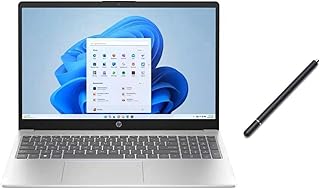
HP 15.6" HD Touch Screen Laptop
Why We Love It
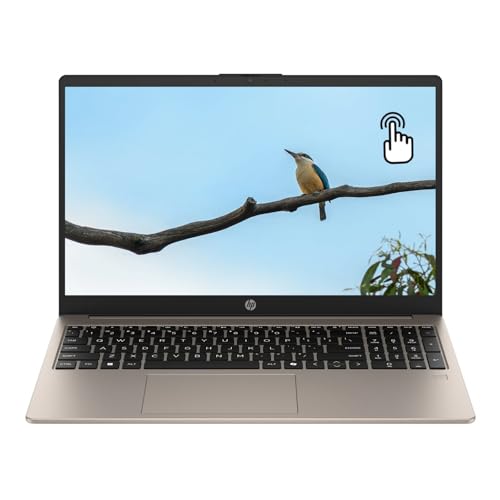
HP 15.6 inch FHD IPS Touchscreen Laptop
Why We Love It

HP - 15.6" Full HD Touch-Screen Laptop
Why We Love It

HP Rechargeable MPP 2.0 Tilt Pen for Touch Screen Devices •
Why We Love It

HP OmniBook 3 14" 2K Touchscreen Laptop
Why We Love It

HP OmniBook 3 16" WUXGA Touchscreen Laptop|AMD Ryzen 5 40
Why We Love It

HP OmniBook 3 16-bu0305dx 2K Touchscreen Laptop
Why We Love It

HP Laptop - AMD Ryzen 5-7520U / 15.6inch FHD Touch/ 512GB
Why We Love It
Quick Pick
10 Best Hp Touchscreen Laptop With Pen Of 2026
Quick Pick
HP 2025 OmniBook X Flip 2-in-1, Copilot+ PC, 16" 2K 400Nits Touch-Screen Laptop, Ultra 7 256V(Beats Ultra 7 155U), 16GB RAM, 1TB SSD, 23H Battery, Win 11, Backlit KB, W/Stylus Pen
HP Chromebook X360 14b, 14" 2-in-1 Laptop, Intel N100, 4GB RAM, 128GB | (64GB eMMC + 64GB SD Card), FHD Touchscreen, for Home, Students & Everyday Use, Long Battery Life, IST Pen & HUB, Chrome OS
HP 15.6" HD Touch Screen Laptop | Intel Core i5-1235U | Intel Iris Xe Graphic | HDMI| Silver | 8GB RAM | 512GB SSD | Windows 11 S | Bundle with Stylus Pen
HP 15.6 inch FHD IPS Touchscreen Laptop, Intel Core i3-N305, 8GB DDR4 RAM, 512GB SSD, Intel UHD Graphics, HDMI, Wi-Fi 6, Bluetooth 5.3, Copilot AI, Windows 11 Home, Cozy Cashmere, EAT 16GB USB Pen
HP - 15.6" Full HD Touch-Screen Laptop - Intel Core i5 1334U 2023-16GB Memory - 512GB SSD - Natural Silver (15-FD0215DX)
HP Rechargeable MPP 2.0 Tilt Pen for Touch Screen Devices • Customizable and Compact Design with Magnetic Barrel • 1-Year Limited Warranty • Black (3J122AA)
HP OmniBook 3 14" 2K Touchscreen Laptop, Snapdragon X (8-core), Qualcomm Adreno GPU, 16GB Memory, 512GB SSD, Copilot+ PC, Wi-Fi 6E, Bluetooth 5.3, Windows 11 Home, Warm Gold, EAT 16GB USB Pen
HP OmniBook 3 16" WUXGA Touchscreen Laptop|AMD Ryzen 5 40 Processor|Copilot AI|AMD Radeon 610M Graphics| Silver|Windows 11 Home |Bundle with Stylus Pen | MS Office (16GB RAM + 512GB SSD)
HP OmniBook 3 16-bu0305dx 2K Touchscreen Laptop | Intel Core Ultra 5 225U | 8GB DDR5 RAM | 512GB PCIe Gen4 SSD | 16" WUXGA IPS LED Display | Intel Graphics | Windows 11 Home | MS Office | Mica Silver
HP Laptop - AMD Ryzen 5-7520U / 15.6inch FHD Touch/ 512GB SSD / 8GB RAM/Shared AMD Radeon Graphics/Windows 11 / English Keyboard/Natural Silver/International Version - [15-FC0025DX]
Buying Guide: Hp Touchscreen Laptop With Pen
📋 Table of Contents
1What's the difference between an active pen and a passive stylus on HP touchscreen laptops?
Active pens have built-in electronics that respond to pressure and tilt, giving you better precision for drawing and note-taking, while passive styluses are simpler and cheaper but less responsive. If you're doing creative work or detailed sketching, an active pen is worth the extra cost.
2Which screen size is best for using a pen on a touchscreen laptop?
13-14 inch screens are portable but cramped for detailed pen work, while 15-17 inch screens give you more comfortable room to write and draw. Choose based on whether you prioritize portability or workspace — there's no one-size-fits-all answer.
3Does the processor matter more than RAM for a touchscreen laptop with pen?
For pen-based work like note-taking or light drawing, 8GB RAM with a mid-range processor handles it fine, but if you're using design software or multitasking heavily, 16GB RAM and a stronger processor prevent lag and stuttering. Check what software you'll actually use — that's more important than specs alone.
4How important is pen pressure sensitivity, and what level should I look for?
Pen pressure sensitivity is measured in levels (typically 1024 to 4096+), and higher numbers mean smoother, more natural writing and drawing. For casual notes, 1024 levels is fine, but if you're doing digital art or handwriting recognition, aim for 2048 levels or higher.
5Should I buy an HP laptop with an included pen or purchase one separately?
Bundled pens are convenient and usually compatible, but some cheaper included pens lack pressure sensitivity or responsiveness. If you plan serious creative work, budget separately for a quality active pen — the one in the box might disappoint you.
How we choose
Our editors are people who genuinely love testing and writing about products. We compare each product's real-world usability and strengths, then distill what matters most into our own "Why We Love It" points — so you get an honest, at-a-glance sense of what counts before you buy.