10 Best Hp Printer Of 2026
Hp Printer — Reviews, Recommendations & Updated Buying Guide November 2026


HP Smart Tank 581 Wireless All In One Printer
Why We Love It


HP | DeskJet Ink Advantage | Wireless | Print
Why We Love It

HP | DeskJet Ink Advantage Ultra | Wireless | Print
Why We Love It

HP OfficeJet Pro 9123 All-in-One Printer - Wireless
Why We Love It

HP | Smart Tank 582 | Wireless | Print
Why We Love It
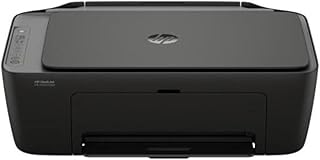
HP DeskJet Ink Advantage 2976 All-in-One Printer
Why We Love It

HP | Smart Tank | Wireless | Print
Why We Love It

HP | Smart Tank | Touchscreen | Wireless | Print
Why We Love It

HP DeskJet Ink Advantage Printer | DJ2975 | Wireless | Print
Why We Love It

Hp Smart Tank 615 Wireless
Why We Love It
Quick Pick
10 Best Hp Printer Of 2026
Quick Pick
HP Smart Tank 581 Wireless All In One Printer, Print, Scan, Copy, Print up to 6000 black or 6000 color pages - Grey [4A8D4A]
HP | DeskJet Ink Advantage | Wireless | Print, Copy, Scan | Manual Duplex | Print Speed: 8.5ppm(black) / 5.5ppm(color) | 35-sheet ADF | DJ4376 | UAE Version
HP | DeskJet Ink Advantage Ultra | Wireless | Print, Copy, Scan | Manual Duplex | Print Speed: 7.5ppm(black) / 5.5ppm(color) | Up to 2600 black, 1400 color pages ink included | DJ4927 | UAE Version
HP OfficeJet Pro 9123 All-in-One Printer - Wireless, Automatic document feeder, Two-sided printing, Two-sided scanning, Scan to PDF/Email, Touchscreen
HP | Smart Tank 582 | Wireless | Print, Copy, Scan | Manual Duplex | Print Speed: 12ppm(black) / 5ppm(color) | Up to 18000 black or 6000 color pages included | ST582 | UAE Version
HP DeskJet Ink Advantage 2976 All-in-One Printer, Color Printer for Home, Print, copy, scan, Wireless; Print from phone or tablet
HP | Smart Tank | Wireless | Print, Copy, Scan | Automatic Duplex | Print Speed: 12ppm(black) / 7ppm(color) | Up to 18000 black or 8000 color pages included | ST670 | UAE Version
HP | Smart Tank | Touchscreen | Wireless | Print, Copy, Scan, Fax | Automatic Duplex | Print Speed: 15ppm(black) / 9ppm(color) | Up to 18000 black or 8000 color pages included | ST795 | UAE Version
HP DeskJet Ink Advantage Printer | DJ2975 | Wireless | Print, Copy, Scan | Manual Duplex | Print Speed: 7.5 black / 5.5 color ppm | 60-sheet input tray | UAE Version [A24J2C]
Hp Smart Tank 615 Wireless, Print, Copy, Scan, Fax, Automated Document Feeder, All In One Printer, Print Up To 18000 Black Or 8000 Color Pages, Black [Y0F71A]
Buying Guide: Hp Printer
📋 Table of Contents
1What's the difference between HP inkjet and laser printers?
Inkjet printers are better for color documents and photos but have higher per-page costs, while laser printers excel at fast black-and-white printing with lower ongoing expenses. Choose inkjet if you print occasionally or need quality color, and laser if you print high volumes regularly.
2Should I buy a printer with a refillable tank system?
Tank systems (like HP Smart Tank) cost more upfront but save significantly on ink if you print 100+ pages monthly. They're worth it for regular users, but stick with standard cartridge printers if you only print occasionally.
3What printer size do I need for a home office?
A compact all-in-one handles most home needs—printing, scanning, and copying in one device that fits on a desk. Only consider larger models if you need high-volume printing or specific features like automatic document feeders.
4Is it worth spending extra for wireless printing?
Wireless connectivity is practically standard now and makes printing from phones and laptops much easier, so it's worth the small extra cost. However, check that your home Wi-Fi is reliable, as connection issues can be frustrating.
5What monthly page volume rating should I look for?
Check the printer's recommended monthly volume—most home inkjets handle 300-500 pages, while office lasers handle 5,000+ pages. Buying a printer rated too low for your needs leads to faster wear and poor performance.
How we choose
Our editors are people who genuinely love testing and writing about products. We compare each product's real-world usability and strengths, then distill what matters most into our own "Why We Love It" points — so you get an honest, at-a-glance sense of what counts before you buy.