10 Best High Speed Business Card Scanner Of 2026
High Speed Business Card Scanner — Reviews, Recommendations & Updated Buying Guide November 2026


Ambir nScan 690gt-BCS High-Speed Vertical Card Scanner with
Why We Love It

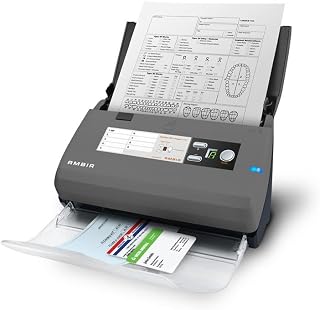
Ambir ImageScan Pro 820ix 20ppm High-Speed ADF Scanner for
Why We Love It

PenPower WorldCard Pro Business Card Scanner (Win/Mac)
Why We Love It

AMBIR Business Card Scanner PS670ST-BCS High Speed Single
Why We Love It

Ambir ImageScan Pro 830ix 30ppm High-Speed ADF Scanner for
Why We Love It

Ambir Technology ImageScan Pro 687 Duplex Card Scanner
Why We Love It

Brother ADS-4700W Professional Wireless Desktop Scanner
Why We Love It

Brother ADS-3100 High speed Desktop Scanner
Why We Love It

Epson WorkForce ES-500WII Wi-Fi and USB 3.0
Why We Love It

Alestron - BUSINESS CARD READER FOR IPHONE WITH CONTACT
Why We Love It
Quick Pick
10 Best High Speed Business Card Scanner Of 2026
Quick Pick
Ambir nScan 690gt-BCS High-Speed Vertical Card Scanner with AmbirScan Business Card for Windows PC One Time Purchase No Subscription Needed
Ambir ImageScan Pro 820ix 20ppm High-Speed ADF Scanner for Windows PC with Business Card Software
PenPower WorldCard Pro Business Card Scanner (Win/Mac)
AMBIR Business Card Scanner PS670ST-BCS High Speed Single Sided Vertical USB Powered Business Card Scanner with AmbirScan Business Card for Windows PC and MAC
Ambir ImageScan Pro 830ix 30ppm High-Speed ADF Scanner for Windows PC with Business Card Software
Ambir Technology ImageScan Pro 687 Duplex Card Scanner
Brother ADS-4700W Professional Wireless Desktop Scanner – High-Speed Network Scanner for Business Workgroups with Photo & Document Scanning
Brother ADS-3100 High speed Desktop Scanner | Duplex A4 Document Scanner | Super Speed USB3.0 | White
Epson WorkForce ES-500WII Wi-Fi and USB 3.0, High-speed (35ppm), Up to A4 (27-413 GSM), 50 Page Auto Feed Colour Scanner with OCR Software
Alestron - BUSINESS CARD READER FOR IPHONE WITH CONTACT MANAGEMENT FOR PC
Buying Guide: High Speed Business Card Scanner
📋 Table of Contents
1What scanning speed should I look for in a high-speed business card scanner?
Look for models that scan at least 10-15 cards per second for fast, efficient processing. Higher speeds are ideal for high-volume use, such as at events or in busy offices, but may come with a higher price tag and increased noise levels.
2Does the scanner support both front and back scanning of business cards?
Yes, dual-sided scanning is essential for capturing contact information, logos, and other details on both sides of the card. Some models use automatic flipping mechanisms, while others require manual insertion for two-sided cards.
3What resolution is necessary for clear scans of business cards?
A resolution of at least 300 DPI is standard for legible scans, but 600 DPI or higher is better for capturing fine details like small text or graphics. Higher resolution may increase file size and processing time, so balance clarity with performance.
4Are there differences between USB-connected and wireless high-speed scanners?
USB-connected scanners typically offer faster data transfer and more reliable performance, while wireless models provide greater mobility but may have slower speeds or require a stable Wi-Fi connection. Choose based on your workflow and need for portability.
5What software features should I prioritize for data management?
Look for scanners that include OCR (optical character recognition) for automatic text extraction, contact management integration, and cloud sync options. These features save time by allowing you to organize and store card data digitally without manual entry.
How we choose
Our editors are people who genuinely love testing and writing about products. We compare each product's real-world usability and strengths, then distill what matters most into our own "Why We Love It" points — so you get an honest, at-a-glance sense of what counts before you buy.