10 Best Heavy Duty Monitor Arms Of 2026
Heavy Duty Monitor Arms — Reviews, Recommendations & Updated Buying Guide November 2026

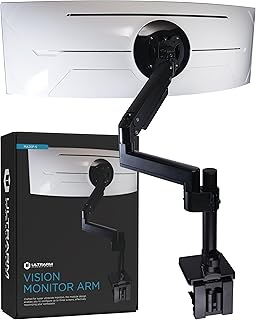
ULTRARM Heavy Duty Monitor Arm for Ultrawide Monitors up to
Why We Love It


ULTRARM Heavy Duty Monitor Arm for Ultrawide Curved Monitors
Why We Love It

MOUNTUP Single Monitor Desk Mount Holds Screen up to 32 inch
Why We Love It

ULTRARM Extra-Tall Heavy-Duty Monitor Arm Mount for 40"
Why We Love It

MOUNTUP Triple Monitor Stand Mount
Why We Love It

NEWSTAR Single Monitor Arm
Why We Love It

NB North Bayou Monitor Desk Mount with Articulating Gas
Why We Love It

HUANUO TitanLift Heavy Duty Monitor Arm for Screens up to
Why We Love It

VIVO Premium Aluminum Heavy Duty Monitor Arm for Ultrawide
Why We Love It
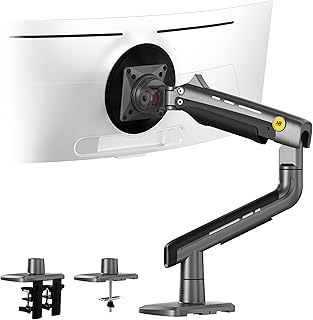
NB ERGONOMIC Gaming Monitor Arm for Flat/Ultrawide/Curved
Why We Love It
Quick Pick
10 Best Heavy Duty Monitor Arms Of 2026
Quick Pick
ULTRARM Heavy Duty Monitor Arm for Ultrawide Monitors up to 57" and 20 KGS, Single Desk Stand, Pneumatic Height Adjustable, Modular Extension Arms - Max VESA 100x100, Black, MA20P-S | Max 57", 44 lb, 900R Screens, VESA 100x100, Upgradable, Pneumatic Height Adjustable, C-clamp & Grommet Mount, Black, MA20P-S
ULTRARM Heavy Duty Monitor Arm for Ultrawide Curved Monitors Modular Design | Max 57", 44 lb, 900R Screens, VESA 100x100, Upgradable, Pneumatic Height Adjustable, C-clamp & Grommet Mount, White, MA20PW-S
MOUNTUP Single Monitor Desk Mount Holds Screen up to 32 inch, Height Adjustable Monitor Arm, Computer Monitors Stand with Clamp/Grommet Base, VESA Mounts Fit 2-9kg Computer, Black, MU0004
ULTRARM Extra-Tall Heavy-Duty Monitor Arm Mount for 40" Ultrawide Monitors | 33.4" Max Height, 26.4 lb VESA Capacity, C-Clamp & Grommet Mount, Height Adjustable, Long-Reach Ergonomic Arm, Black, MA12P-S
MOUNTUP Triple Monitor Stand Mount - 3 Monitors Desk Mount for Computer Screens Up to 27 inch, Triple Monitor Arm with Spring, Heavy Duty Monitors Stand, Each Arm Holds 4.4-19.8 lbs, Black
NEWSTAR Single Monitor Arm, Gas Spring Single Monitor Mount up to 49 inches, Ultrawide Monitor Arm Holds up to 20KG, Heavy Duty Monitor Mount Desk with C Clamp and Grommet Base
NB North Bayou Monitor Desk Mount with Articulating Gas Spring Monitor Arm for 22''-35''Inch Curved Computer Monitors Height Adjustable Monitor Stand F100A-B
HUANUO TitanLift Heavy Duty Monitor Arm for Screens up to 49", Holds 44 lbs, Aluminum Ultrawide Screen Monitor Mount, Fully Adjustable Single Gaming Desk Mount with Dual C-Clamp, Max VESA 100x100mm
VIVO Premium Aluminum Heavy Duty Monitor Arm for Ultrawide Screens up to 49 inches and 44 lbs, Single Wall Mount, Pneumatic Height, Max VESA 100x100, White, MOUNT-V101G1W
NB ERGONOMIC Gaming Monitor Arm for Flat/Ultrawide/Curved Monitors 32 to 60 inch, Heavy Duty Monitor Stand Load up to 20 kg, VESA 75/100 mm Mount (Grey Black) F5-G
Buying Guide: Heavy Duty Monitor Arms
📋 Table of Contents
1What weight capacity should I look for in a heavy duty monitor arm?
Look for arms rated for at least 15-20 pounds to support larger monitors or multiple displays. Higher weight capacity ensures stability and reduces the risk of sagging or tipping, especially when used with heavier devices or in open desk setups.
2What materials are best for durability and strength?
Heavy duty monitor arms are typically made from steel or aluminum alloys for strength and longevity. Steel offers greater rigidity and is ideal for heavy loads, while aluminum is lighter but still strong enough for most professional setups.
3How does adjustable height and tilt affect usability?
Adjustable height and tilt allow for ergonomic positioning, reducing strain on your neck and back. Look for arms with at least 12 inches of vertical adjustment and 15-30 degrees of tilt to accommodate different monitor sizes and user preferences.
4What’s the difference between fixed and rotating monitor arms?
Fixed arms provide stability and are ideal for single monitors, while rotating arms allow 360-degree swivel motion, making it easier to switch between tasks or share your screen. Rotating arms are better for collaborative workspaces or multi-tasking setups.
5Are there any common mistakes to avoid when installing a heavy duty monitor arm?
Avoid overloading the arm beyond its rated weight capacity, and ensure it’s securely mounted to a sturdy desk surface. Also, don’t skip the manufacturer’s recommended mounting hardware, as using inferior screws or brackets can compromise safety and stability.
How we choose
Our editors are people who genuinely love testing and writing about products. We compare each product's real-world usability and strengths, then distill what matters most into our own "Why We Love It" points — so you get an honest, at-a-glance sense of what counts before you buy.