10 Best Hdmi Switches For Xbox Of 2026
Hdmi Switches For Xbox — Reviews, Recommendations & Updated Buying Guide November 2026


UGREEN HDMI 2.1 Switch
Why We Love It


UGREEN HDMI Switch 3 in 1 Out
Why We Love It

UGREEN 8K@60 Hz HDMI 2.1 Switch
Why We Love It

UGREEN Video Capture Card HDMI to USB C 2K@30Hz 1080P@60fps
Why We Love It

CABLETIME Active HDMI to USB-C Cable 1m with USB Power
Why We Love It

BENFEI HDMI Switch 4 in 1 Out 4K@60Hz
Why We Love It
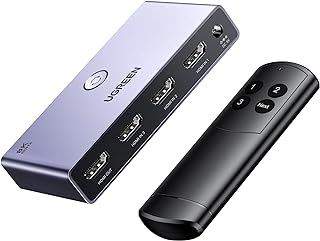
UGREEN HDMI 2.1 Switch
Why We Love It

4K HDMI Switch 3 In 1 Out
Why We Love It

KASTWAVE 3 Port HDMI 2.1 HDR 3In 1Out
Why We Love It

KabelDirekt – 4K HDMI Cable – 10m
Why We Love It
Quick Pick
10 Best Hdmi Switches For Xbox Of 2026
Quick Pick
UGREEN HDMI 2.1 Switch, 4K@120Hz 8K@60Hz HDMI Switcher 2 IN 1 OUT, Hdmi Splitter Support HDCP 2.3, VRR & ALLM, Dolby Vision & Atmos for Switch 1/2, PS5 Pro/5/4, Xbox, Roku, Firestick, HDTV, Monitor | HDMI Splitter Support HDCP 2.3, VRR & ALLM, Dolby Vision & Atmos for Switch 1/2, PS5 Pro/5/4, Xbox, Roku, Firestick, HDTV
UGREEN HDMI Switch 3 in 1 Out, 4K@60Hz HDMI Splitter with Remote Supports HDR10+, 3D, Dolby Atmos, HDCP 2.2 Switcher Compatible with PS5/4/3 Xbox Series Roku TV Fire Stick Blu-Ray Player | Supports HDR10+, 3D, Dolby Atmos, HDCP 2.2 Switcher Compatible with PS5/4/3 Xbox Series Roku TV Fire Stick Blu-Ray Player
UGREEN 8K@60 Hz HDMI 2.1 Switch, 2-in-1-out, 4K@120 Hz, 48 Gbps | 3D, CEC, HDR, Dolby Audio, Compatible with PS5/PS4, Fire TV Stick, Xbox, Apple TV and Blu-ray Players
UGREEN Video Capture Card HDMI to USB C 2K@30Hz 1080P@60fps Game Record | 4K Passthrough Loop-out Streaming Device Compatible with Quest 3/3s PS5 PS4 Xbox Switch iPad DSLR Camera Mac Laptop PC
CABLETIME Active HDMI to USB-C Cable 1m with USB Power, HDMI Source to USB-C Display, One-Way, 4K 60Hz Unidirectional Adapter for Xreal Air 2, Rokid Max, RayNeo, PS5, Xbox, Switch Dock
BENFEI HDMI Switch 4 in 1 Out 4K@60Hz, 2K@144Hz, HDCP 2.3 【with Adaptive Equalization support 10M HDMI Transmit】Compatible for PS5/4, Xbox, Roku, FireStick, Switch
UGREEN HDMI 2.1 Switch, 4K@120Hz HDMI Switch 3 In 1 Out, 8K@60Hz HDMI Switcher Support VRR & ALLM, Dolby Vision & Atmos, High-Speed 48Gbps HDMI Splitter 3 In 1 Out for PS5, Xbox, TV Box, DVD Player
4K HDMI Switch 3 In 1 Out, High Speed 18Gbps 4K HDR HDMI Switcher Adapter, Gold-Plated 3-Port HDMI Switch for TV Xbox PS4 PS5 Laptop Blu-Ray Player 3D Support Plug and Play
KASTWAVE 3 Port HDMI 2.1 HDR 3In 1Out, 8K Switcher with Remote Control Directional, 8K@60Hz 4K@120Hz HDR 48Gbps 3D HDMI Video Converter, Compatible with XBOX PS5 Projectors Monitors
KabelDirekt – 4K HDMI Cable – 10m – German Flexcore Technology | 4K@60Hz, High Speed HDMI - for PS5, Xbox Series X/S, Switch 2, PC & Blu-ray - Interference Free & Flexible
Buying Guide: Hdmi Switches For Xbox
📋 Table of Contents
1How many ports do I actually need for my setup?
For a basic Xbox setup, a 4-port HDMI switch is usually sufficient, allowing you to connect your console, streaming device, Blu-ray player, and cable box. If you have more devices or plan to expand, consider a 6- or 8-port model for future-proofing.
2Does the switch support 4K and high refresh rates for gaming?
Yes — look for an HDMI 2.1 switch to ensure support for 4K at 60Hz or 120Hz, which is essential for smooth gaming and high-resolution visuals. Older HDMI 1.4 or 2.0 models may not handle the latest Xbox features like variable refresh rate (VRR) or ultra-low latency mode (ULL).
3Should I prioritize a switch with audio return channel (ARC) support?
If you use a soundbar or AV receiver connected to the same TV, choose a switch with ARC support to simplify audio routing. This allows your TV to send audio back to the receiver without a separate cable, reducing clutter and improving setup flexibility.
4Is a powered or unpowered switch better for my Xbox?
A powered switch is recommended for setups with long HDMI cables or multiple devices, as it maintains signal strength and prevents lag. Unpowered switches work for short distances and simple setups but may struggle with high-bandwidth signals like 4K or 8K.
5What are the best ways to switch between devices without a remote?
Look for switches with physical buttons or a push-to-select design for quick, manual switching. Some models also support IR or RF remote control, which is handy if your devices are in a cabinet or hard to reach. Avoid switches that require a separate app or complex setup for basic use.
How we choose
Our editors are people who genuinely love testing and writing about products. We compare each product's real-world usability and strengths, then distill what matters most into our own "Why We Love It" points — so you get an honest, at-a-glance sense of what counts before you buy.