10 Best Hdmi Switches For Ps5 Of 2026
Hdmi Switches For Ps5 — Reviews, Recommendations & Updated Buying Guide November 2026


UGREEN HDMI 2.1 Switch
Why We Love It


UGREEN 8K@60 Hz HDMI 2.1 Switch
Why We Love It

UGREEN Video Capture Card HDMI to USB C 2K@30Hz 1080P@60fps
Why We Love It

BENFEI HDMI Switch 4 in 1 Out 4K@60Hz
Why We Love It

UGREEN HDMI Switch 3 in 1 Out
Why We Love It
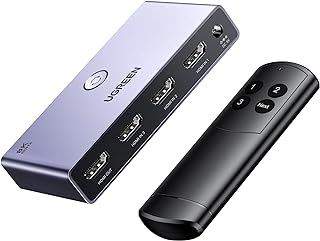
UGREEN HDMI 2.1 Switch
Why We Love It

4K@60HZ HDMI Switch splitter
Why We Love It

UGREEN HDMI Switch 5 in 1 Out
Why We Love It

KASTWAVE 3 Port HDMI 2.1 HDR 3In 1Out
Why We Love It

4K HDMI Switch 3 In 1 Out
Why We Love It
Quick Pick
10 Best Hdmi Switches For Ps5 Of 2026
Quick Pick
UGREEN HDMI 2.1 Switch, 4K@120Hz 8K@60Hz HDMI Switcher 2 IN 1 OUT, Hdmi Splitter Support HDCP 2.3, VRR & ALLM, Dolby Vision & Atmos for Switch 1/2, PS5 Pro/5/4, Xbox, Roku, Firestick, HDTV, Monitor | HDMI Splitter Support HDCP 2.3, VRR & ALLM, Dolby Vision & Atmos for Switch 1/2, PS5 Pro/5/4, Xbox, Roku, Firestick, HDTV
UGREEN 8K@60 Hz HDMI 2.1 Switch, 2-in-1-out, 4K@120 Hz, 48 Gbps | 3D, CEC, HDR, Dolby Audio, Compatible with PS5/PS4, Fire TV Stick, Xbox, Apple TV and Blu-ray Players
UGREEN Video Capture Card HDMI to USB C 2K@30Hz 1080P@60fps Game Record | 4K Passthrough Loop-out Streaming Device Compatible with Quest 3/3s PS5 PS4 Xbox Switch iPad DSLR Camera Mac Laptop PC
BENFEI HDMI Switch 4 in 1 Out 4K@60Hz, 2K@144Hz, HDCP 2.3 【with Adaptive Equalization support 10M HDMI Transmit】Compatible for PS5/4, Xbox, Roku, FireStick, Switch
UGREEN HDMI Switch 3 in 1 Out, 4K@60Hz HDMI Splitter with Remote Supports HDR10+, 3D, Dolby Atmos, HDCP 2.2 Switcher Compatible with PS5/4/3 Xbox Series Roku TV Fire Stick Blu-Ray Player | Supports HDR10+, 3D, Dolby Atmos, HDCP 2.2 Switcher Compatible with PS5/4/3 Xbox Series Roku TV Fire Stick Blu-Ray Player
UGREEN HDMI 2.1 Switch, 4K@120Hz HDMI Switch 3 In 1 Out, 8K@60Hz HDMI Switcher Support VRR & ALLM, Dolby Vision & Atmos, High-Speed 48Gbps HDMI Splitter 3 In 1 Out for PS5, Xbox, TV Box, DVD Player
4K@60HZ HDMI Switch splitter, HDMI Switch 3 in 1 out with 1.2M HDMI Cable, HDMI Switcher Support 3D, 1080P, HDCP2.2, HDR, Dobly, 3 Ports HDMI Switch for PS5,HDTV, Xbox,Roku, Fire Stick,DVD, Projectors
UGREEN HDMI Switch 5 in 1 Out, HDMI Splitter 4K@60Hz with Remote, 5 Port HDMI 2.0 Switcher Support 3D CEC HDR HDCP 2.2, Compatible with PS5/4, Xbox, TV Box, Blu-Ray, HDTV, Monitor, Projector (Black) | HDMI Switcher Support 3D CEC HDR HDCP 2.2, Compatible with PS5/4, Xbox, TV Box, Blu-Ray, HDTV, Monitor, Projector
KASTWAVE 3 Port HDMI 2.1 HDR 3In 1Out, 8K Switcher with Remote Control Directional, 8K@60Hz 4K@120Hz HDR 48Gbps 3D HDMI Video Converter, Compatible with XBOX PS5 Projectors Monitors
4K HDMI Switch 3 In 1 Out, High Speed 18Gbps 4K HDR HDMI Switcher Adapter, Gold-Plated 3-Port HDMI Switch for TV Xbox PS4 PS5 Laptop Blu-Ray Player 3D Support Plug and Play
Buying Guide: Hdmi Switches For Ps5
📋 Table of Contents
1What HDMI version do I need for PS5 4K and HDR?
Look for HDMI 2.1 support to enable 4K at 120Hz, variable refresh rate (VRR), and auto low latency mode (ALLM) for smooth gaming. HDMI 2.0b or lower will limit frame rates and may not support all PS5 features.
2How many ports do I actually need on an HDMI switch?
Choose a switch with at least 4 input ports if you plan to connect your PS5, Blu-ray player, streaming box, and soundbar. A 4K-compatible switch with 1 output and 4 inputs is ideal for most home setups without overcomplicating things.
3Does the switch support 4K and 8K resolutions?
For PS5, 4K at 60Hz or 120Hz is the priority, so ensure the switch supports 4K@120Hz. Some models also support 8K@60Hz, but this is optional unless you plan to future-proof your setup with compatible displays.
4Should I prioritize a switch with an IR remote or a physical button?
A remote is more convenient for switching between devices from across the room, while physical buttons on the switch are reliable and don’t require batteries. Choose based on your setup and how often you’ll need to change inputs during gameplay or media use.
5What’s the difference between a powered and unpowered switch?
A powered switch has its own power adapter and handles signal boosting, which is better for long HDMI cables or multiple devices. Unpowered switches work well for short cable runs and basic setups but may struggle with signal loss over distance or with high-bandwidth content like 4K HDR.
How we choose
Our editors are people who genuinely love testing and writing about products. We compare each product's real-world usability and strengths, then distill what matters most into our own "Why We Love It" points — so you get an honest, at-a-glance sense of what counts before you buy.