10 Best Hdmi Capture Cards For Pc Of 2026
Hdmi Capture Cards For Pc — Reviews, Recommendations & Updated Buying Guide November 2026


UGREEN Video Capture Card HDMI to USB C 2K@30Hz 1080P@60fps
Why We Love It


UGREEN Video Capture Card HDMI to USB C 1080P 60FPS Capture
Why We Love It

Capture Card Nintendo Switch
Why We Love It

Elgato 4K X–Capture Up to 4K144 with Ultra-Low Latency on
Why We Love It
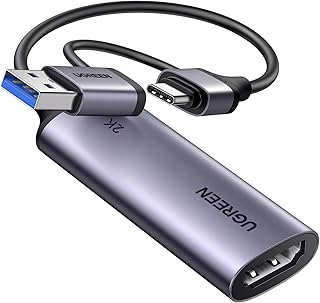
UGREEN Video Capture Card HDMI to USB C 2K@30Hz 1080P@60fps
Why We Love It

Elgato 4K S External Capture Card for PS5
Why We Love It

BENFEI Video/Audio Capture Card Supporting Full HD 1080P
Why We Love It

FIFINE AmpliGame V3 Video Capture Card for Audio Video
Why We Love It

4k HDMI Capture Card for Streaming
Why We Love It
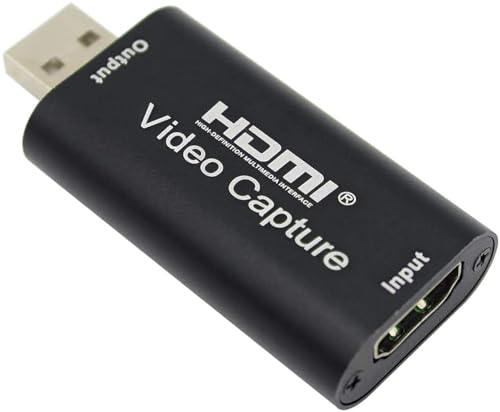
4K Video Capture Card
Why We Love It
Quick Pick
10 Best Hdmi Capture Cards For Pc Of 2026
Quick Pick
UGREEN Video Capture Card HDMI to USB C 2K@30Hz 1080P@60fps Game Record | 4K Passthrough Loop-out Streaming Device Compatible with Quest 3/3s PS5 PS4 Xbox Switch iPad DSLR Camera Mac Laptop PC
UGREEN Video Capture Card HDMI to USB C 1080P 60FPS Capture | 4K Input Audio Game Recording Streaming Device Compatible with Switch PS5 Xbox DSLR iPad PC Laptop Phone Quest 3 TV Box
Capture Card Nintendo Switch, Video Capture Card, Game Capture Card 4K 1080P 60FPS, HDMI to USB 3.0 Capture Card for Streaming Work with PS4/PC/OBS/Camera
elgato 4K X–Capture Up to 4K144 with Ultra-Low Latency on PS5, Xbox Series X/S, Nintendo Switch, OBS and More, HDMI 2.1, VRR, HDR10, USB 3.2 Gen 2, for Streaming & Recording, Works with PC/Mac/iPad | VRR passthrough, HDR10, Up to 1080p240 capture, USB 3.2 Gen 2, Works with OBS and more, For PS5, Xbox, Switch, PC, Mac
UGREEN Video Capture Card HDMI to USB C 2K@30Hz 1080P@60fps | Capturadora Video Streaming Game Recording and Live Streaming Compatible with Quest 3 Switch 2 PS5 PS4
elgato 4K S External Capture Card for PS5, Xbox Series X/S, Switch 2, PC, Mac, iPad, 4K60, 1440p120, 1080p240 Passthrough, HDR10, USB-C, Windows 11, Black
BENFEI Video/Audio Capture Card Supporting Full HD 1080P 60FPS for Streaming, Recording, Gaming, Compatible with Switch, PS4, PS5, Xbox, Work with PC/Windows/Mac OS
FIFINE AmpliGame V3 Video Capture Card for Audio Video, Gaming,Streaming
4k HDMI Capture Card for Streaming, Full HD 1080P 60FPS Capture USB 3.0 Game Audio Video Capture Card, for PS4/PS5/Xbox/Switch/OBS/Camera/PC/Laptop/Mac Plug and Play
4K Video Capture Card, HDMI to USB Capture Card 1080P for Streaming Recording Gaming, Compatible with Switch PS5 Xbox, Live Broadcast for PC Mac OBS Twitch YouTu
Buying Guide: Hdmi Capture Cards For Pc
📋 Table of Contents
1What resolution and frame rate should I look for?
For smooth gameplay or video, aim for at least 1080p at 60fps. If you need 4K, ensure your PC and card support it, as higher resolutions require more bandwidth and may need USB 3.1 or Thunderbolt for stable performance.
2Do I need a capture card with hardware encoding?
Hardware encoding (like via an H.264 chip) reduces CPU usage and is ideal for streaming or multitasking. Software-only cards are cheaper but may cause lag if your PC isn't powerful enough to handle real-time encoding.
3What input types are essential for my setup?
Most cards use HDMI, but some also support SDI or analog inputs. If you're capturing from a console or camera, confirm the input type matches your source device and that the card supports the required resolution and audio format.
4Is audio capture important, and how does it work?
Yes — look for cards that extract audio from the HDMI signal or have a 3.5mm audio input. Some cards let you adjust audio levels separately from video, which is helpful for balancing game sound and commentary.
5What are the best ports and connectivity options for my PC?
USB 3.0 or higher is standard for most capture cards, but Thunderbolt offers faster data transfer and less latency. Ensure your PC has the right port and that the card is compatible with your operating system before purchasing.
How we choose
Our editors are people who genuinely love testing and writing about products. We compare each product's real-world usability and strengths, then distill what matters most into our own "Why We Love It" points — so you get an honest, at-a-glance sense of what counts before you buy.