10 Best Hard Drive Accessories Of 2026
Hard Drive Accessories — Reviews, Recommendations & Updated Buying Guide November 2026


UGREEN Hard Drive Case
Why We Love It


UGREEN 2.5 Inch Hard Drive Enclosure
Why We Love It

UGREEN 6Gbps 2.5 Inch Hard Drive Enclosure Type C USB-C SATA
Why We Love It
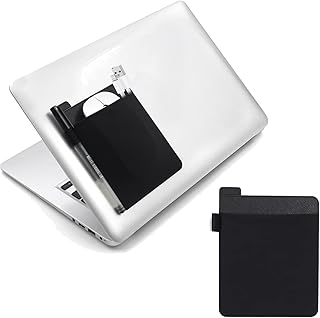
Portable External Hard Drive Carrying Case
Why We Love It

KingData 2.5" inch SSD HDD Hard Drive Enclosure SATA III USB
Why We Love It

Amazon Basics Small Hard Shell Carrying Case For My Passport
Why We Love It

UGREEN External Hard Drive Enclosure 3.5 USB 3.0 to SATA
Why We Love It

ProCase Travel Tech Organizer Case Bag for Electronics
Why We Love It

12pcs Hard Drive Mounting Screws Kit with Shock Absorbing
Why We Love It

12PCS Hard Drive Screws with Rubber Washer
Why We Love It
Quick Pick
10 Best Hard Drive Accessories Of 2026
Quick Pick
UGREEN Hard Drive Case, Portable External Hard Drive Case for 2.5 Inch HDD SSD, Waterproof Protective Storage Pouch EVA Compatible with Solid State Drive WD Western Seagate Toshiba Lacie T5 T3 | Protective Storage Pouch EVA Hard Shell Compatible with T9/T7 Solid Drive WD Western/Seagate Electronic Passport Cable Bag
UGREEN 2.5 Inch Hard Drive Enclosure, 5Gbps USB 3.0 SSD Enclosure | External SATA HDD Caddy, UASP SSD Reader, Hard Drive Caddy for 2.5-Inch SSD/HDD, Samsung 870 EVO, WD and Crucial Drives
UGREEN 6Gbps 2.5 Inch Hard Drive Enclosure Type C USB-C SATA HDD/SSD Caddy | Compatible with 2.5" SATA SSD/HDD, Samsung 870 EVO, Crucial, Kingston, WD Blue. Works with Windows, macOS, Linux, PS4, Xbox.
Portable External Hard Drive Carrying Case, Sleeve Storage for Laptop, Reusable Adhesive Stick on Holder for Computer Accessories, Wireless Mouse/Earphones/USB Cable, Travel Pocket Pouch
KingData 2.5" inch SSD HDD Hard Drive Enclosure SATA III USB 3.0 Caddy Case External Reader Laptop Fast Data Trasfer UASP Cable Included Tool-Free LED Indicator Clear
Amazon Basics Small Hard Shell Carrying Case For My Passport Essential External Hard Drive 1 Pack, Black
UGREEN External Hard Drive Enclosure 3.5 USB 3.0 to SATA Hard Drive Enclosure with Power Adapter Compatible with 3.5 2.5 Inch Hard Drive, WD, Seagate, Toshiba, HDD, SSD 10TB, UASP-UK Plug Tool-Free
ProCase Travel Tech Organizer Case Bag for Electronics Accessories -Black | Hard Charger Cord Portable External Hard Drive USB Cables Power Bank SD Memory Cards Earphone Flash Drive
12pcs Hard Drive Mounting Screws Kit with Shock Absorbing Rubber Washers for 3.5 inch SSD & HDD, Anti-Vibration Computer Screw Accessories for Desktop PC, Durable & Rust-resistant
12PCS Hard Drive Screws with Rubber Washer, Anti-Vibration Shock Absorbing PC Hard Drive Screws, 3.5" HDD SSD Mounting Screws for Computer Case, NAS, Home Server (Black)
Buying Guide: Hard Drive Accessories
📋 Table of Contents
1What should I look for in a hard drive enclosure?
Check that the enclosure matches your drive's size (2.5-inch for laptops, 3.5-inch for desktops) and supports your connection type—USB 3.0 is standard now but USB 3.1 or Thunderbolt offers faster speeds if your computer supports it. Look for enclosures with good ventilation and sturdy materials to protect your drive from physical damage.
2What's the difference between USB docking stations and enclosures?
Docking stations let you connect drives directly without opening a case, making them faster to swap between drives, while enclosures permanently house a single drive. Docking stations are better for people who work with multiple drives regularly, but enclosures provide more protection for drives you use daily.
3Do I need a special cable for my external hard drive?
Most modern external drives use standard USB cables that come included, but it's worth checking your drive's specifications to confirm the type (USB-A, USB-C, or micro-USB). If you need to replace a damaged cable, buying the correct type ensures your drive works properly and charges quickly if applicable.
4Is it worth buying a hard drive with built-in cooling?
Cooling becomes important only if your drive stays powered on constantly or you live in a very hot climate—most external drives used occasionally don't need it. If you're running 24/7 backups or a NAS setup, a cooled enclosure prevents performance drops and extends drive lifespan.
5What's the difference between HDD and SSD external drives?
SSDs are faster, more durable, and lighter but cost significantly more per unit of storage, while HDDs offer better value for large backup needs but are slower and more prone to failure from drops. Choose SSDs if you transfer large files frequently or need ruggedness; pick HDDs if you just need affordable long-term storage.
How we choose
Our editors are people who genuinely love testing and writing about products. We compare each product's real-world usability and strengths, then distill what matters most into our own "Why We Love It" points — so you get an honest, at-a-glance sense of what counts before you buy.