10 Best Gravastar Wireless Mouse Of 2026
Gravastar Wireless Mouse — Reviews, Recommendations & Updated Buying Guide November 2026


GravaStar Mercury M2 Wireless Gaming Mouse with 26
Why We Love It


GravaStar Mercury M1 Pro Wireless Gaming Mouse
Why We Love It

GravaStar Mercury X Pro Wireless Gaming Mouse 8K Polling
Why We Love It

GravaStar Mercury X Air Wireless Gaming Mouse
Why We Love It

GravaStar Mercury X Wireless Gaming Mouse – 32
Why We Love It

GravaStar Mercury M1 Pro Gaming Mouse
Why We Love It

GravaStar Mercury K1 Lite 75% Gaming Keyboard
Why We Love It
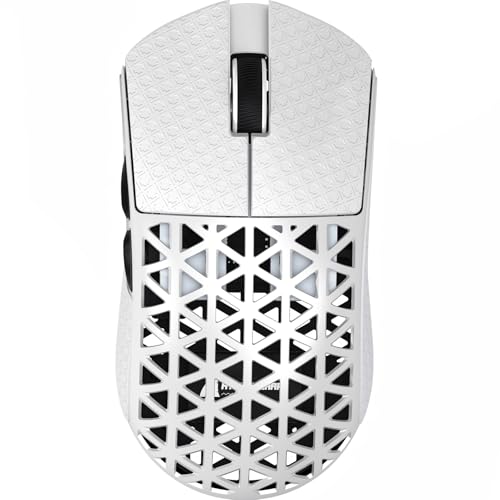
R5Ultra 8K Carbon Fiber Wireless Gaming Mouse with 42
Why We Love It

GravaStar Mercury K1 Pro Mechanical Keyboard
Why We Love It

Glassology 2.4GHz Wireless + Bluetooth Mouse
Why We Love It
Quick Pick
10 Best Gravastar Wireless Mouse Of 2026
Quick Pick
GravaStar Mercury M2 Wireless Gaming Mouse with 26,000 DPI, PAW3395DM Sensor -79g Lightweight Hollowed-Out Design -5 Programmable Buttons -5 Dynamic Lightsync RGB - Stealth Black (Transparent Black)
GravaStar Mercury M1 Pro Wireless Gaming Mouse, Lightweight Magnesium Alloy, 26,000 DPI, PAW3395DM Sensor, 5 Programmable Buttons, Support Wired/2.4GHz/BT, Up to 200 Hours Battery (Gradient Black)
GravaStar Mercury X Pro Wireless Gaming Mouse 8K Polling | 49g Magnesium Alloy Gaming Mouse with PAW3950 Sensor, Hollow Frame, RGB Lighting and 5 Programmable Buttons
GravaStar Mercury X Air Wireless Gaming Mouse
GravaStar Mercury X Wireless Gaming Mouse – 32,000 DPI PAW 3950 Sensor, 1000Hz Polling Rate, Only 49g, Magnesium Alloy Hollow Frame, RGB Lighting, 5 Programmable Buttons
GravaStar Mercury M1 Pro Gaming Mouse, 26,000 DPI, 78g Hollow Lightweight Design, 5 Programmable Buttons, 5 Dynamic RGB LightSync Modes | Magnesium alloy, PAW3395DM 26,000 DPI sensor, Bluetooth/2.4 GHz/USB, Battery life up to 200 hours and 5 programmable buttons
GravaStar Mercury K1 Lite 75% Gaming Keyboard, 2.4GHz/BT/Wired Tri-Mode Wireless Keyboard, Gasket Hot Swappable Mechanical Keyboard, Pre-lubed Linear Switches, RGB Backlit【Transparent Black】
R5Ultra 8K Carbon Fiber Wireless Gaming Mouse with 42,000 DPI -PAW3950 MAX Sensor -Nordic 52840 MCU Chip-39g Ultra-Lightweight -Wired/BT/2.4GHz Wireless Programmable Mice Griptape for PC/Mac(White)
GravaStar Mercury K1 Pro Mechanical Keyboard, Hot-Swap, CyberFlare | Hot-swap PCB, CNC aluminium frame, Kailh linear switches, 8000mAh battery, and tri-mode wireless for gaming and work.
Glassology 2.4GHz Wireless + Bluetooth Mouse, Multi-Device Dual Mode Slim Rechargeable Silent Click Buttons Wireless BT Mouse, Adjustable DPI 800-1200-1600, Multicolor LED Lights, Auto Sleep
Buying Guide: Gravastar Wireless Mouse
📋 Table of Contents
1What DPI range should I look for in a Gravastar wireless mouse?
Look for a DPI range of 800-3200 for general use, with adjustable settings for precision tasks. Higher DPI improves cursor speed on large screens, while lower DPI offers better control for detailed work like graphic design or gaming.
2Does the Gravastar wireless mouse support both Windows and Mac?
Yes, most Gravastar wireless mice are compatible with both Windows and macOS, using standard Bluetooth or USB receivers. Check the product specs to confirm cross-platform support and driver requirements.
3What battery life can I expect from a Gravastar wireless mouse?
Typically, a Gravastar wireless mouse offers 12-24 months of battery life on a single AA or AAA battery, depending on usage. Mice with low-power Bluetooth or sleep modes tend to last longer, reducing the need for frequent replacements.
4Are there differences between wired and wireless Gravastar mice for gaming?
Wireless Gravastar mice often have lower latency and more ergonomic designs for gaming, while wired models may offer faster response times and no battery concerns. Choose based on your preference for mobility versus performance consistency.
5What kind of surface compatibility should I check for?
Look for a Gravastar mouse with optical or laser sensors that work on glass, wood, and glossy surfaces. Laser sensors offer better accuracy on non-traditional surfaces, while optical sensors may struggle with reflective or dark materials.
How we choose
Our editors are people who genuinely love testing and writing about products. We compare each product's real-world usability and strengths, then distill what matters most into our own "Why We Love It" points — so you get an honest, at-a-glance sense of what counts before you buy.